English - 8
© 2016 Midmark Corp. | 60 Vista Drive Versailles, OH 45380 USA | 1-800-643-6275 | 1-937-526-3662 |
003-2426-99
TP201 20-42-FO-00013 Rev A1 C2169
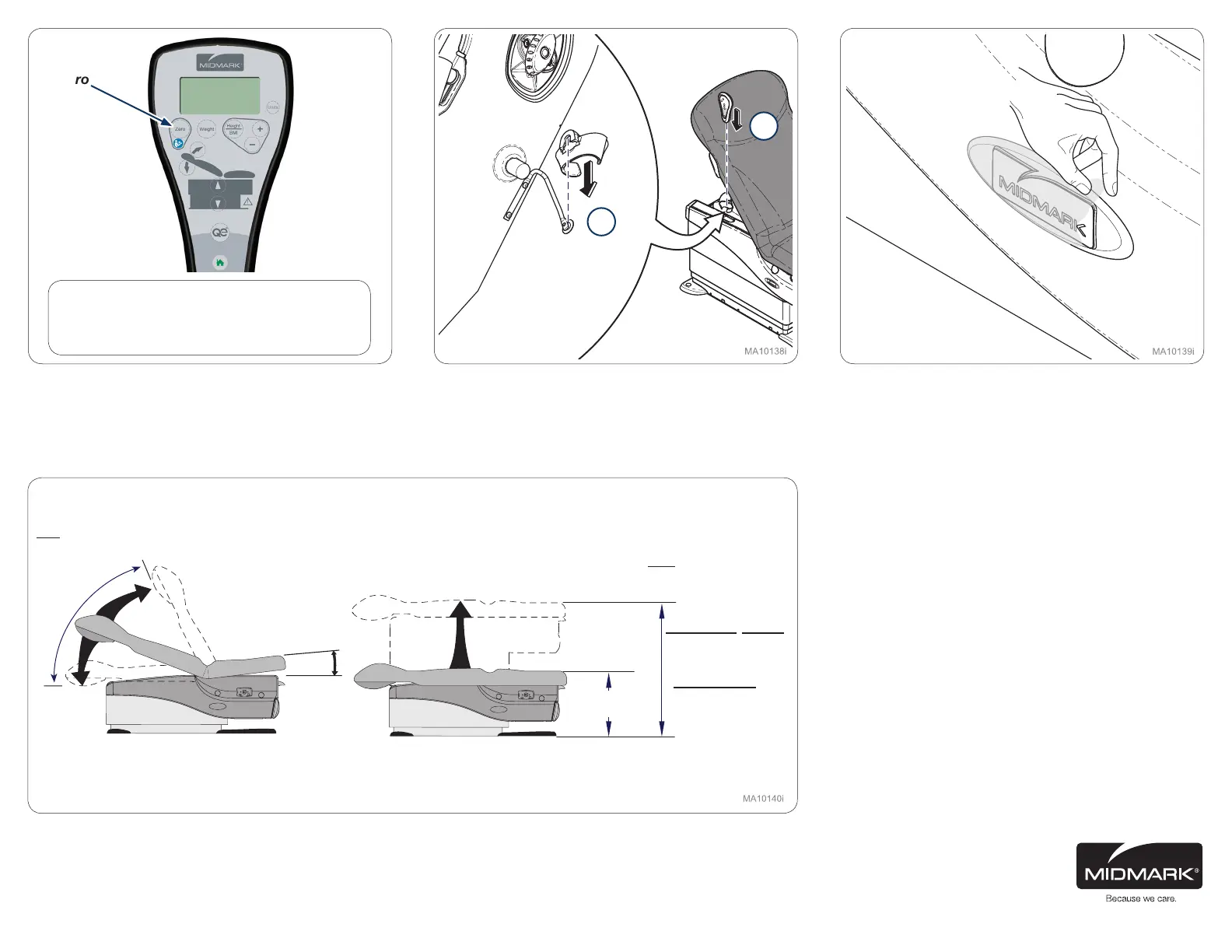
Step 27: 625-004 (ONLY)
Use hand control and press zero button to calibrate table.
Display should cycle and read “Scale Ready”.
Step 28:
Snap on holster to hanging bar and place hand control
into holster.
Step 29:
Remove clear plastic covers (2) from Midmark name
plate.
Tables range of motion.
Zero
Max.
37.5 ± 0.5 in.
(95.3 ± 1.3 cm)
Min.: 18.5 ± 0.5 in.
(47 ± 1.3 cm)
‘Home’ Height
20.5 ± 0.5 in.
(52.1 ± 1.3 cm)
Quick Exam
®
Height
34.5 ± 0.5 in.
(87.7 ± 1.3 cm)
Max. 7° ± 2°
Min. 1.5°
0° (horizontal)
to +80° ± 5°
2
1
Note
If a malfunction is detected contact Midmark
Technical Service by calling: 1-800-MIDMARK.



 To Next Page