2
BE SURE THE CONSOLE IS SELECTED TO THE
CORRECT APPLICATION PROGRAM
There are 5 choices total
Liquid or Dry
Programming for your Mid-Tech ARC 6000 Console Granular
Console calibration is a one-time procedure that, once it has been performed, does not
have to be repeated. Turning the POWER ON/OFF switch does not affect the console’s
memory—all data is retained.
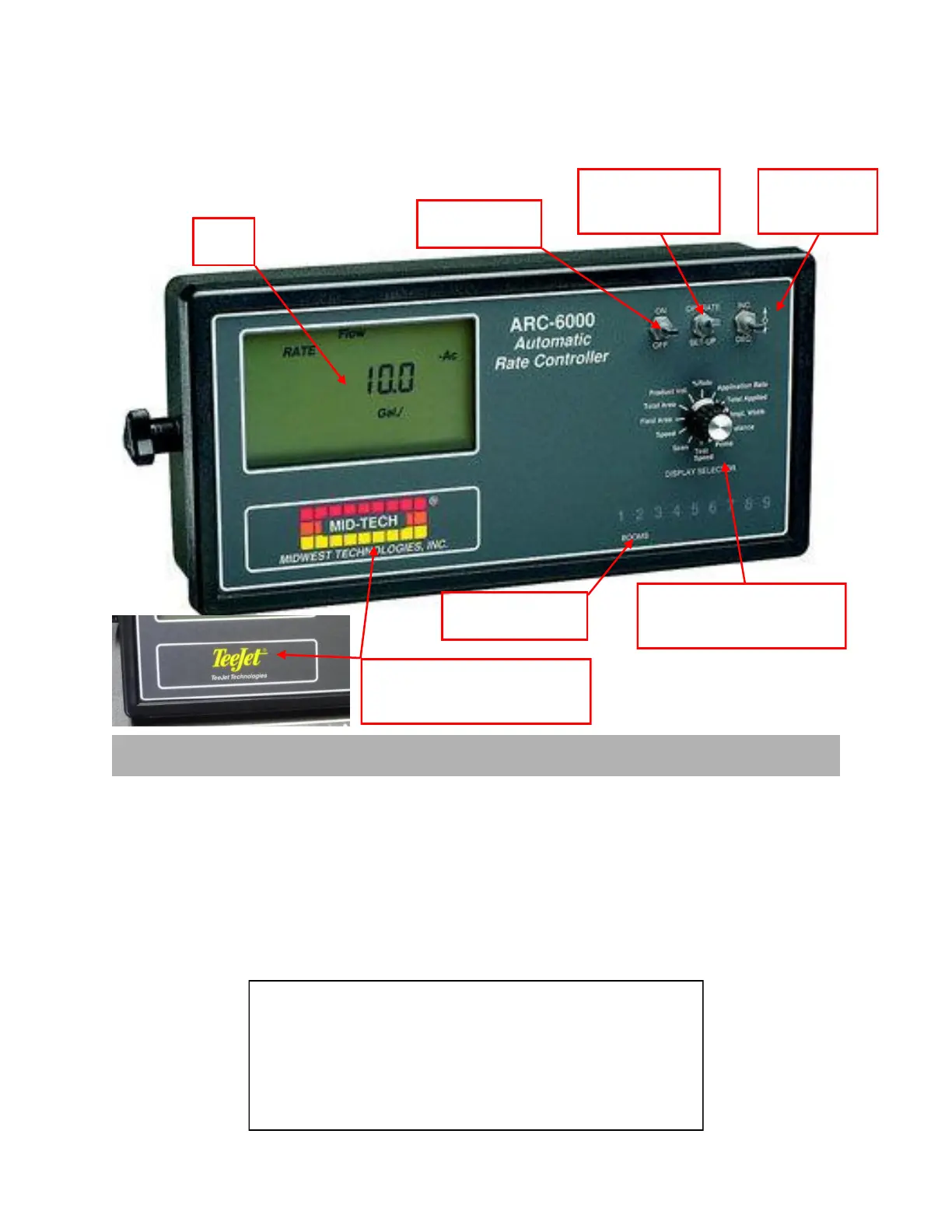
Turns the console
power ON or OFF
Mode Selector Switch
selects either Operate
or SetUp mode
INC/DEC Switch
changes values in
display
Display Selector Function Knob is
used for Operate or SetUp in both
Granular and Liquid
Boom Switch ON / OFF
Indicators
Displays
Data
1. Liquid Pressure—normal pressure based spraying
2. Liquid Standard—normal flow based spraying
3. Liquid Reflow—used on some European sprayers
4. Granular Standard—single conveyor spreader
5. Granular Split Drive—dual conveyor spreader
The control console must be calibrated & programmed before it is ready to be used.
4. C Stnrd
5. C SPL
1. L PSI
2. L Stnrd
3. L rEFLO
©2011 Newton Crouch Inc. This information is the property of Newton Crouch Inc. and is loaned confidentially to our customer for his sole use. It must not be used in any way
detrimental to our interest or shared with outside parties. Technical Tips/ ARC6000 Programming—Dry Rev 2.2.2011
Logo on console may vary due to the
age of the console. They work exactly
the same regardless of logo



 To Next Page
 Loading...