Turning on the dishwasher
^
Make sure spray arms are not
blocked.
^ Close the door.
^ Open the water valve (if closed).
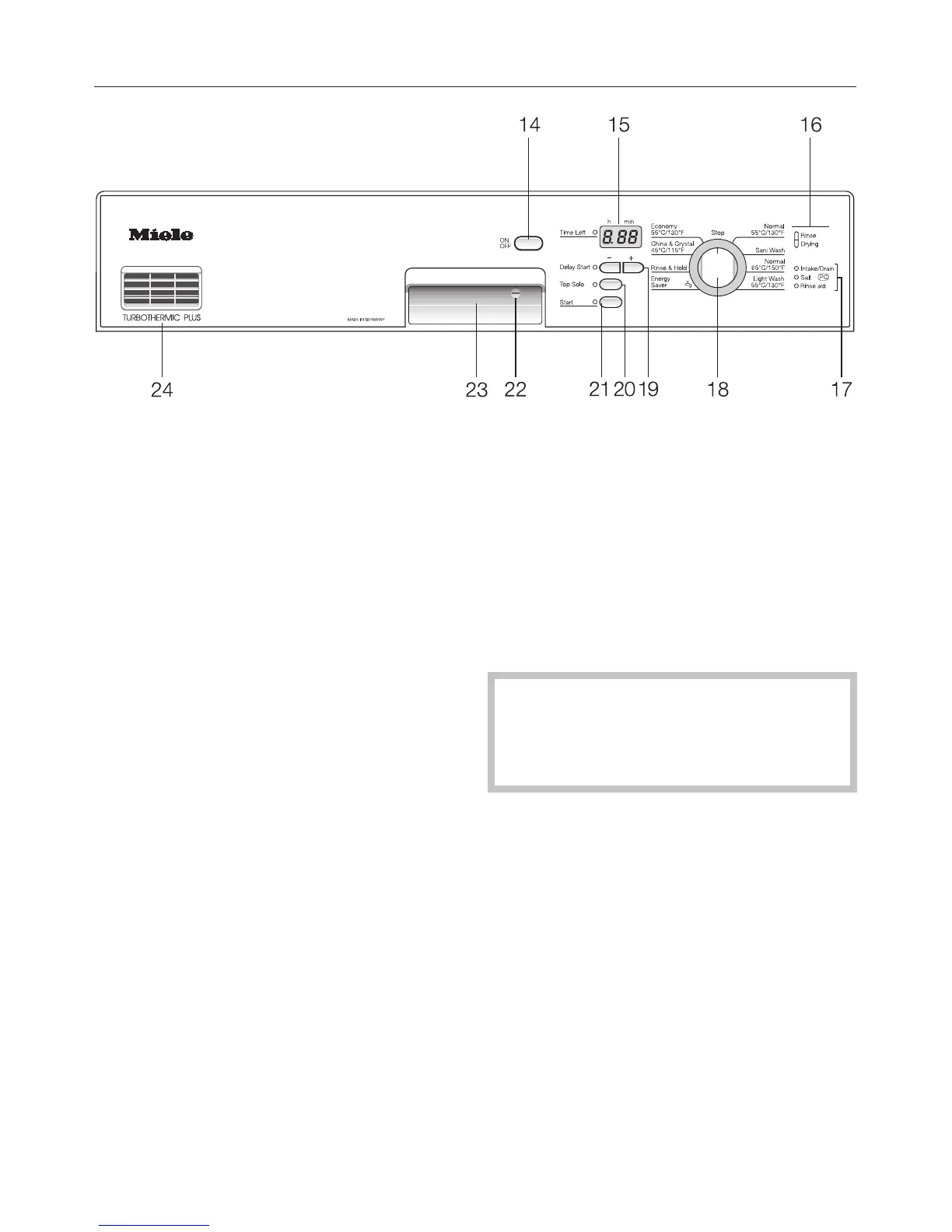
^ Press the “On/Off” button (14).
The light ring around the program se-
lector (18) and the decimal point in the
time display (15) will light.
Starting a program
^
When selecting a program, refer to
the program chart in the operating in
-
structions.
^
Turn the program selector (18)
clockwise or counter clockwise to the
desired program.
The running time of the program se
-
lected shows in the time display (15) in
hours and minutes. The “Time Left” in
-
dicator next to the time display (15) and
the “Start” indicator (21) light.
Note:
“Delay Start” or “Top Solo” must be se
-
lected before the program is started
(see “Additional features”).
^ Press the “Start” button (21).
The program cycle begins. The “Start”
indicator light (21) goes out and the
“Rinse” indicator (16) lights.
If a program is ended prematurely,
important program steps (e. g. reac-
tivating the water softener) may be
omitted.
Operating the dishwasher
32



 To Next Page