Switching on and off
Switching on
Close the door
Open the stopcock (if it is closed).
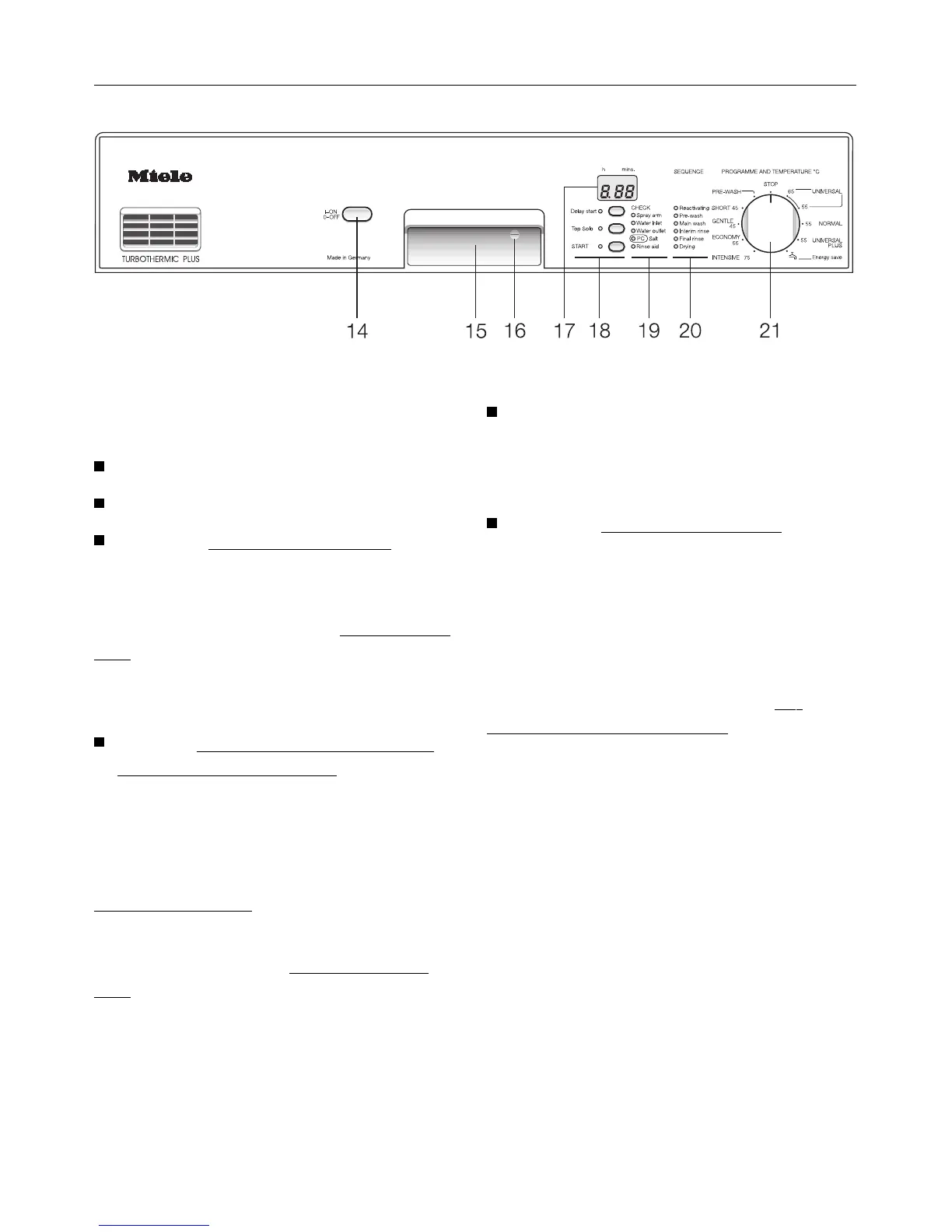
Press the “On/Off”-switch (14).
When the programme and temperature
selector switch (21) is in the “STOP” po-
sition a dot lights up in the
display field
(17).
Starting a programme
Turn the Programme and tempera-
ture selector switch (21) clockwise or
anti-clockwise to the required pro-
gramme.
The length of the programme selected
appears in hours and minutes in the
Time display (17).
At the same time an indicator light il-
luminates next to the
“START”-button
(18).
Before starting a programme select
additional options “Delay start” or
“Top Solo” if required
(see chapter “Additional options”).
Press the “START” button (18).
The indicator light next to the “START”-
button goes out. The programme
starts.
Sequence indication (20)
After starting a programme the se-
quence indicator light (20) show the ac-
tual programme stage reached in a pro-
gramme.
Switching on and off
36



 To Next Page