Guide to the appliance
18
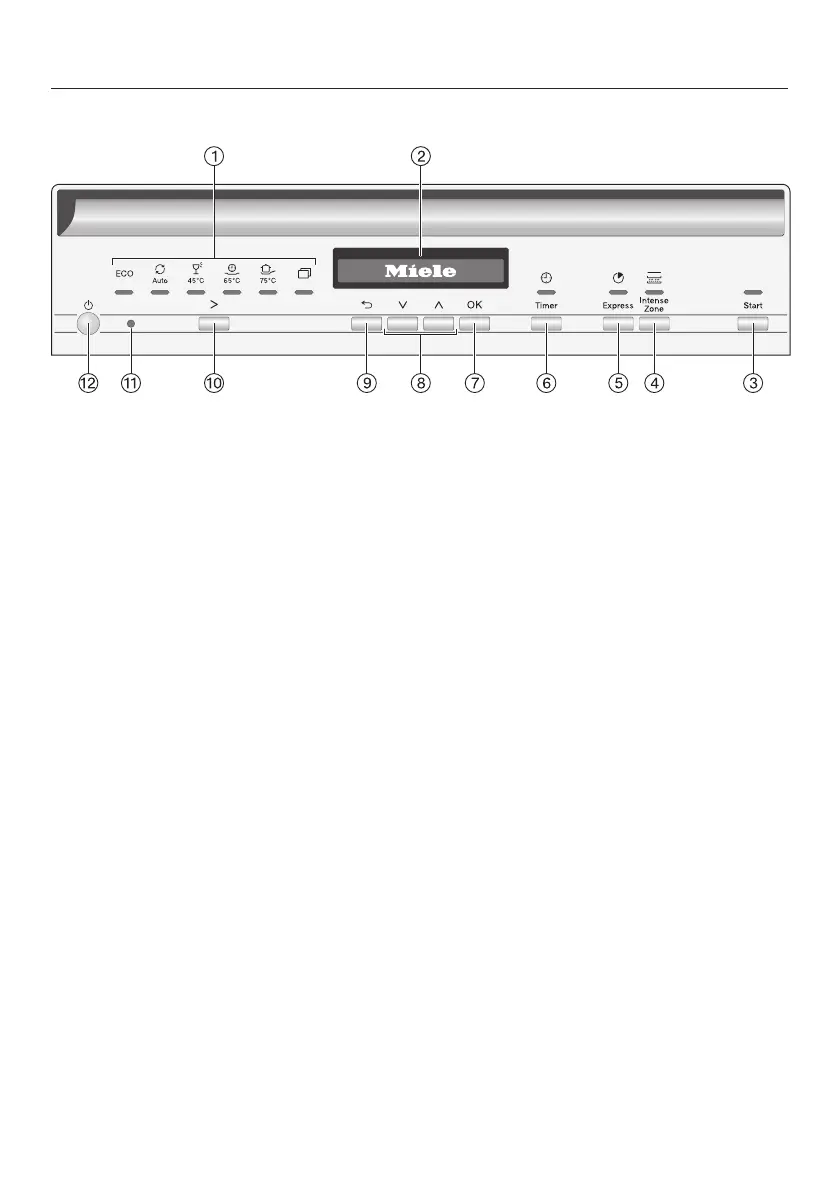
Control panel
a
Programme selection
ECO = ECO
Auto = Auto45–65°C
45°C = Gentle45°C
65°C = QuickPowerWash65°C
75°C = Intensive75°C
= Further programmes/
settings
b
Display
For further information, see “Guide
to the appliance” in the “Display
functions” section.
c
Startbutton with indicator light
For starting the selected programme.
d
IntenseZone button
Increases cleaning performance in
the lower basket.
e
Express button
For reducing the programme dura-
tion.
f
Timer button
For selecting a later programme
start.
g
OK button
To select menu options and values
displayed.
To confirm messages.
h
buttons
For programme selection.
For changing the values displayed.
For scrolling to other menu pages.
i
Back button
For navigating back to the previous
menu or deleting values that have
been set previously.
j
Programme selection button
For programme selection.
k
Optical interface
For service technicians.
l
ON/OFF button
For switching the dishwasher on and
off.




 To Next Page