Technical Information
S171 i / S172 i
8
AND POTENTIOMETER (S172i)
1. Remove the switch cover as outlined in section
2.8
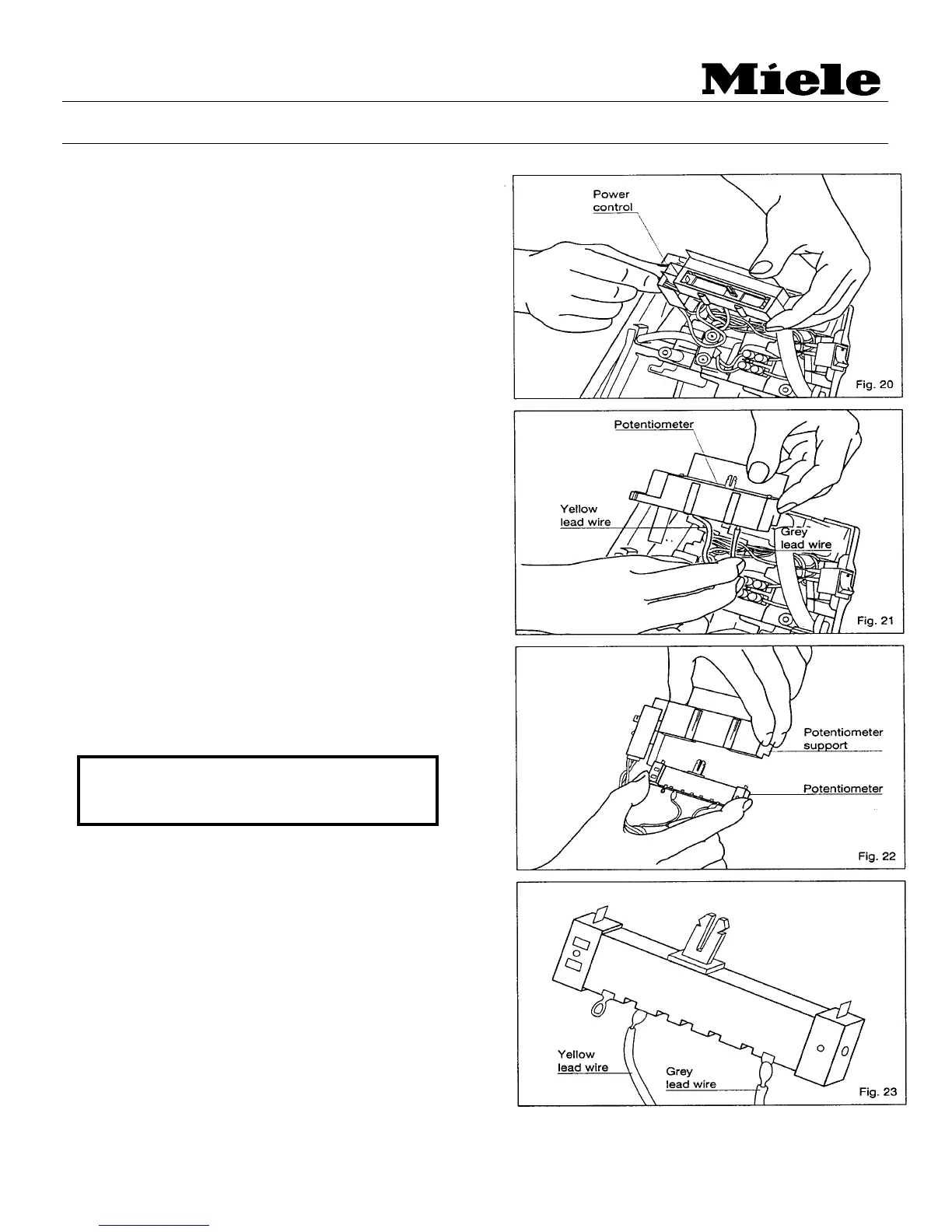
2. Press the two clamps holding the power control
unit in it’s housing and remove. (Fig. 20)
3. Disconnect the yellow and black wires from
the power control.
4. Unsolder the gray wire that is connected to the
potentiometer and remove the power control.
(Fig. 21)
5. Install the new power control, solder on the gray
wire and reconnect the black and yellow wires
according to the wiring diagram.
2.11 Potentiometer
1. Remove the switch cover as outlined in section
2.8.
2. Pull out the power control unit and remove the
potentiometer from its support. (Fig. 22)
3. Unsolder the yellow and gray wires from the
potentiometer tabs. (Fig. 23)
4. Replace the potentiometer and solder the
yellow and gray wires to their respective tabs.
NOTE: MAKE SURE THE WIRES ARE IN
THE CORRECT POSITION BEFORE
SOLDERING.



 To Next Page