Guide to the appliance
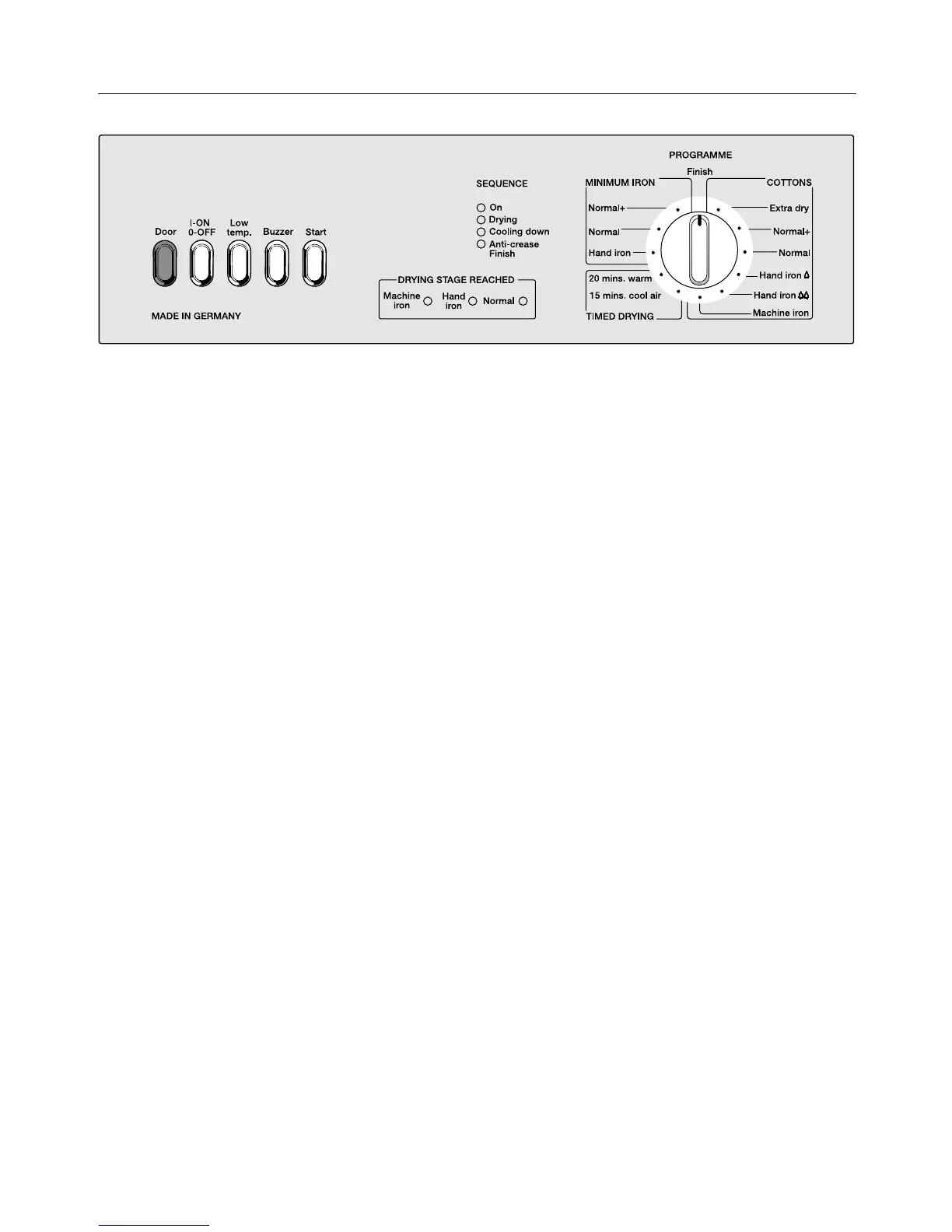
Push buttons
– Door
opens the door.
This button does not stay pressed in.
– l-On / 0-Off
for switching the appliance on and off.
Lights on when the dryer is switched
on . . .
. . . the SEQUENCE indicator light
"ON".
. . . Drum interior light when the door is
opened.
– "Low temperature" additional option
– "Buzzer" additional option
– Start
starts a drying programme.
This button does not stay pressed in.
Indicator lights
– SEQUENCE
4 lights to show the part of the pro-
gramme reached.
– DRYING STAGE REACHED
3 lights to show the stage of drying
reached.
For programmes "Normal +" and
"Extra dry" the indicator light remains
at the "Normal" position.
PROGRAMME selector switch
The selector switch can be turned
clockwise or anti-clockwise.
– COTTONS
– MINIMUM IRON
– TIMED DRYING
4


 To Next Page