EasyManua.ls Logo

Mieo HT706 - Overview; Unit View; Control Displays and Symbols; Replacing the Battery

Default Icon
7 pages
Print Icon
To Next Page IconTo Next Page
To Previous Page IconTo Previous Page
Loading...
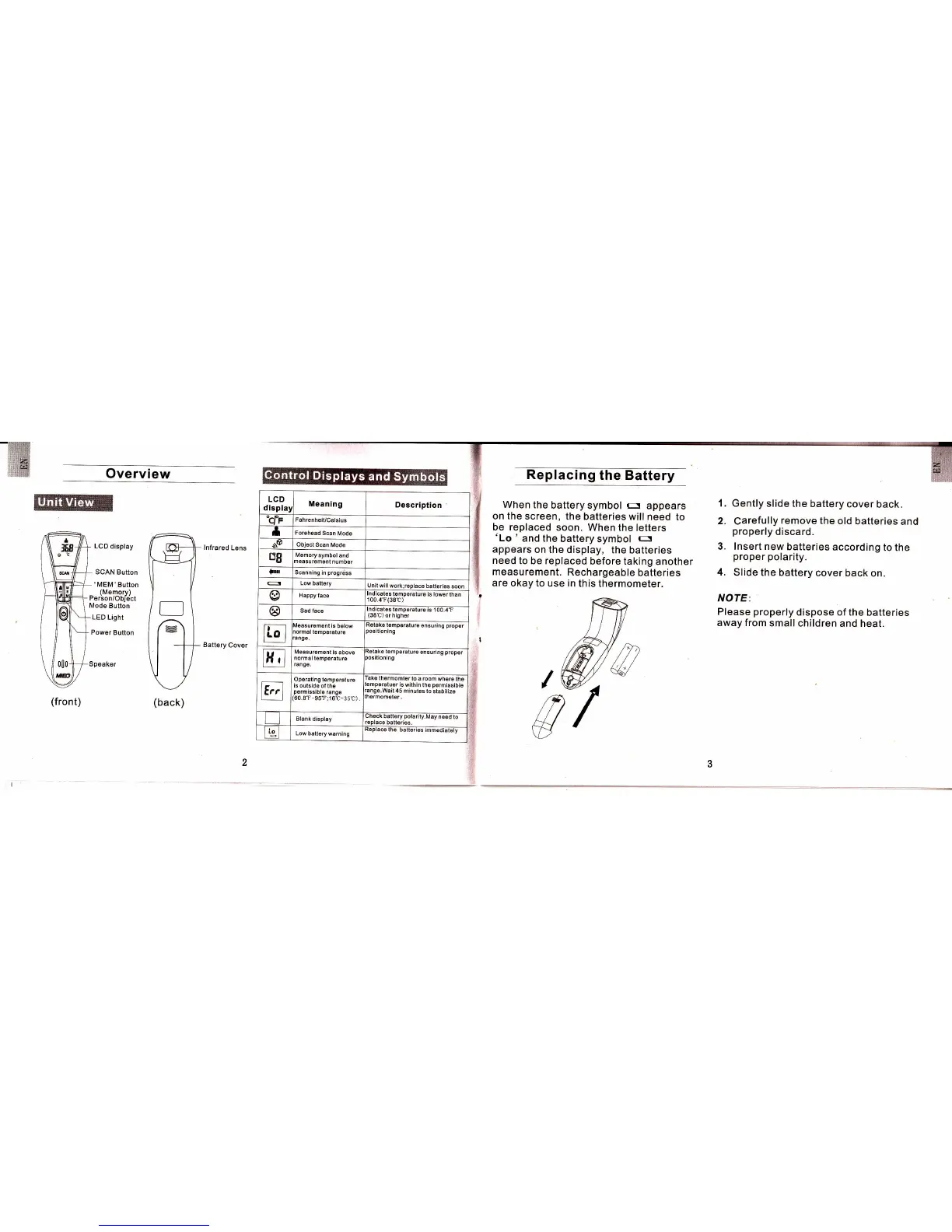
Overview
LCD display
SCAN Button
'MEM'Button
(Memorv)
Perbon/Obirict
Mode
Button
LED Lisht
Power
Button
lnfrared
Lens
Battery
Cover
(front)
(back)
LCD
displar
Meaning
Oescription
"cfr
Fahrenheil/Celsius
t
For6heed
Scan
Mod6
sP
Object
Scan
Mode
B8
l\remory
symbol
and
neasuremenl
numbet
lIo Scanning
in
progrdss
5
Low
battery
Jnit will
work;replace
batteries
soon
@
Happy
face
rnotcates
temperature
is lower
than
100.4'F(38t)
@
Sad face
nolcatas
lemp€rature
is 100.47
(38t)
or hlgher
E4
r'lgasurement
is
b6low
rormal
tomp6ralu16
ange.
{gtaKe
temper6lur€
ensuring
propor
)osltioning
E
Measuremenl
is above
normal temperature
range.
tetaKe
temperature
ensuring
prop6r
)osilioning
tri
Operaling
temperature
ls outside
ofthe
permiSsiblo
range
60.8T-95r;1
6C-35()) .
lake
th€rmomterto
a room
where
the
emperaluor
i6
wllhin
the
permlssible
ange.Wait
45 minutes
to
stabilize
hermometar
tt
BIank
display
lheck
batt6ry
potarity.lvlay
n€ed
to
'6place
batteries.
rg
Low
battery warnlng
s rmmedaat6ly
Replacing
the Battery
When the
battery
symbol
r:
appears
on the
screen,
the batteries
will need
to
be replaced
soon.
When
the letters
'Lo
' and the
battery
slmbol
n
appears
on the
display, the
batteries
need
to be replaced
before
taking
another
measurement.
Rechargeable
batteries
are
okay to
use
in
this
thermometer.
1.
Gently slide
the battdry
cover
back.
2. Carefully
remove
the old
batteries
and
properly
discard.
3. lnsert new
batteries
according
to the
proper
polarity.
4.
Slide the
battery cover
back
on.
NOTE:
Please
properly
dispose
of the
batteries
away from
small
children
and heat.