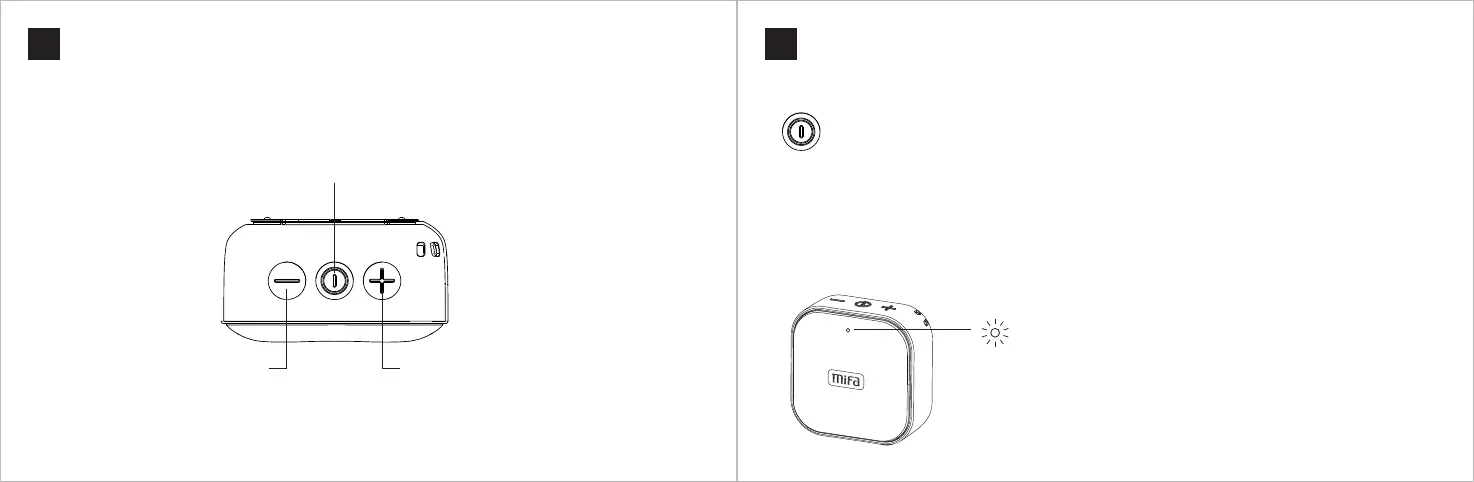
Keys Functions
05
Keys Functions
04
English English
Other Instructions
Modes Switch
• Once powered on, the speaker enters Bluetooth pairing mode by default.
• •If it is inserted with a Micro SD card or an audio cable, double press the power button to switch modes in
turns: Bluetooth mode → Micro SD card mode or Aux-in mode
• •If it is inserted with a Micro-SD card and an audio cable, double press the power button to switch modes
in turns: Bluetooth mode → Micro SD card mode → Aux-in mode
Restart
If the speaker doesn't respond to any operation, press and hold the power button for 8 seconds to restart it.
LED Indicator
Blue light flashes after powered on
Blue light stays on after connected to a device
Blue light stays on while playing
Blue light flashes slowly when playing is paused
Blue light flashes rapidly at the max / min volume
Red light stays on while charging; when fully charged, red light goes off
Power Button
• Press and hold the button for 2 seconds to turn on or turn off
• When playing music, short press to pause or play
• When a call coming, short press to answer or hang up; press and hold it for 2 seconds to reject
Volume Down Button
• Short press to decrease the volume
• Long press to play the previous song
Volume Up Button
• Short press to increase the volume
• Long press to play the next song



 To Next Page