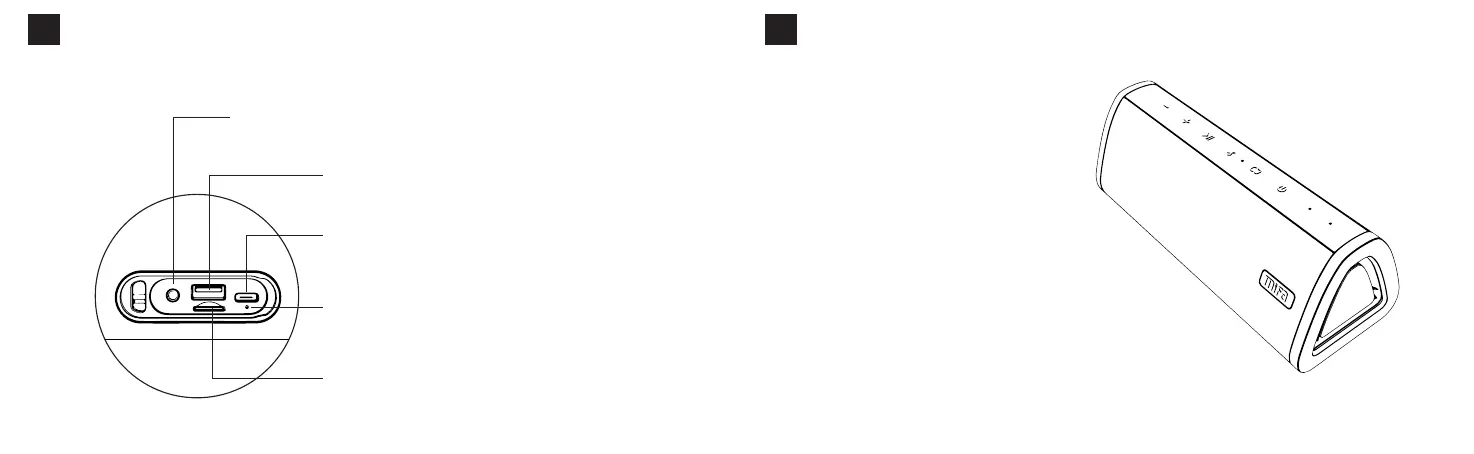
PortsFunctions
04
ChargingIndicator:Redlightwillstayonwhencharging,
turnoffafterfinishcharging.
Aux-injack
Insertedanaudiocableinthepowered-onstate,itwillentertheAux-in
modeautomatically.
Built-inresetbutton:Presstheresetbuttoninthejackwithaneedle
toresetspeaker.
USBType-CPort:UseC5V/1Aadaptortocharge
thespeaker
MicroSDCardSlot
Inthepowered-onstate,insertaMicro-SDcard,itwillplay
themusicstoredinthecardautomaticallyafterbeeps.
USBflashdriverPort
InsertedanUSBflashdriverinthepowered-onstate,
itwillplaythemusicstoredinthedriverautomatically
afterbeeps.
English
BluetoothConnection
05
1.Turnonthespeaker
Pressandholdthepowerbuttonfor2secondsto
turnonthespeakerwithapromptsound.Andthe
whiteLEDlightflashesindicatingitisinthe
pairingmode.
OtherInstructions
Toconnecttoanotherdevice,pressandholdtheBluetoothbuttonfor2
secondstodisconnectthepairedoneandthespeakerwillenterthepairingmode.
Toreconnectittothelastuseddevice,shortpresstheBluetoothbutton.
2.Connectittoyourdevice
TurnontheBluetoothofyourdeviceandselect
Mifa_A10+.Oncetheconnectioniscompleted,itwill
beepandthewhiteLEDlightwillstayon.
Thespeakerwillconnecttothelast-connecteddevice
automaticallyoncethedevice'sBluetoothisturnedon.
English


 To Next Page