EasyManua.ls Logo

Mifa K3 - Page 4

Mifa K3
10 pages
Print Icon
To Next Page IconTo Next Page
To Previous Page IconTo Previous Page
Loading...
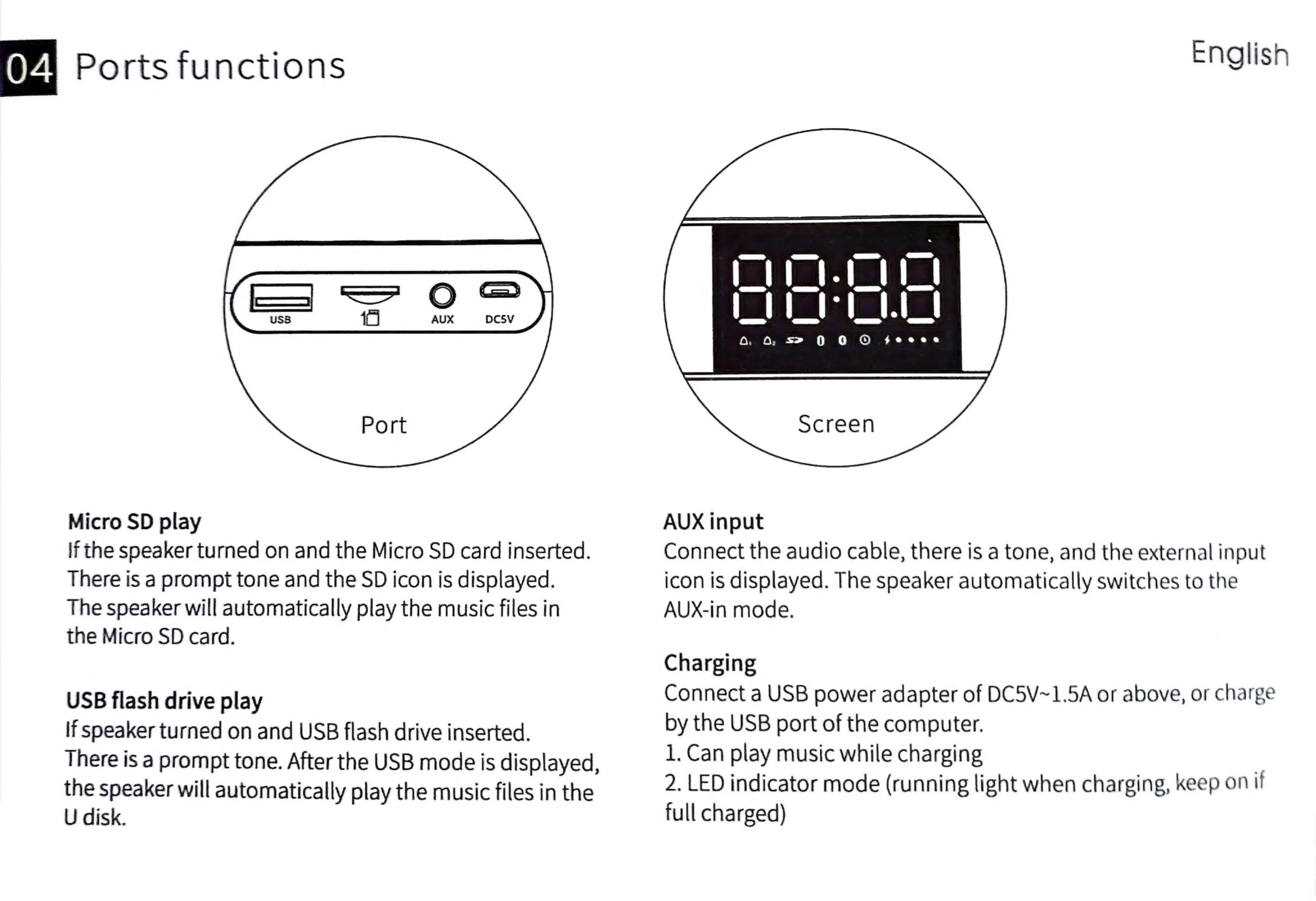
Ports
functions
English
Micro
SD
play
AUX
input
if
the
speaker
turned
on
and
the
Micro
SD
card
inserted.
Connect
the
audio
cable,
there
is
a
tone,
and
the
external
input
There
is
a
prompt
tone
and
the
SD
icon
is
displayed.
icon
is
displayed.
The
speaker
automatically
switches
to
the
The
speaker
will
automatically
play
the
music
files
in
AUX-in
mode.
the
Micro
SD
card.
Charging
USB
flash
drive
play
Connect
a
USB
power
adapter
of
DC5V~1.5A
or
above,
or
charge
If
speaker
turned
on
and
USB
flash
drive
inserted.
by
the
USB
port
of
the
computer.
There
is
a
prompt
tone.
After
the
USB
mode
is
displayed,
1.
Can
play
music
while
charging
.
the
speaker
will
automatically
play
the
music
files
in
the
2.
LED
indicator
mode
(running
light
when
charging,
keep
on
tI
U
disk.
full
charged)