Wheel Measurement
Single/Continuous Measurement
Area Measurement
Volume
V
MEAS
Pythagoras (2-point)
7. Send data by Bluetooh / Historical record
Short press to turn on Bluetooth (manually)/
transfer data to App.
Long press to check historical record
8. Down/Subtract Button
Press this button to page down/subtract
9. Wheel
In wheel measurement mode, move the
wheel along the measuring path to measure
distance.
12. Tripod Screw Hole
13. Laser Line Emitting Hole
11. Battery Compartment
Notes: Each time when turning on wheel
measuring, first direction that wheel
measured is calculated as positive data,
the opposite direction measured is
calculated as negative.
10. USB-C Port
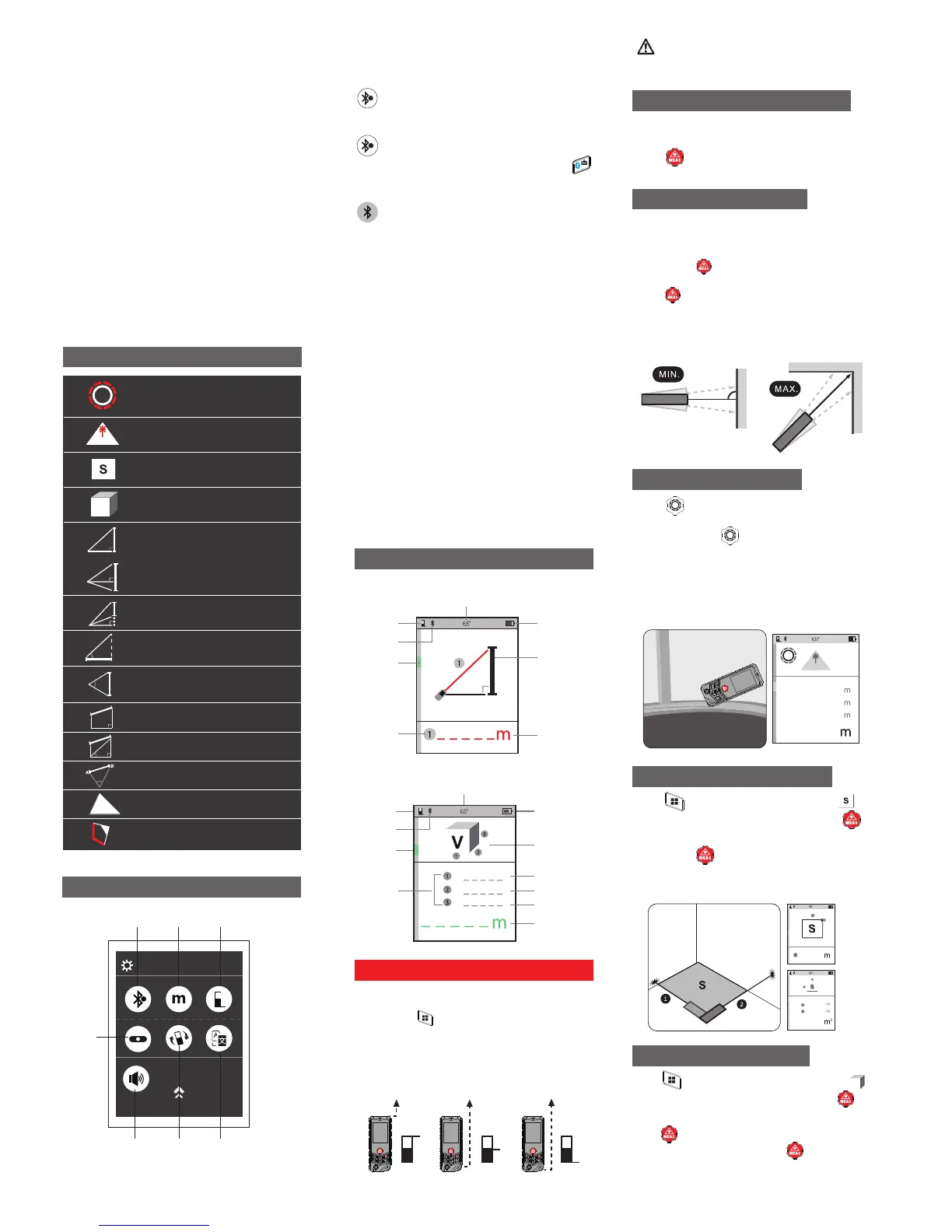
Instruction for icons
Pythagoras (3-point)②
Auto level
Auto height
α
Pythagoras (3-point)①
α
α
α
Trapezoid measurement①
Trapezoid measurement②
3D measuring: P2P
Laser Line Marking Function
Setup menu explanation
①Bluetooth
Short press to switch on Bluetooth (automatically
/manually), and turn off Bluetooth.
Bluetooth (Automatic mode), measured
data will be transfered to App automatically.
Bluetooth (Manual mode), measured date
will be transferred to the App by pressing
manually.
When the icon turns gray, Bluetooth is off.
④
⑤ ⑥
① ② ③
A
⑦
M
A
② Measuring units
Short press to switch measuring units between
m/ft/in/ft+in
③Reference
Short press to change measuring reference
⑥Chinese/English Voice broadcast.
Short press to select Chinese/English voice
broadcast.
⑤Rotary screen settings
Short press to activate/de-activate the screen
rotary settings for Portrait & Landscape view
(only available in Single/Continuous
measurement)
⑦Voice
Short press to turn the Voice Broadcast ON/OFF.
④Digital Level
Press to activate d , the electronicigital level
tilt sensor makes it easier to achieve horizontal
alignment with the real-time measuring angle.
Triangle Area Measurement
S
Operation Instructions
The device will enter Single distance
measurement mode when it is powered ON,
short press to select measuring mode, the
reminding of the red flashing line shows the
line to be measured.
※The measuring data should be different due
to different Reference settings. The Rear is
the default reference.
Front Tripod Rear
It can be used to measure the diagonal of
the house, horizontal lines, and stake out
purposes.
Long press to activate Continuous
measurement, aiming at the target and
press to stop, the Minimum and
Maximum data will be displayed
accordingly.
※The continuous measurement will stop
automatically after 5 minutes.
Continuous Measurement
Single Distance Measurement
The device will enter Single distance
measurement mode when it is powered ON,
press after aiming at target to get result
at bottom of the screen.
Interface
Measuring mode
display
Measuring
reference
Bluetooth
Angle display
Battery status
A Measuring interface:
Digital tilt
display
To be
measured line
B Measuring data interface:
Measuring mode
display
Measuring
reference
Bluetooth
Angle display
Battery status
Digital tilt
display
Final result display
First line display
Second line display
Third line display
Measuring
sequence
number
Measuring
sequence
number
3
Power on the device, measure in the
certain distance within ±2mm accuracy, it
can work properly.
Press to select Area measurement ,
according to the red flashing line, press
to get the ① distance (Length) from the target
point, press again to get ② distance(Width)
from the second target point, Area will be
calculated and displayed accordingly.
Area Measurement
Volume Measurement
Press to select Volume measurement ,
according to the red flashing line, press to
get ① distance (Length) from the target point,
press again to get ② distance (Width) from
the second target point, press the third time
to get ③ distance (Height), the Volume will be
calculated and displayed accordingly.
Press to activate wheel measurement,
scroll the wheel from the start point to
end point, press to stop.
※The wheel measurement can be used in
Single measurement, Area measurement
and Volume measurement.
Note: When starting the wheel measurement,
please keep an eye on right direction of the
wheel.
Wheel Measurement
V
MEAS
0.513
0.428
0.445
0.458
5.088
5.088
5.104
25.969


 To Next Page
 Loading...