EasyManua.ls Logo

Minco Heat ME83 - User Manual

Minco Heat ME83
2 pages
Print Icon
To Next Page IconTo Next Page
Loading...
M 83Heating Thermostat Manual
Application
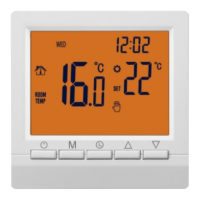
Power Key : Press the On / Off key to turn the system on or off.
User Operation
Mode Key :You can select “period control mode” or “manual mode” by this key
Up / Down key:Press the Up and Down keys to set the temperature and adjust
system parameters. And press Up and Down simultaneously and hold for 5 seconds
to enter lock key function.
Clock key: You can adjust the time and the week by this key.
Technical data
1. Temperature sensor : NTC
2. Temperature accuracy : ±1
3.Power consumption : <170uW
4.Voltage:
5. Load current : 3A
6.Temperature setting : 5~90
V
V
Manual mode: Set the temperature manually by this key.
Automatic mode: Adjust to the automatic mode, the thermostat will work cyclically
by week programming.
Programming: 6 –event time and temperature
In the shutdown state, long press mode key " " and the clock key " " for 5 seconds
to enter programming mode. you can switch parameters by mode key. After entering the
programming mode press mode key to adjust " hour" ,then press mode key to adjust
"minute".Press the mode key again to adjust temperature.
1 .Wake-up 2. Leave 3 Return(am) 4.Leave(pm) 5.Return(pm) 6.Sleep
Advanced setting (qualified person preferred)
Press" "and" "at the same time to enter the mode of advanced setting immediately
when thermostat is turned off. The following seven functions can be chosen by" M "key.
Anti-frozen function
When the room temperature is below 5. when the room temperature is above 7, the
thermostat will turn off the heating device automatically.
In the state of shutdown, the thermostat will turn on the heating device automatically
E
1
2
3
4
-2
1℃
ON
Symbol
Setting
Default value
or
Temperature
Switching
Anti-frozen
Adjust measured temperature range:-9-9°C
Adjust switching differential range:1-5℃
Turn ON/OF Anti-frozen function
calibration
differential
function
of time mode
7
01
Kinds of periods
5
6
protection
Overheating
60
Adjust range:5℃~60℃
8
Max . temperature
40
Set the lower limit
of temperature
10
Reset to factory
settings
7. Protection Class : IP20
20
15
15
15
22
15
Key
Event
Symbol
Time
Default value
01
02
03
04
05
06
01
02
Week day
Weekend
M
06: 00
08:00
11:30
12:30
17:00
22:00
08:00
23:00
Set time
15
22
Set temperature
01:5+2 day mode
02:6+1 day mode
03:7 +0day mode
OF : Close
Adjust range:30℃~90
Adjust range:5℃~20
3
The thermostat is recommended for control of electric heating devices or on/off valve
actuator used in water-based system.
Question and Answer IconNeed help?

Do you have a question about the Minco Heat ME83 and is the answer not in the manual?

Summary

Application

User Operation

Anti-frozen Function

Technical Data

Programming: Event Time and Temperature

Event Time and Temperature Setting

Configure wake-up, leave, and return times and temperatures for weekly cycles.

Advanced Settings

Parameter Configuration

Adjust temperature calibration, protection, and reset parameters for advanced users.

Wiring Diagram

Icon Description

Mounting Steps

Mounting Location Recommended

Common Failure Handling

Overview

This document outlines the features and operation of the ME83 Heating Thermostat, a device designed for controlling electric heating systems or on/off valve actuators in water-based systems.

Function Description

The ME83 Heating Thermostat serves as a central control unit for managing room temperature. Its primary function is to regulate heating devices based on user-defined schedules and temperature settings. The thermostat can operate in both "period control mode" (automatic mode) and "manual mode," offering flexibility in how heating is managed. In automatic mode, it follows a weekly programming schedule, ensuring the heating system operates efficiently according to pre-set times and temperatures. The device also incorporates an anti-frozen function, which automatically activates the heating device if the room temperature drops below 5°C and turns it off when the temperature rises above 7°C, preventing pipes from freezing.

Usage Features

The thermostat is designed for user-friendly operation with several key controls:

  • Power Key: A simple press of this key turns the system on or off.
  • Mode Key (M): This key allows users to switch between "period control mode" (automatic) and "manual mode." In programming mode, it's used to navigate between different parameters (hour, minute, temperature) for adjustment. In advanced settings, it's used to select different functions.
  • Up/Down Keys (AV): These keys are used to set the desired temperature and adjust system parameters during configuration. Pressing and holding both keys simultaneously for 5 seconds activates the lock key function, preventing unintended changes.
  • Clock Key: This key is used to adjust the current time and day of the week.
  • Manual Mode: In this mode, users can manually set the desired temperature, overriding any programmed schedules.
  • Automatic Mode: When set to automatic mode, the thermostat operates according to a pre-programmed weekly schedule, adjusting heating based on the defined time periods and temperatures.

Programming: The thermostat supports a 6-event time and temperature program. To enter programming mode, users long-press the mode key "M" and the clock key for 5 seconds. Once in programming mode, the mode key is used to switch between adjusting the hour, minute, and temperature for each event. The default programming includes events for wake-up, leaving, returning (AM), leaving (PM), returning (PM), and sleep, with pre-set times and temperatures.

Advanced Settings: For qualified persons, advanced settings can be accessed by simultaneously pressing the "A" and "V" keys when the thermostat is off. These settings allow for fine-tuning of the thermostat's behavior:

  • Temperature Calibration: Adjusts the measured temperature range.
  • Overheating Protection: Sets the maximum temperature limit.
  • Switching Differential: Configures the temperature difference before the heating switches on or off.
  • Anti-frozen Function: Toggles the anti-frozen feature on or off.
  • Kinds of Periods of Time Mode: Selects different programming modes (e.g., 5+2 day mode, 6+1 day mode, 7+0 day mode).
  • Max. Temperature (GUTL): Sets the upper limit for temperature adjustment.
  • Lower Limit of Temperature (bof): Sets the lower limit for temperature adjustment.
  • Reset to Factory Settings (BLEP): Resets all parameters to their default values by pressing and holding "A" for 3 seconds.

Mounting: The thermostat is designed for wall mounting with an 86mm screw expansion sleeve. The installation process involves opening the surface and bottom shells, routing wires through the back of the case, fixing the bottom shell to the wall, connecting terminal wires, and finally covering the bottom shell with the surface shell. The recommended mounting location is on a wall with free air circulation, away from direct heat sources, drafts from doors or windows, or the outer wall, to ensure accurate temperature readings.

Maintenance Features

The manual provides a "Common failure handling" section to assist users in troubleshooting common issues:

  • No Power On: Suggests checking if the battery is reversed or if the power button is working.
  • LCD Display Garbled: Recommends checking if the shell is deformed after installation and reinstalling if necessary.
  • Display Normal, No Output: Advises checking the wiring between the MPU and the power board for damage, and verifying that the null line and live line are correctly connected.
  • Remote Failure: Instructs users to check if the remote control battery has sufficient power and to replace it if needed.
  • Temperature Display Error: Directs users to adjust the panel temperature display using the first option in the Advanced tab (Temperature Calibration).

These troubleshooting steps help users address minor issues without requiring professional assistance, contributing to the device's ease of maintenance.

Minco Heat ME83 Specifications

General IconGeneral
Current Load16A
Installation Hole Distance60mm
Protection ClassIP20
Sensor TypeNTC
Enclosure RatingIP20
Weight150g
Accuracy±1°C
Set Temp. Range5℃ - 40℃
Ambient Temp.0°C to 50°C
Humidity< 85% (Non-condensing)
Power Consumption< 2W
Shell MaterialPC + ABS (Flame Retardant)
Temperature Range5℃ - 40℃
MountingWall-mounted
Dimensions86mm x 86mm x 35mm