33
Procedures
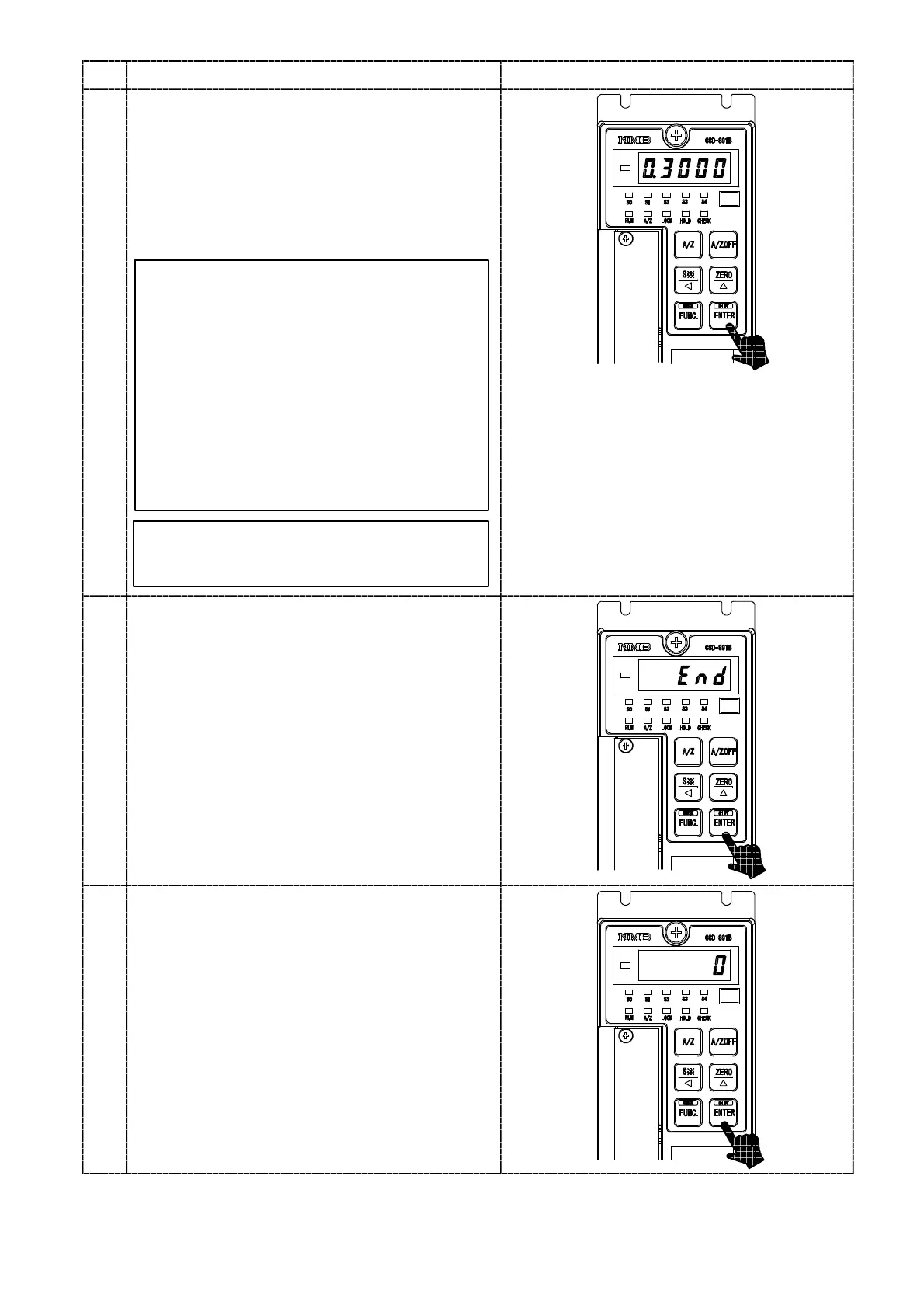
Press the key.
The load display shows “0.300 0” and the digit at
10
0
will flash on and off. In case that calibration
has completed already, the registered output
value of load cell at that time is displayed.
Set the output value for load cell corresponding
to the maximum display value with the initial
load application with the right keys.
10
The set value to be set here should be
0.2 mV/V or more than the set value in the
step 8. Though the number of digits has not
prepared in the Inspection data for load cell
as many as the digits in the right figure,
extra digits are necessary for the
compensation for the internal standard
point of the instrument. In case of actual
setting, insert “0” into the extra digits.
As for the value of extra digits, when tare
compensation and fine adjustment on load
are applied, it is written as a compensated
value automatically.
key :Set value carry key
key :Set value inclement key
key :Set value initialization key
By pressing the key continuously,
increment can be provided continuously.
11
Press the key.
The load display shows the “END”.
12
Press the key.
After “ACAL” mode is over, the load display
shows the present load.



 To Next Page