EasyManua.ls Logo

Mini Robot Metal Fighter - User Manual

Mini Robot Metal Fighter
2 pages
Print Icon
To Next Page IconTo Next Page
Loading...
Metal Fighter & ROBONOVA Operating Notice (v 1.1)
z To assemble the MF tool like +type no.1 driver can be used.
z The MF assembling method is using a screw bolt ( jointed to servo motor). Screw of motor doesn’t
have to be removed completely. But some of screw bolts would be used for some of brackets.
z Cabling should be clean according to MF manual after assembling the MF
z Every motor cable ports should be connected to assignment port on MRC-3024 MF.
z It can’t be able to service as free of charge when user mistake.
z If you have any question about the assembly or zero point method, Please call MINIROBOT
(tel.82-32-260-7272, fax:82-32-260-7273) or connect hompage Q&A(http://www.minirobot.co.kr
)
z MF kit could be worked only after assembling and setting zero point through robobasic MF version.
Basically, robobasic commands and operating method can be known though application course
through robobasic can’t be explained.
(because of many of motion sources to be known, please refer to them)
z Charging time should be 1 hour, after full of charge, user can operate MF during 5min to 40 min
depending of every motion.
( If the robot running time is to be short, that’s condition need to charge)
z The MF battery is 6V-NIMH 1000mA with high discharge rate.
z The charge is for 6V-NIMH with a charging current 1A. Honest battery have to be used.
z The charge would be red lamp during charging, and it would be appear green lamp after full of
charge, the lamp appears to be on end off or put out the light when it has some some problem.
z Even if the charge appears green lamp, any charge cannot full. In this case the safe status to
protect the battery and charger. Please reconnect.
z If the charge would be green lamp after retrying one or two, this condition is full of charged
condition.
z If the condition of charge would be flickering, that would be over electric charged or impossible
condition.
z Remote controller shoud be operated by shooting against to MF head part. Also, as operating
system of the remote controller is an infrared rays, it might be unstable under fluorescent lamp or
outdoor.
z The MF controller loading basic source program, user can operate various motion. The kind of
motions are entertainment mode, fighter mode, game mode, soccer mode, hurdle mode. User can
operate 120 type of motions.
z Enclosed CD would include a users program source, user can programming through robobasic MF
version.
z Included Battery inner kit would not be charged , user should charge it.
z User should operate MF motion on the hard flat floor. It could not operate on a lot of frictionized
floor like carpets or rubber floor
z If you have any problem, Please check encloused CD
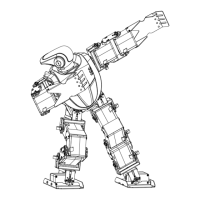
Metal Fighter
(ROBONOVA )
Metal Fighter Quick Guide (v1.1)
Mini Robot Corp.
Question and Answer IconNeed help?

Do you have a question about the Mini Robot Metal Fighter and is the answer not in the manual?

Summary

Metal Fighter & ROBONOVA II Operating Notice

Assembly and Cabling Procedures

Details on robot assembly using screws and connecting motor cables to assignment ports.

Initial Setup and Software Installation

Steps for setting the zero point and installing/using the Robobasic MF version software.

Battery Charging and Management

Information on charging time, battery specifications, charger status lights, and troubleshooting.

Remote Control and Operating Environment

Guidelines for remote controller operation, infrared signal usage, and suitable flooring.

Motion Modes and Programming Options

Overview of available motion modes and how to program them using the included CD.

Robot Operation and Motion Command Reference

Pre-Operation Checks and Setup

Steps including checking parts, installing software, connecting cables, and setting communication ports.

Motion Command Table

Detailed reference of commands for various modes: Dance, Fighter, Game, Soccer, and Racing.

Multi-User Game Mode and Mode Switching

Instructions for setting remote controller IDs for multi-user games and switching between motion modes.

Overview

The Metal Fighter (ROBONOVA II) is a programmable robot designed for entertainment and educational purposes, allowing users to engage with it through various motion modes and custom programming. It is assembled using screw bolts, with some bolts used for brackets, and requires careful cabling according to the manual. All motor cable ports must be connected to their assigned ports on the MRC-3024 MF controller.

Function Description:

The Metal Fighter operates through a controller that loads a basic source program, enabling a wide range of motions. Users can choose from several motion themes, including:

  • Dance Mode: Offers various dance routines.
  • Fighter Mode: Includes combat-oriented movements.
  • Game Mode: Features motions suitable for interactive games.
  • Soccer Mode: Provides movements for playing soccer.
  • Hurdle Racing Mode: Designed for obstacle course navigation.
  • Camera Pose Mode: Allows the robot to strike different poses.

The robot is capable of performing over 120 types of motions. Users can easily select motion themes, and up to four users can enjoy games simultaneously by setting the ID of their remote controllers. Each mode can be changed by pressing specific buttons (B, C, D, E, F, G) after pushing the red button, and finally the button.

The Metal Fighter kit requires assembly and setting a zero point through the robobasic MF version. While robobasic commands and operating methods are not explicitly explained in the manual, users can learn them through application courses. The enclosed CD includes a user's program source, allowing users to program the robot through the robobasic MF version.

Important Technical Specifications:

  • Battery: 6V-NIMH 1000mA with a high discharge rate.
  • Charger: Designed for 6V-NIMH batteries with a charging current of 1A. Only "honest" batteries should be used.
  • Charging Time: Approximately 1 hour for a full charge.
  • Operating Time: After a full charge, the robot can operate for 5 to 40 minutes, depending on the complexity and intensity of the motions performed. If the robot's running time is short, it indicates a need for charging.
  • Remote Controller: Operates using infrared rays and should be aimed at the MF head part. Its stability might be affected by fluorescent lamps or outdoor conditions.
  • Software: Requires "robobasic MF. v 2.8" to be installed on the user's PC. The enclosed CD contains the robobasic file, which may need to be reloaded with administrator authority if issues arise on Windows Vista.
  • Connectivity: After installing robobasic, a download cable must be connected to the serial port of the user's PC. Notebook or netbook PC users may require an optional USB port download cable. The communication port needs to be set in the robobasic pull-down menu (typically COM1 for desktop PCs).

Usage Features:

  • Assembly: The MF tool can be assembled using a +type no.1 driver. The assembly method involves using screw bolts to join parts to the servo motor. It is not necessary to completely remove all screw bolts from the motor, but some will be used for brackets.
  • Zero Point Setting: After assembly, the robot requires a zero-point setting to function correctly.
  • Motion Control: The remote controller allows users to select and activate various motions.
  • Programming: Users can program the robot using the robobasic MF version, with program sources provided on the enclosed CD.
  • Operating Surface: The robot should be operated on a hard, flat floor. It may not operate effectively on high-friction surfaces like carpets or rubber floors.
  • Troubleshooting: If any problems are encountered, users should consult the enclosed CD for assistance. For assembly or zero-point method questions, users can contact MINIROBOT via phone (tel: 82-32-260-7272, fax: 82-32-260-7273) or their homepage Q&A (http://www.minirobot.co.kr).

Maintenance Features:

  • Charging Indicators: During charging, a red lamp will be displayed. Upon full charge, a green lamp will appear. If the lamp appears to be on, off, or flickering, it may indicate a problem such as overcharging or an impossible charging condition.
  • Battery Protection: If the charger displays a green lamp but the battery is not fully charged, it indicates a safe status to protect the battery and charger. Reconnecting the charger may resolve this. If the green lamp appears after one or two retries, the battery is fully charged.
  • User Responsibility: The manual states that free service will not be provided for user mistakes.
  • Battery Kit: The included battery inner kit is not pre-charged and must be charged by the user before first use.

Mini Robot Metal Fighter Specifications

General IconGeneral
BrandMini Robot
ModelMetal Fighter
CategoryToy
LanguageEnglish