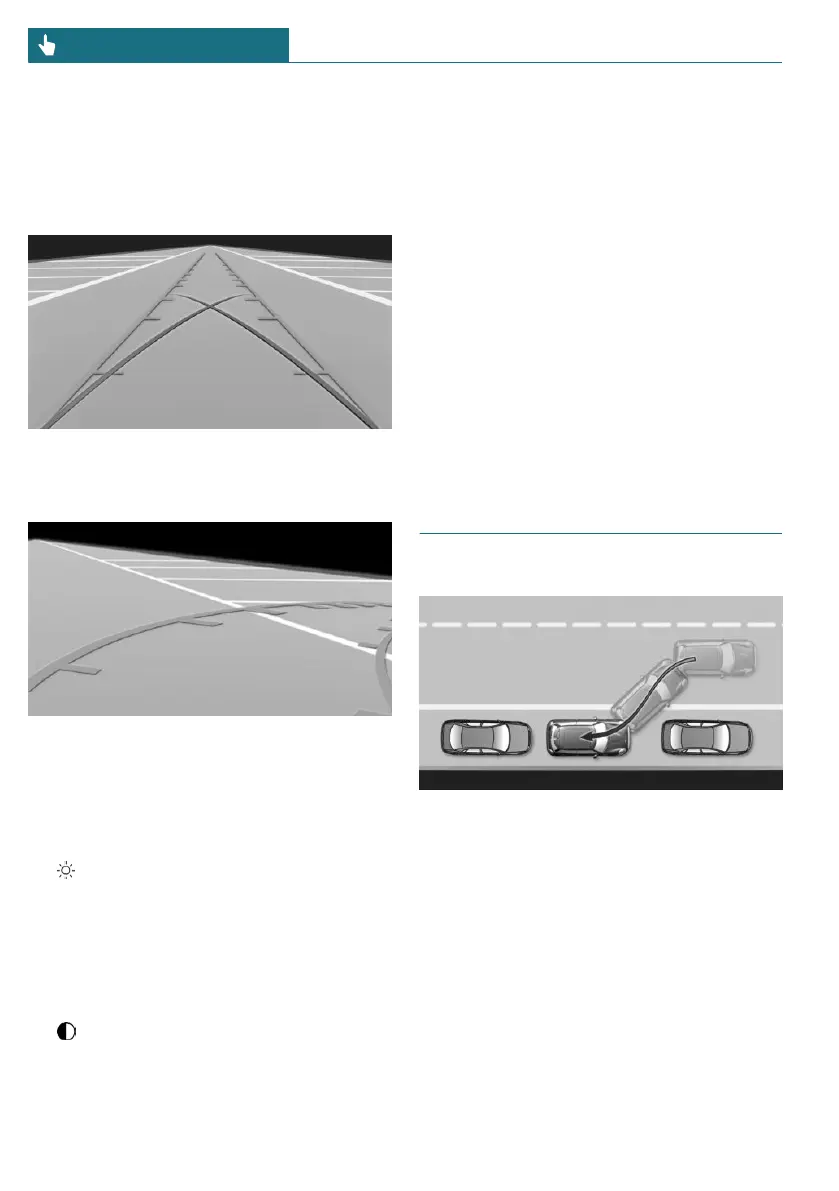
Parking using lanes and turning
circle lines
1. Position the vehicle so that the turning
circle lines lead to within the limits of
the parking space.
2. Turn the steering wheel to the point
where the pathway line covers the cor-
responding turning circle line.
Display settings
Brightness
With the rearview camera switched on:
1. Select the icon.
2. Turn the Controller until the desired set-
ting is reached and press the Controller.
Contrast
With the rearview camera switched on:
1. Select the icon.
2. Turn the Controller until the desired set-
ting is reached and press the Controller.
System limits
Detection of objects
Very low obstacles or high, protruding ob-
jects such as ledges may not be recognized
by the system.
Depending on the equipment, some assis-
tance functions also take into account data
from the Park Distance Control.
Follow the notes in the Park Distance Con-
trol chapter.
The objects displayed on the Control Dis-
play may be closer than they appear. There-
fore, do not estimate the distance from the
objects on the display.
Automatic Parking Assistant
Principle
This system assists the driver in parking
parallel to the road.
General information
Automatic Parking Assistant handling is
divided into three steps:
– Switching on and activating.
– Parking space search.
– Parking.
Ultrasound sensors measure parking spaces
on both sides of the vehicle.
Seite 200
CONTROLS Driving comfort
200
Online Edition for Part no. 01405A53AA0 - II/22




 To Next Page