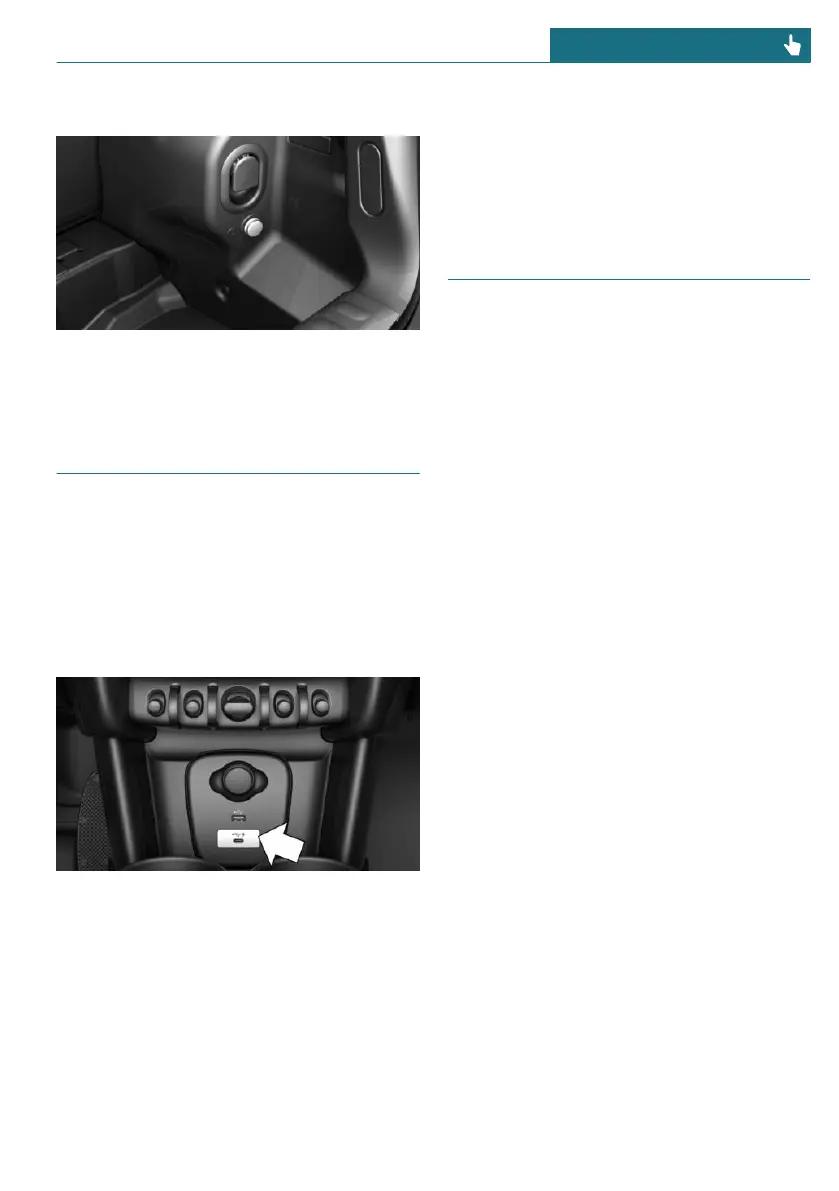
In the cargo area
The socket is located on the right side in
the cargo area.
USB port
General information
Follow the information regarding the con-
nection of mobile devices to the USB port in
the section on USB connections, refer to
page 54.
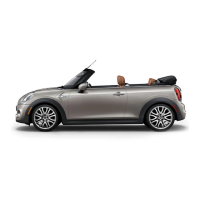
In the center console
Depending on the equipment version, a USB
port Type A or a USB port Type A and a USB
port Type C are located in the front of the
center console.
Properties of upper USB port:
– USB port Type A.
– For charging mobile devices and for
data transfer.
– Charge current: max. 1.5 A.
Properties of lower USB port:
– USB port Type C.
– For charging of mobile devices.
– Charge current: max. 3 A.
Wireless charging tray
Principle
The wireless charging tray enables the fol-
lowing functions to be performed without
cables:
– Charging the rechargeable battery of a
mobile phone with Qi capability and of
other mobile devices, which support the
Qi standard.
– Connect the mobile phone to the exter-
nal antenna.
Depending on the country, this provides
for better network reception and a con-
sistent reproduction quality.
General information
When inserting the mobile phone, make
sure there are no objects between it and the
wireless charging tray.
During charging, the surface of the tray and
the mobile phone may heat up. Higher tem-
peratures may lead to a reduction in the
charge current through the mobile phone,
and in isolated cases the charging process is
paused temporarily. Follow the relevant in-
structions in the mobile phone owner's
manual.
NOTE
This device has been tested for human ex-
posure limits and found compliant at a mini-
mum distance of 4 in/10 cm during opera-
tion.
Seite 221
Interior equipment CONTROLS
221
Online Edition for Part no. 01405A53AA0 - II/22




 To Next Page