The Mini HD Media Box is a compact and versatile media player designed to enhance your home entertainment experience by allowing you to play a wide variety of digital content on your TV or monitors. It supports playback from flash drives, external HDDs, and SD/MMC cards, decoding the content and outputting it via HDMI or AV.
Function Description:
The primary function of the Mini HD Media Box is to act as a media player for various digital files. It connects to your TV or monitor and allows you to browse and play movies, music, and pictures stored on external storage devices. The device is capable of full HD playback up to 1080p, ensuring a high-quality viewing experience. It decodes content and outputs it through HDMI or AV, making it compatible with a wide range of display devices. The user interface is designed to be intuitive, with a main menu that provides easy access to different media categories such as "Movie," "Music," "Picture," and "File," along with a "Setting" option for configuration.
Important Technical Specifications:
Video Decoding:
- MPEG1: Supports DAT, MPG, and MPEG files up to 720x576 resolution.
- MPEG2: Supports MPG, MPEG, VOB, TS/TP, and M2TS files up to 1080p resolution.
- MPEG4 (Xvid): Supports MKV, AVI, MP4, and M2TS files up to 1080p resolution.
- H.264: Supports MKV, AVI, MP4, MOV, M2TS, and TS/TP files up to 1080p resolution.
- WMV9/VC-1: Supports M2TS and WMV files up to 1080p resolution.
- Real Video: Supports RM/RMVB files up to 720p resolution.
- MJPEG: Supports AVI files up to 1080p resolution.
- FLV: Supports FLV files up to 1080p resolution.
- H.264 Decode Technology: Features 1080p resolution decoding.
Audio Decoding:
- Supports AC3/DTS/MP3/WMA/WAV/OGG/AAC/APE/FLAC/RA audio formats.
- Supports JPG, BMP, PNG, and GIF image formats.
- Supports SRT, SMI, SSA, ASS, and SUB+IDX subtitle formats.
Hardware Specifications:
- Video Output: AV (PAL/NTSC), HDMI (480P, 720P, 1080i, 1080P).
- Audio Output: Audio L/R, HDMI (Stereo), SPDIF Coaxial.
- Hard Disk Support: FAT/FAT32/NTFS/exFAT.
- LED Indicator: For HDMI/AV Output.
- IR Receiver: Receives signals from the Remote Control.
- Size: 90 x 90 x 36 mm.
- USB OTG: USB2.0 Host.
- Memory Card Support: SD/SDHC/MMC.
- Power: 5V 2A.
Usage Features:
To start, ensure your USB storage device is plugged in before turning on your TV. Switch your TV's video source to the correct input (e.g., AV or HDMI) corresponding to how the media player is connected. The main menu will then display icons for "Movie," "Music," "Picture," "File," and "Setting."
Settings:
The "Setting" menu allows for customization of the media player. Options include:
- Video Output Mode: Allows selection of video output standards (e.g., PAL, NTSC, 720P 50HZ, HDMI_720P_50HZ, HDMI_720P_60HZ, HDMI_1080P_24HZ, HDMI_1080P_50HZ).
- Language: Supports 22 different languages, including English, Simplified Chinese, Traditional Chinese, Japanese, Korean, German, Spanish, and French.
- Screen Saver: Configurable screen saver activation time (e.g., 2 minutes, 5 minutes, 10 minutes, 30 minutes, 1 hour, 2 hours, or Off).
- Audio Output Mode: Selectable modes include Normal, SPDIF LPCM, and SPDIF RAWDATA.
- Restore Default Setting: Option to revert all settings to factory defaults.
- System Information: Displays software version details (e.g., TVD2.0 2011-07-25 RSH).
-
Movie Playback:
- Requires a USB device or SD/MMC card connected.
- Navigate to the "Movie" icon and press "Enter."
- Video Options (OSD key):
- "Subenable": Toggle subtitles on/off.
- "Subtitle": Choose different subtitle tracks.
- "Colour": Change subtitle color.
- "Rimcolor": Apply different effects to subtitles.
- "Size": Adjust subtitle size.
- "Text Encoding": Select encoding style.
- "Time Sync": Adjust subtitle synchronization.
- "Offset": Adjust subtitle location.
- Playback Controls: Remote control buttons for Repeat, Play/Pause, Stop, Rewind, Fast Forward.
- Resume Playback: The player supports resuming video from where it was last stopped.
-
Music Playback:
- Requires a USB device or SD/MMC card connected.
- Navigate to the "Music" icon and press "Enter."
- Browse folders and music files on the selected device.
- Audio Options (OSD key):
- "EQ Mode": Choose from various equalizer presets (normal, DBB, POP, Rock, Classic, Jazz, Vocal, Dance, Soft).
- "Lyric Focus Color" & "Lyric Unfocus Color": Customize lyric colors.
- "Lyric Play Mode": Select display modes like "Line Roll" or "Kalaok."
- "Repeat": Loop music playback.
-
Picture Viewing:
- Requires a USB device or SD/MMC card connected.
- Navigate to the "Picture" icon and press "Enter."
- Browse folders and picture files on the selected device.
- Picture Options (OSD key):
- "Switch Mode": Select from various slideshow transition effects (Default, Persian blinds H/V, Slide up/down/left/right, Stretch up/down/left/right, Mosaic, Zoom in/out).
- "Play Interval": Set slideshow interval (1s, 3s, 5s, 10s, 30s).
- "Background Music": Toggle background music on/off during slideshows.
-
File Management:
- The "File" icon allows browsing of all files on connected storage devices.
- Copy/Delete Functionality: The device supports copying movies and music between different external memory disks.
Remote Control Guide:
The remote control provides comprehensive navigation and control over the media player's functions, including power on/off, setup menu access, TV mode selection, aspect ratio adjustment, subtitle control, picture rotation, file information display, volume control, arrow keys for navigation, enter/confirm/OK, loop function, playback controls (play/pause, rewind, fast forward, stop), and menu navigation. Dedicated buttons for Movie, Music, Picture, and File categories are also available.
Connection Ports:
The device features a USB host port and an SD/MMC memory card slot on the front. The back view shows HDMI (1080p), AV (576p), and YUV (720p) output ports.
Maintenance Features:
Troubleshooting (FAQ):
- Unit not functioning: Suggests checking for data loading from USB/SD/MMC, unplugging and replugging the power adapter.
- No picture on screen: Recommends checking power adapter connection, AV/HDMI cable connection, removing and re-inserting SD/MMC or USB devices after power-on, and ensuring correct TV source (output) and media player output settings (AV or HDMI).
- Movie file not playing: Advises checking supported movie formats, rebooting the unit, and noting that some formats may not be supported.
- Subtitle adjustment issues: Explains that embedded subtitles in downloaded videos cannot be adjusted by the player's subtitle functions.
End-user Agreement and Precautions:
- General Safety: Do not dismantle the product for improper purposes, do not tamper with firmware, and do not reverse engineer software.
- Environmental: Do not expose to rain, dampness, moisture, dripping, or splashing to prevent fire, electric shock, or product damage.
- Power: Use the original adapter, do not share it with other devices, and keep the power cord away from heat sources. Do not dismantle or repair the adapter or its power cord.
- Enclosure: Do not open the product enclosure; maintenance should be performed by trained professionals.
Maintenance Tips:
- The product has a complicated structure; only trained professionals should open it.
- Dismantling components yourself will void the warranty.
- Contact the local warranty department for maintenance.
- Use original manufacturer-designated parts for replacements.
Warning:
The user manual is for a specific product, and while prepared with care, its contents are not guaranteed to be fully correct. The company assumes no responsibility for losses arising from its use. The right to interpret all contents belongs to the company, and the manual is subject to change without notice. Reproduction or copying, in part or whole, is not authorized.

 Need help?
 General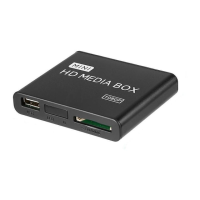

 To Next Page