Preparations before usage
Startup & Shutdown/Usage notices:
1.Turn the printer power switch to theIStatus, that is, to turn on the power switch;
2.Turn the printer power switch to theOStatus, that is, to turn off the power switch;
3.The power supply must be turned off using a power switch. If you directly unplug
the power plug, it can easily damage the printer Internal circuit, resulting in the
loss of printing data;
4.When the power is switched on again, wait for a while (greater than5 Seconds)
Open immediately without interval The power supply is easy to cause failure;
5.Please use the original power supply, otherwise it may reduce the print quality or
damage the printer.
Cable Connection
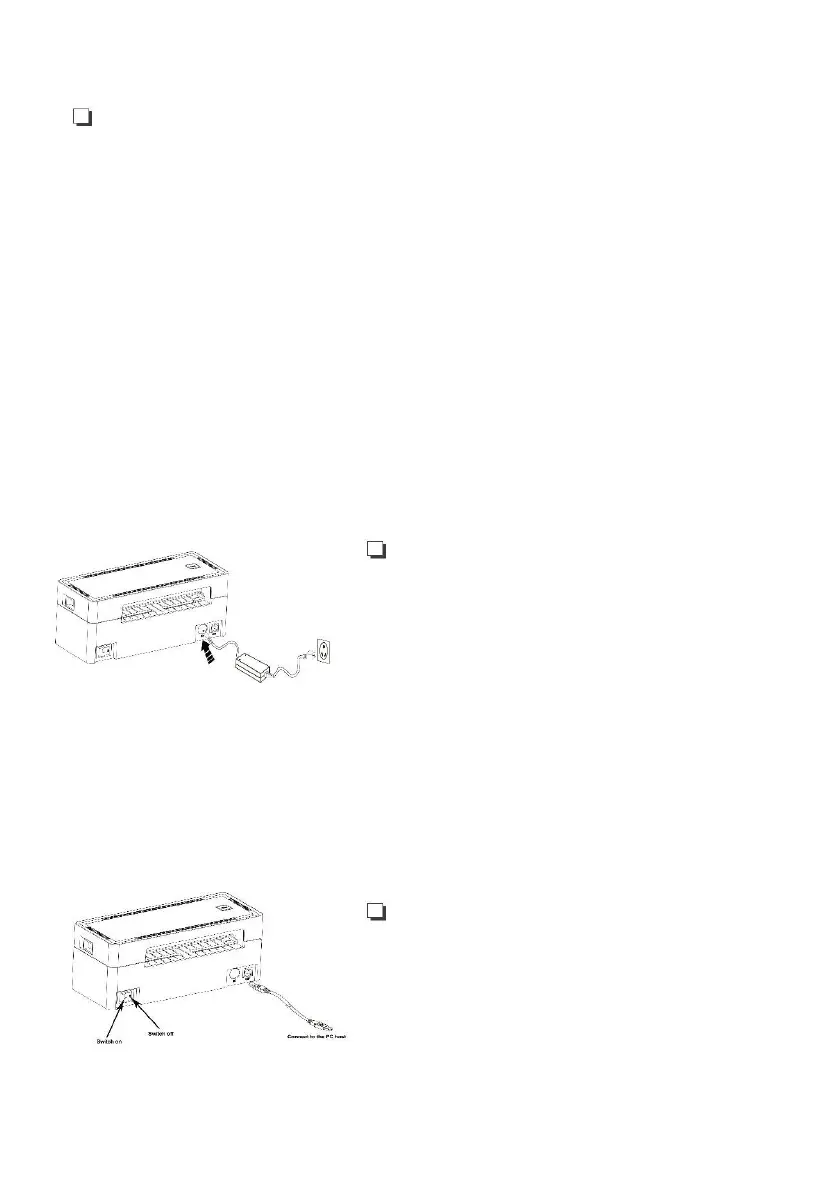
Connect the power line
1.Confirm that the power switch is in off (O)state.
2.Connect the power adapater to the printer.
3.Connect the power line to the power adapater.
4.Connect the other end of the power line to a nearby socket.
Connect the USB cable
1.Connect the USB cable to the printer.
2.Connect the USB cable to PC host.
3.Turn the power switch to on (I) state.



 To Next Page