This document describes an Intelligent 4K All-in-one Video Bar, a comprehensive solution for video conferencing. It integrates a 4K UHD camera, microphone array, high-fidelity speaker, and an electric privacy cover into a single device. The video bar is designed to enhance communication with advanced features like face recognition, voice localization, voice tracking, and intelligent noise reduction.
Function Description:
The primary function of this device is to provide a high-quality, all-in-one video conferencing experience. It automatically adjusts image size based on the number of participants to ensure optimal framing. It can detect and track the speaker in real-time, providing close-ups for a hands-free operation. The integrated 6-array MEMS microphone system, coupled with advanced 3A audio algorithms, delivers exceptional full-duplex communication. The device also functions as a Bluetooth speaker and microphone, allowing connection to mobile phones and other Bluetooth-enabled devices.
Important Technical Specifications:
- Camera:
- FOV (Diagonal/Horizontal/Vertical): 120° (D) / 106° (H) / 72° (V)
- Iris: F2.0
- Focal Length: 1.89mm
- Digital Zoom: 10X
- Sensor: High quality CMOS sensor, effective pixel 8 million, 16:9
- Minimum Illumination: 0.5Lux
- DNR: 2D & 3D
- Focus: Auto/Manual
- BLC: On/Off
- Exposure: Parameter adjustable, AE (Auto Exposure) available
- Video Adjustment: Brightness, sharpness, saturation, contrast, white balance, gain, anti-flicker, low brightness compensation, and other parameters adjustable.
- SNR: ≥50dB
- Video Format: HDMI: 4KP30, 1080P60 compatible downward; USB: 4KP30, 1080P60 compatible downward
- Video Compression Format: MJPEG, YUY2, H.264, H.265, NV12
- Privacy Cover: Automatic privacy cover closes when no image output and opens when there is image output.
- Audio:
- Microphone: 6 x MEMS Microphones
- Pickup Distance: 6 meters
- Microphone Frequency Response: 120 Hz-16 kHz
- Speaker: Built-in dual speaker
- Speaker Voltage: 2*10W
- Speaker Output Voice Pressure: 80±3 dB 1.0M/1.0W
- Speaker Frequency Response: 100 Hz-20 KHz
- Audio Processing: AEC, AGC, ANS
- AI Function:
- Group Framing: Automatically adjusts screen size according to participant count for optimal framing.
- Speaker Tracking: Tracks each speaker in real-time, ensuring the speaker is centered on the screen.
- Remote Control: Infrared remote control.
- Physical Interfaces:
- USB: USB3.0 audio video output interface, Type C, Support UVC1.1, UAC1.0 and higher.
- HDMI: HDMI video output interface, compatible with HDMI2.0 standard.
- LINE IN: 3.5mm audio line input interface (automatically switches to external pickup if connected).
- LINE OUT: 3.5mm line output (automatically switches to external speakers if connected).
- Extension Mic Interface: RJ45 interface for connecting expansion microphone.
- Power Interface: HEC3800 power socket (DC12V), input AC110V-AC220V, output DC12V/2.5A.
- Bluetooth: Bluetooth 5.0, can be connected to mobile phones or other devices as a Bluetooth microphone and speaker.
- Compatibility: Windows 7, Windows 8, Windows 10, Mac OS X, Linux, Android.
- Power Supply Method: Power adapter.
- Working Condition:
- Storage Temperature: -10℃ ~ +70°C
- Storage Humidity: 20% ~ 95%
- Working Temperature: -10℃ ~ +50°C
- Working Humidity: 20% ~ 80%
- Environment: Indoor
- Installation Method: Walling Mount (comes with bracket, camera needs to be close to the wall), Desktop (comes with desktop mounting bracket), Installed on Monitor (bracket for monitor installation, optional).
Usage Features:
- Quick Start: Simple power-on procedure by connecting to a DC12V power adapter.
- Status Indicator Light: Provides visual feedback on device status:
- Green lights running left to right: Boot initialization.
- Blinking Blue Lights: Bluetooth pairing mode.
- Lights Turn Blue and Stay 3S: Bluetooth pairing finished.
- Solid Green Light: Working status (all green when Auto-framing & Voice tracking are off, partial green when on).
- Blinking Green Light: Standby status (device on without video).
- Solid Red Light: Microphone Muted.
- Green Indicator Light On/Off: Volume up/down.
- Partial Light Turn Green: Indicates voice source.
- Video Output: Connects to PCs via USB cable for video software output or to monitors via HDMI cable.
- Audio Input: Defaults to built-in microphones; automatically switches to external pickup if a 3.5mm linear audio cable is connected.
- Audio Output: Defaults to built-in speaker; automatically switches to external speaker if a 3.5mm linear audio cable is connected.
- Remote Control: Comprehensive control over device functions including Bluetooth, Auto Framing & Voice Tracking, Menu navigation, HOME, Up/down/left/right, Answer/Reject call, Microphone mute, Volume up/down, Preset settings, and Zoom in/out.
- Menu Settings: Access to various settings via the remote control:
- Language: Change device language.
- Setup: Configure Image Style (Default/standard/clear/bright/soft), Auto Framing (On/off), Auto Framing Sensitivity (high/medium/low), Voice Location (Close), Location Sensitivity (Medium), Max Framing (3X/5X/10X), Locate Mode (Smart mode/pan mode/movie mode/discussion mode), Prompt Info (On/off), Menu Mirror (On/off), and Transfers Mode (Bulk/synchronization).
- Exposure: Adjust Mode (Auto/manual/shutter priority/bright priority), EV (On/off), BLC (On/off), Flicker (50Hz/60Hz/off), G.Limit (0-15), DRC (1-8, off), Shutter Priority (various speeds), and Brightness (0-23).
- Color: Adjust WB Mode (Auto/manual/one-push/specified temperature), RG Tuning (-10~10), RW Tuning (-10~10), Saturation (0~127), Hue (0~8), and AWB Sensitivity (High/medium/low).
- Image: Adjust Brightness (0~14), Contrast (0~14), Sharpness (0~15), Flip-H (On/off), Flip-V (On/off), B&W-Mode (Color/B&W), Gamma (Default, 0.34, 0.39, 0.47, 0.50), and Low-Light Mode (On/off).
- Noise Reduction: Configure 2D NR (Auto, manual 1~7) and 3DNR (Off, 1~8).
- Version: Display Camcra Version and Audio Version.
- Restore Default: Reset settings to default (color style and video format cannot be restored).
Maintenance Features:
- Power Management: Turn off the power switch if the camera will not be used for a long time.
- Cleaning: Use a soft cloth or lotion-free tissue to clean the camera body. For the lens, use a soft dry lint-free cloth; if very dirty, use a diluted neutral detergent. Avoid solvents or harsh detergents.
- Troubleshooting:
- No image: Check power cord, voltage, POWER lamp, camera self-test, rotary dial, and HDMI cable connection.
- Shaky/vibrating image: Check video output and monitor cable.
- Remote control not working: Check remote control battery and device working status. Ensure the menu has been exited (menu automatically exits after 30 seconds without operation if an image is output).

 Need help?
 General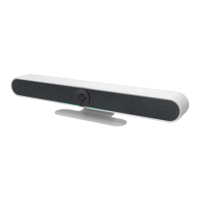

 To Next Page