
 Need help?
Do you have a question about the Mint FLASH BAR 2 and is the answer not in the manual?
Details on the re-usable electronic flash bar for Polaroid SX-70 cameras, featuring ND-compensation and improved features.
Guidance on achieving brighter photos, adjusting exposure, and testing the flash socket with an empty film cartridge.
Instructions for inserting batteries, attaching the flash bar, setting power levels for film types, and confirming readiness.
Details on guide number, power source, battery life, charging time, color temperature, flash duration, and dimensions.
Warning against disassembling the device due to high voltage components and immersion in liquids.
Advice to avoid high temperatures and humidity to maintain the device's longevity.
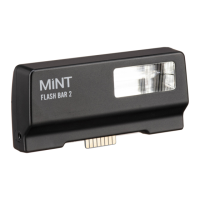
The Mint Flash Bar 2 is a high-quality, reusable electronic flash bar designed for use with all Polaroid™ folding and box-type SX-70 cameras. It is specifically optimized for use with Polaroid Film, ensuring brilliant and perfectly illuminated instant photos in various lighting conditions. A key feature is its special ND-compensation mode, which allows the use of film designed for 600-type cameras, expanding the versatility of your SX-70. To use, simply attach the flash bar to your camera's flash-socket.
This device offers several significant improvements over previous versions. The charging time has been substantially reduced, making it quicker to get ready for your next shot. An auto-sleep function has been integrated to help extend battery life, ensuring your flash bar is ready when you need it most. For creative experimentation, the Mint Flash Bar 2 includes two extra color filters, allowing you to add tinted light effects when shooting in low-light conditions. Furthermore, a new 2.5mm audio jack provides the capability to easily sync additional, external flash units, offering more advanced lighting setups.
To operate the Mint Flash Bar 2, first, open the battery compartment and insert two fresh AAA-size batteries, paying close attention to the correct alignment. Once the batteries are in place, attach the Flash Bar securely to your Polaroid SX-70 camera. The function switch on the device allows you to select the appropriate power setting based on the film you are using. If you are using film for Polaroid SX-70 type cameras, set the function switch to HIGH power (right position). If you are using film for Polaroid 600 type cameras, set the function switch to LOW power (center position).
A green light will illuminate on the flash bar as soon as it is fully loaded and ready to fire. The flash bar will then synchronize automatically with your camera's shutter release button, ensuring perfect timing for your flash photos. When you are finished using the flash bar, remember to turn it off by setting the switch to the left position to conserve battery life.
For optimal photo brightness, especially with folding SX-70 cameras, try focusing slightly behind your subject. This technique can cause the camera's aperture to widen, resulting in a brighter image. Additionally, you can fine-tune the brightness by adjusting the lighten/darken control on your SX-70 camera. If you desire a brighter photo, simply push this control slightly towards the "bright" setting. If this is your first time using a flash with your SX-70, it's a good idea to test the camera's flash socket a few times with an empty film cartridge to ensure everything is working correctly before loading a new film pack.
Regarding maintenance and safety, it is crucial not to disassemble the device. The Mint Flash Bar 2 contains high-voltage components inside, and attempting to disassemble it could result in electrical shock. To prevent damage and ensure safety, do not immerse the device in water or any other fluids. Furthermore, avoid using the device near flammable or explosive gases. For proper care and longevity, never leave the device in environments with high temperatures (above +40°C / 104°F) or high humidity for extended periods. Adhering to these guidelines will help ensure the safe and effective operation of your Mint Flash Bar 2.
 General
| Guide Number | 14 m at ISO 100 |
|---|---|
| Color Temperature | 6000K |
| Power Source | 2 x AA batteries |
| Dimensions | 64 x 103 x 29 mm |
| Weight | 100 g (without batteries) |
| Type | Flash |
| Flash Modes | Manual, Multi |

 To Next Page