5
3. Camera Calibration
You need to find a good position and angle to install the dash
cam. Start the car engine (DO NOT install under driving) to
power on and start from pressing the Setting Button in the
middle on the right side, find System Settings g AI g Camera
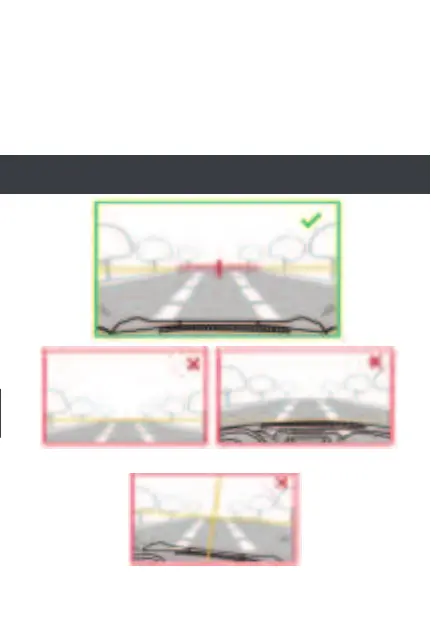
calibration. Align vertical line to the center, horizontal line to
the vanishing point of the road in the preview LCD screen as
shown below. Make sure the dash cam does not interfere with
the driver’s view.
Note: The AI accuracy is dramatically effected by the
position of installation. Please install carefully.
The vanishing point of the road is
in the button of the image.
The camera is tilted
The engine cover occupy too much
area in the image


 To Next Page