5
Powering on Your MiP™ Arcade
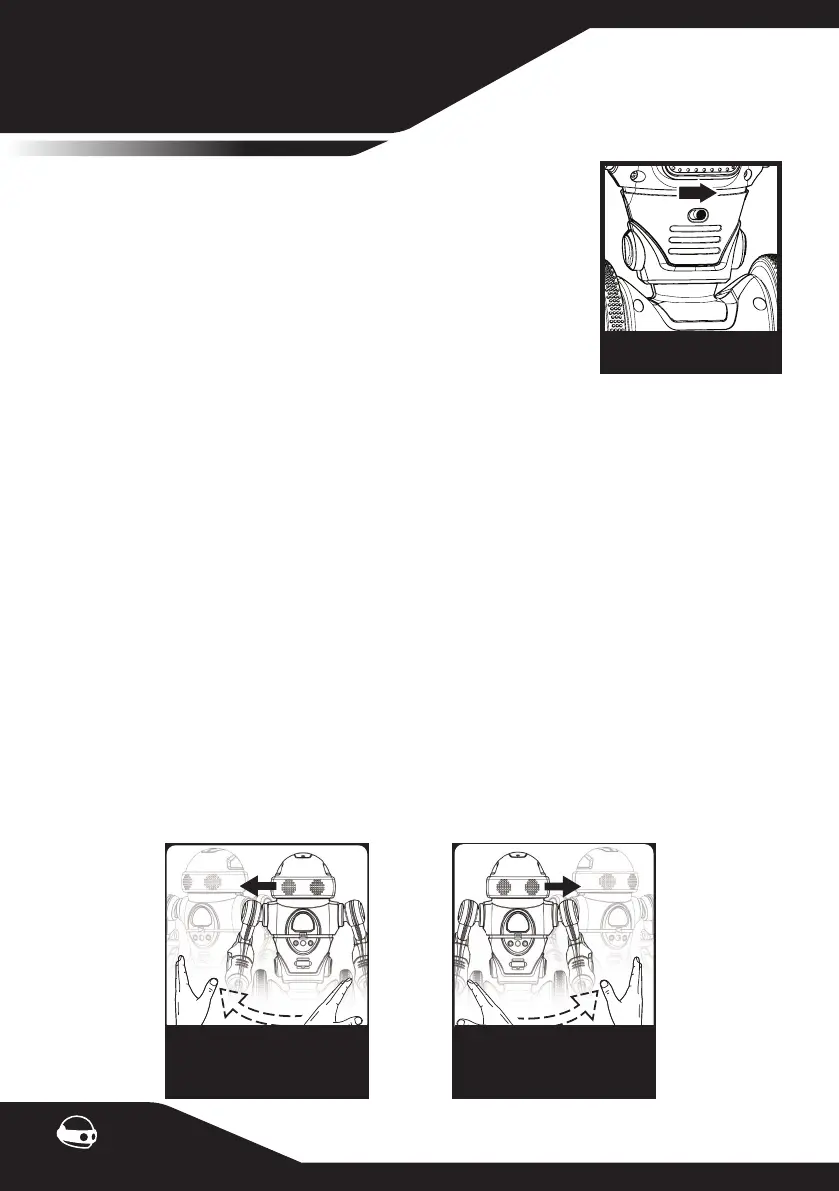
Locate the power switch on the back of MiP™ Arcade, toggle the
switch to the ON position. MiP™ Arcade will make a sound soon as
it is powered on.
Chest Light Indicator
Red - Low battery
Green - Connected to App
Blue - Default
Orange - Basketball Mode
Yellow - Tray Mode
GETTING STARTED
How to Play with your MiP™ Arcade
**Balancing MiP™ Arcade**
Find a at surface and place MiP™ Arcade’s wheels on it. Without letting go, MiP™ Arcade will
detect the surface and initiate self balance. You can let go of MiP™ Arcade as soon as you feel
MiP™ Arcade has gained traction of the surface.
**Default Mode**
MiP™ Arcade loves to play. Pick him up, shake him, tap his head, double clap your hands to
trigger a bunch of fun reactions.
**Gesture Control**
Control MiP™ Arcade with hand gestures.
Note: You can only use hand gestures to guide MiP™ Arcade in non-app modes. Ensure gestures
are close to MiP™ Arcade’s chest for him to detect.
Off - On
To make MiP™ Arcade
turn left
To make MiP™ Arcade
turn right
Swipe Left Swipe Right


 To Next Page