36
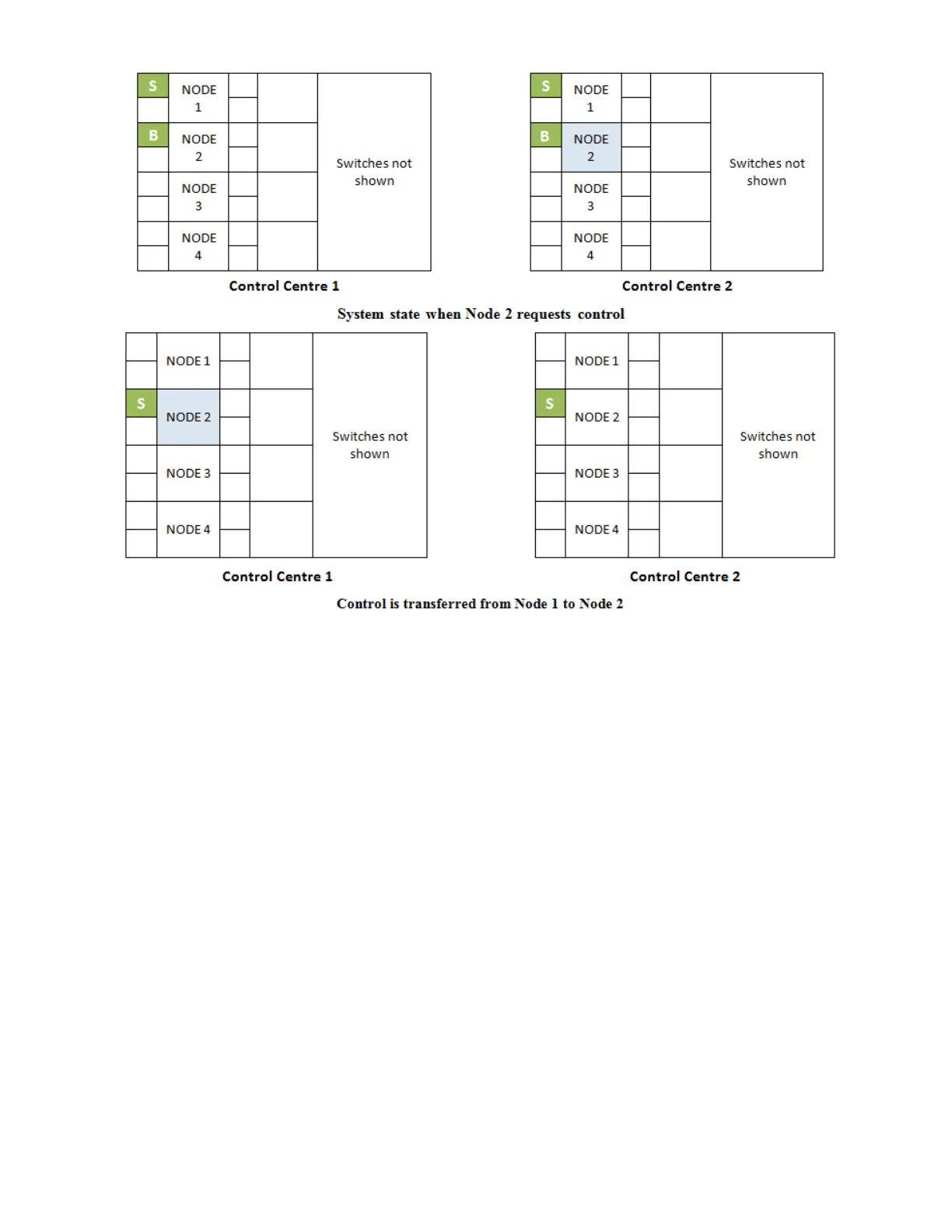
o Green LEDs of the granted node stop blinking and turn ON solid
o Green LEDs of the previously in control node extinguish
Example: Node 1 has control, and a user on Node 3 wishes to access a function which is
restricted by Node Control. The user at Node 3 presses the local Telephone/Page selector
switch that has been correlated with Node 3. The LEDs correlated with Node 3 control begin
to blink everywhere on the network, indicating a request for control from Node 3. The user
at Node 1 sees the blinking LED and has finished using the function which is restricted by
Node Control. The user at Node 1 presses the Telephone/Page Selector switch that is
correlated to node 3, granting control to Node 3. The blinking LEDs on the switches
correlated with Node 3 begin to illuminate steadily and The LEDs correlated with Node 1 go
dark. The user at Node 3 now has access to all of the functions that are restricted by Node
Control and the user at Node 1 can no longer use them.
Modes of operation
Nodes in the system can operate in any of the following modes:
Normal: This is the default mode of operation. In a multi-node setup it indicates that a
node can communicate with the rest of the nodes in the system.


 To Next Page