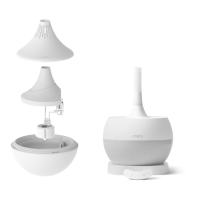
The Miro humidifier, specifically the NR08 Series, is designed to enhance indoor air quality by adding moisture to the environment. This user manual provides comprehensive instructions for assembly, operation, and maintenance, ensuring users can maximize the humidifier's efficiency and lifespan.
Function Description
The Miro humidifier operates on an ultrasonic humidification method, transforming water into a fine mist that is dispersed into the air. Its primary function is to increase humidity levels, which can alleviate issues associated with dry air, such as dry skin, irritated sinuses, and static electricity. The device is designed for ease of use and maintenance, featuring modular components that simplify cleaning and assembly.
Usage Features
The Miro humidifier offers a range of features designed for user convenience and optimal performance:
- Modular Design: The humidifier consists of several distinct modules, including the Main Unit (comprising Inner Vapor Cap, Splash Guard, Outer Funnel, Inner Funnel, Mist-maker, and Floating Base), Water Bowl, Water Bowl Cover, Noise Muffler, Outer Vapor Cap, Touch Station, and DC Adapter. This modularity facilitates easy assembly, disassembly, and cleaning.
- Powering On/Off: The device is powered on and off by tapping the power icon on the Touch Station. To conserve energy, the humidifier automatically enters snooze mode after 25 seconds of inactivity.
- Output Setting: Users can adjust the humidification output level across three settings (Level 1, Level 2, Level 3) or turn it off completely by pressing the 'output level' icon. Miro recommends maintaining a low mist output for most of the day, reserving higher settings for extremely dry environments to prevent over-humidification and potential condensation.
- Timer Function: A timer icon allows users to set the humidifier to operate for 1 hour, 4 hours, or 8 hours, or to turn off the timer function.
- Low Water-Level Indicator: The Touch Station features a blinking 'low water-level' icon that alerts users when the water level in the Water Bowl is insufficient for the Main Unit to float and produce mist. In such cases, the Mist-maker and fan automatically stop, requiring a refill and restart.
- LED Lighting: The humidifier incorporates an LED light that cycles slowly through different colors when the device is on. The light glows more vividly when the Water Bowl is full. Users can stop the LED light on a specific color by tapping the 'light setting' icon once. Tapping it twice turns the LED light off. The LED light can also function as a night light even when the Water Bowl is empty. Advanced LED settings and brightness adjustments are available through the Miro Smart Home mobile application, requiring a MiroT WiFi chip.
- Silent Mode: To disable button chimes, users can tap and hold the 'light setting' icon for 2-3 seconds. The 'timer' and 'output level' icons will blink to indicate that Silent Mode has been activated. This feature can also be controlled via the Miro Smart Home application with a MiroT WiFi chip.
- Water Type Recommendation: While tap water can be used, Miro strongly recommends using purified water, distilled water, or drinking water. This is because tap water contains minerals that can lead to mineral buildup, shortening the humidifier's lifespan and requiring more frequent cleaning. Hot water, hard water, or contaminated water can permanently damage the unit.
- Splash Guard (Optional): The Splash Guard is an optional component designed to minimize water condensation around the humidifier, especially in environments with varying temperatures and humidity levels. Its use may slightly decrease the humidifier's output.
- Noise Muffler (Optional): For light sleepers or those seeking an even quieter operation, the Noise Muffler can be used. Miro humidifiers are inherently quiet, but the Noise Muffler further reduces operating noise to approximately 8dB.
- Outer Vapor Cap: The Outer Vapor Cap can be used in conjunction with the Noise Muffler to help change the direction of the mist output.
- Placement Guidelines: For optimal performance, the humidifier should be placed at least 2 feet away from walls to ensure proper vapor circulation. If used near a Miro Air Purifier, it is recommended to maintain at least 8 feet of distance, as the humidifier's vapor particles can cause the air purifier's sensor to detect high particle levels, leading it to operate at maximum output. In such cases, setting the Air Purifier's power level to one is advised. Placing the humidifier on a cold surface may promote water condensation, which can be mitigated by placing a towel underneath.
Maintenance Features
The Miro humidifier is designed for straightforward and thorough cleaning, promoting hygiene and prolonging the device's life:
- Washable Modules: Almost all modules of the Miro humidifier are washable with gentle dish soap and a sponge. This includes the Outer Vapor Cap, Noise Muffler, Inner Vapor Cap, Splash Guard, Water Bowl Cover, Outer Funnel, Inner Funnel, Water Bowl, Mist-maker (excluding the cable tip), and Floating Base.
- Mist-maker Cleaning: When washing the Mist-maker, it is crucial to cover the USB port with the provided USB port cover to prevent water ingress, which can damage the humidifier. After washing, ensure the USB port is completely dry before reassembly. The tip of the Mist-maker's cable should not be washed and must be kept away from water.
- Non-Washable Modules: The Touch Station, DC Adapter, and the USB port of the Mist-maker are not waterproof and should never be washed or submerged in water. Washing these components will void the warranty.
- Cleaning Agents: Only gentle dish soap and a sponge should be used for cleaning. Harsh chemicals, including vinegar, acidic liquids, baking soda, hot water, or boiling water, are not recommended as they can damage the unit and are unnecessary for effective cleaning.
- Cleaning Tools: Avoid using tough scrubbers, as they can damage the humidifier's surfaces.
- Water Bowl Cleaning: Regularly clean the Water Bowl to prevent mineral buildup, especially if using tap water.
- Main Unit Cleaning: Ensure the bottom of the Main Unit is clean to prevent any blockages that could affect mist production.
- Mist-maker and Fan Cleaning: Periodically check and clean the Mist-maker and fan for any foreign materials, mineral buildup, soap residue, or essential oil residue (if essential oils were used despite recommendations).
- Cable Handling: Always unplug the humidifier by holding the plug head, not by pulling the wire. Avoid bending or pulling cables excessively, and do not tie them too tightly, as this can cause damage.
- Storage: Do not leave water inside the water tank for extended periods when the humidifier is not in use.
By following these guidelines for usage and maintenance, users can ensure their Miro NR08 Series humidifier operates effectively and safely for a long time, providing consistent and clean humidification.

 Need help?
 General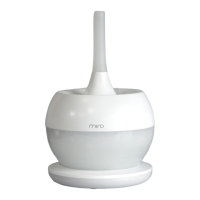

 To Next Page