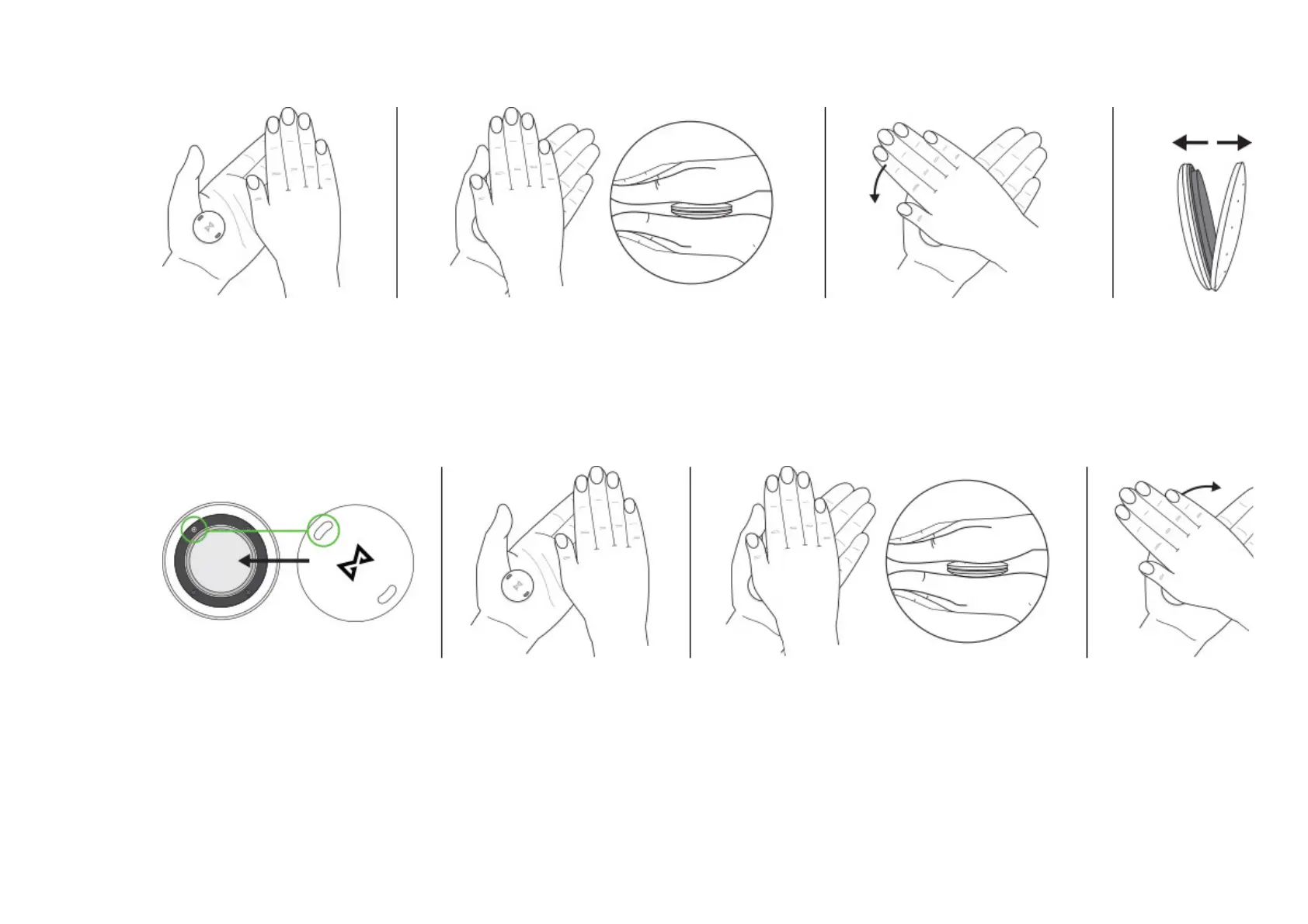
HOW TO CLOSE SHINE 2 WITHOUT A BATTERY DOOR TOOL
Place Shine 2 in your palm and put the battery door onto the back of the Shine 2. Make sure the indent above the Misfit
logo on the battery door aligns with the small silver screw inside the Shine 2. Place your other palm over the back of the
Shine 2, making good contact with both sides of the Shine 2. Press Shine 2 firmly in-between your palms and rotate to the
right until the battery door will not rotate anymore. The Shine 2 will vibrate when closed.
BEST PRACTICES TO MAXIMISE SHINE 2’S BATTERY LIFE:
Keep the app up to date Keep Shine 2 device’s firmware up to date Resist unnecessary tapping of Shine 2 as a party trick
CR2032 battery info: 3V Li-MnO2 225mAh


 To Next Page