5
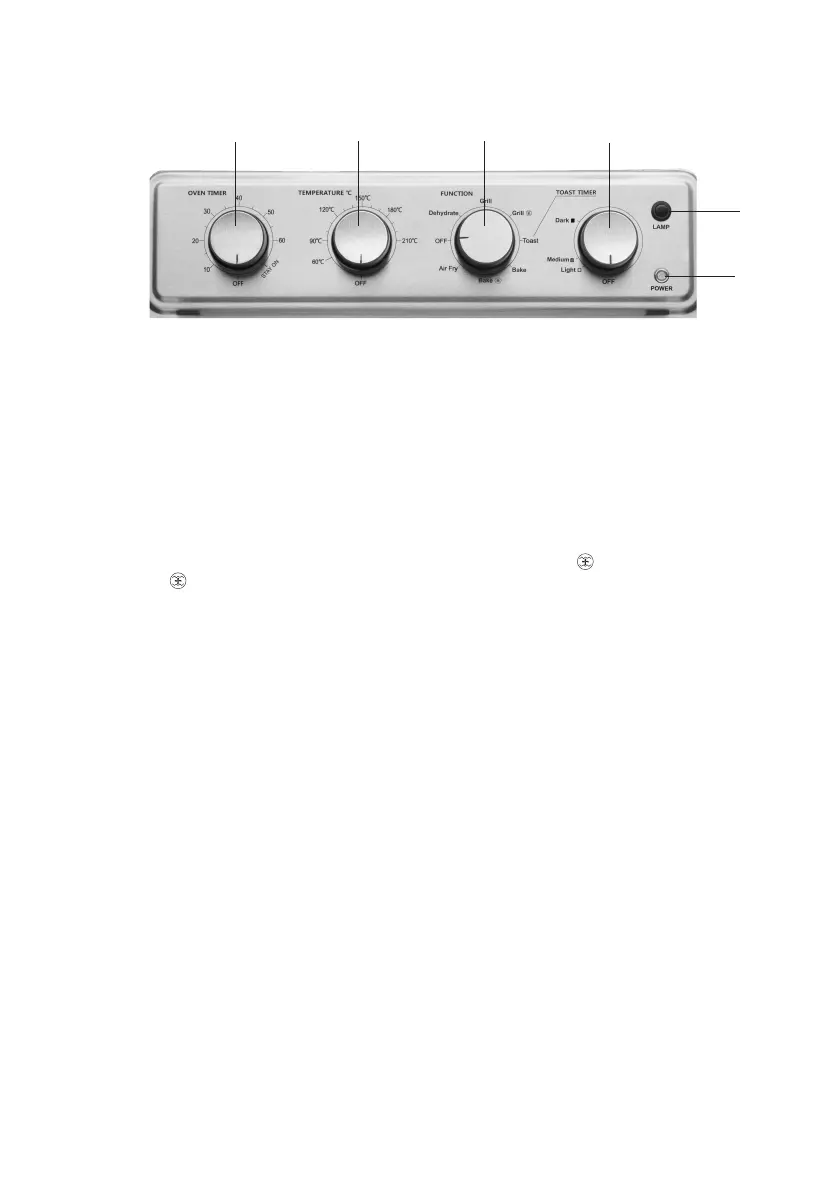
Control Panel
A
B
C
D
E
F
A Oven Timer Dial
Use this dial to set the desired time (from 10 to 60 minutes) for all functions except Toast. Setting the
oven timer powers the unit on and begins the cooking cycle. When the timer runs out, the unit will
emit a beep and power off. Alternatively, set the timer to Stay On for continuous operation, without
automatic switch-off.
B Temperature Dial
Use this dial to set the desired oven temperature.
C Function Dial
Use this dial to select the desired cooking method: Dehydrate, Grill, Grill (Convection Grill), Toast,
Bake, Bake (Convection Bake), Air Fry.
D Toast Timer Dial
Use this dial to set the desired toast shade: Light, Medium or Dark. Setting the toast timer powers the
unit on and begins the toasting cycle. On completion of the cycle, the unit will power off.
Warning: do not turn the dial beyond the Dark mark to avoid overcooking.
E Lamp Button
Press this button to switch on or off the interior oven light while the oven is in use and the door is
closed.
F Power Indicator
The power indicator light will turn on and remain lit when the oven is in use.


 To Next Page