9
Clean Dust Cup and
Filter
In order to achieve the best performance, empty
the dust cup and clean lter after each use.
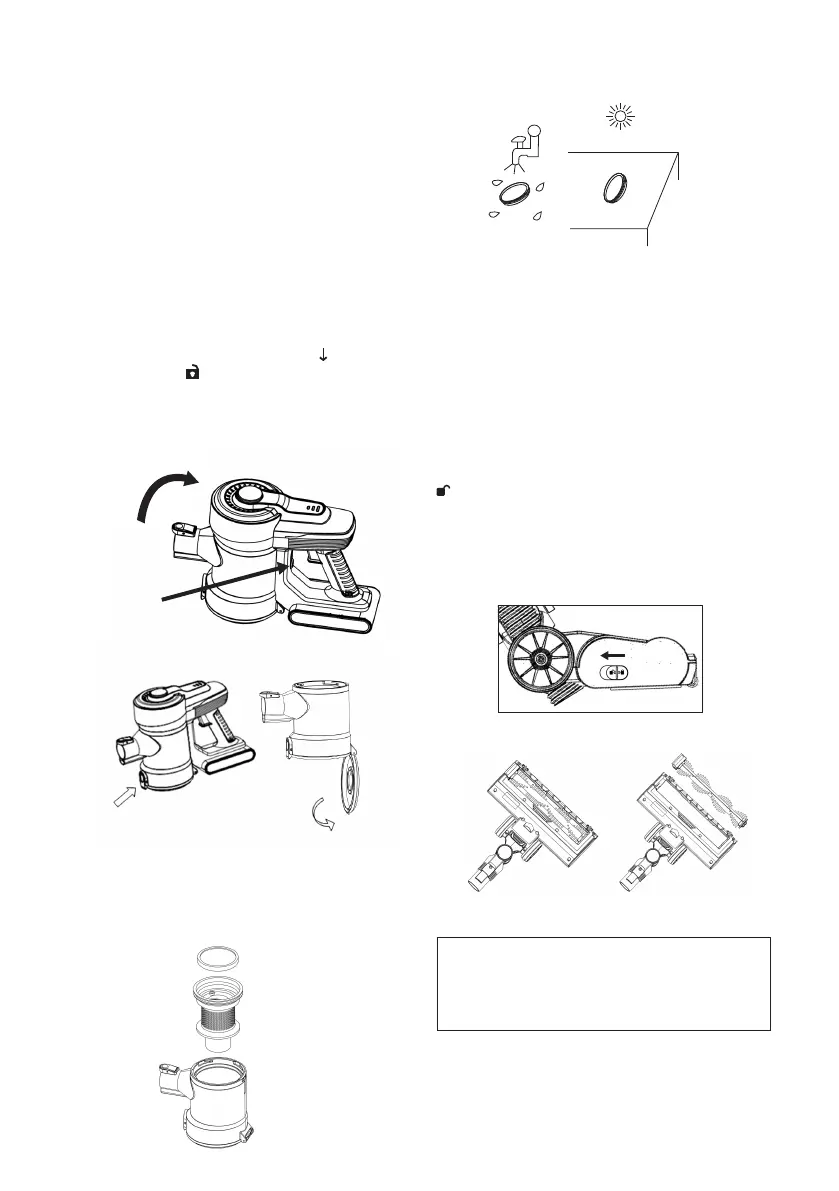
1. Turn o the vacuum cleaner.
2. Press the upper Dust Cup Release Buon
to release the dust cup assembly unit then
press the lower Dust Cup Cover Release
Buon to release the Dust Cup Cover. It is
recommended to clean the dust cup after
using every time.
• Press the Dust Cup Release Buon to
disconnect it from the dust tank and rotate
the tank clockwise until the arrow is aligned
to the symbol and extract it (Fig.14). Then
press the lower Dust Cup Cover Release
Buon to release the dust cup lower cover. To
empty the dust tank. (Fig.15)
Fig.14
Fig.15
· Remove the tissue lter and the lter cover
(Fig.16) and wash them in water. Let them
completely dry at the air before reassemble
them. The tissue lter must be repositioned.
Fig.16
Tips: Clean the lter under running water and dry
it under sunlight. (Fig.17)
Fig.17
· Be sure the lter and all parts are well
positioned before reconnect the dust tank to
the main body.
How to Clean the
Motorized Brush
Turn the brush upside down to have the bristles
facing up, push the lock chip on the left of the
brush downwards, moving it towards the symbol
(Fig.18). In this way the cylinder with the
bristles is raised and it is possible to remove it.
Wash it with water and allow to dry completely.
To reinsert the cylinder, insert the round end into
the right side of the brush and press the left side
down until you hear a click. (Fig.19)
Fig.18
Fig.19
Note: After long period using, the bristle
may be jammed by hair or something
similar, need to clean it in time in order
to make the machine work eiciently.


 To Next Page