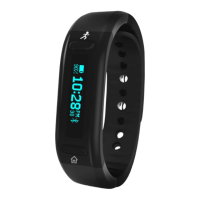
Press the S2 button to enter each section, press the S1 button to adjust each value, press the S2
button to advance through each option in the section.
Press-and-hold the S2 button to save your settings.
Repeat this process for all sections in SET mode.
DAILY ACTIVITY AND INFORMATION AT A GLANCE
As you wear the Smart Gear it automatically counts your steps and calorie burn while also comparing
your current stats to your pre-set goals.
Pressing button S1 repeatedly allows you to scroll through all your real-time daily activity
information.
Note: on all daily information screens, the Bluetooth icon will appear if the Bluetooth is ON. There is
no Bluetooth icon if the Bluetooth is OFF. In any Daily Activity screen, press-and-hold the S1 button
to turn the Bluetooth ON or OFF.
• TIME: this screen shows the current time and current battery power
• DATE: this screen shows the day of the week and date
• CALORIE: this screen will auto-scroll through your current total of calories burned for the day and
your current percentage of hitting your daily calorie burn Cal
• DISTANCE: this screen shows your accumulated distance for the day.
• STEP: this screen will auto-scroll through your current step total for the day and your current
percentage of your hitting your daily step Cal
Note: your device must be paired to your smartphone using the Smart Gear App for the WEATHER,
PHONE, and MESSAGE functions to work. (On Android models not all function are supported)
• WEATHER: this screen shows the current weather and temperature
• PHONE: this screen shows the number of incoming calls / this screen also provides access to the
phone call information.
Information detail
• MESSAGE: this screen shows the number of incoming text messages / this screen also provides
access to the text
Message information detail
• BATTERY POWER: this screen shows your current battery power as well as a summary of your
number of call and text messages


 To Next Page
 Loading...