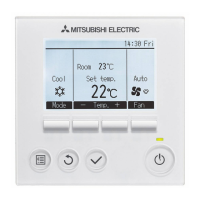
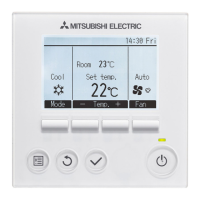
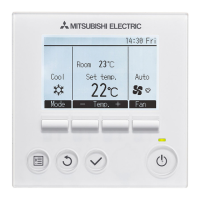
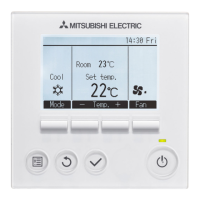
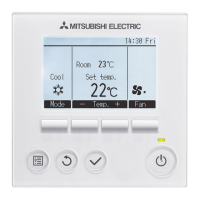
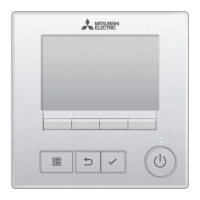
The Mitsubishi Electric MA Remote Controller PAR-31MAA is a control system designed for CITY MULTI and Mitsubishi Mr. Slim Air Conditioners, suitable for residential, commercial, and light-industrial environments. This device allows users to manage various aspects of their air conditioning units, including operation modes, temperature settings, fan speed, and vane angles, while also providing features for timer-based operations, energy saving, and maintenance.
Function Description
The PAR-31MAA remote controller serves as the primary interface for operating Mitsubishi Electric air conditioning and ventilation units. It offers both "Full" and "Basic" display modes, with "Full" being the factory default, providing comprehensive information at a glance.
Operation Modes: The controller supports multiple operation modes, including Cool, Dry, Heat, Fan, Auto, Auto cool, and Auto heat. Users can cycle through these modes using the F1 function button. The availability of specific modes depends on the connected indoor unit models. In "Auto" mode, the system automatically switches between cooling and heating based on the room temperature relative to the preset temperature. For dual set point systems, separate cooling and heating preset temperatures can be configured.
Temperature Control: Users can set the desired temperature in increments of 0.5 or 1 degree Celsius, or in Fahrenheit, depending on the indoor unit model and display settings. The F2 and F3 function buttons are used to decrease and increase the preset temperature, respectively. In dual set point "Auto" mode, users can select and adjust both cooling and heating preset temperatures. The system incorporates temperature range restrictions, and a "Temp. range locked" message will appear if settings fall outside the allowed range.
Fan Speed Control: The remote controller allows users to adjust the fan speed of the indoor unit. The F4 function button cycles through available fan speed settings. The actual fan speed may vary from the displayed setting under certain conditions, such as during "Standby" or "Defrost" modes, when the room temperature is higher than the preset temperature during heating, or immediately after heating operation.
Vane Setting: The controller provides control over the vane angle, which directs airflow. By accessing the "Vane Louver Vent.(Lossnay)" option in the Main menu, users can adjust the vane angle using the F1 or F2 buttons. The settable vane angle varies with the model of indoor units, and the actual vane angle may differ from the displayed setting under specific operational conditions, similar to fan speed variations.
Ventilation Operation: The PAR-31MAA supports interlocked operation with ventilation units, allowing both the indoor unit and ventilation unit to be turned on simultaneously using the ON/OFF button. Alternatively, the ventilation unit can be operated independently by navigating to the "Vane Louver Vent.(Lossnay)" option in the Main menu and adjusting its fan speed.
Timer Functions: The controller includes several timer features to automate operation:
- On/Off Timer: Allows setting specific ON/OFF times in 5-minute increments.
- Auto-Off Timer: Enables setting an automatic shut-off time, ranging from 30 to 240 minutes, in 10-minute increments.
- Weekly Timer: Provides the ability to set up to eight operation patterns for each day of the week, allowing for customized schedules.
Energy Saving: The energy-saving features help optimize power consumption:
- Automatic Return to Preset Temperature: After a period of energy-save operation, the units can automatically return to the preset temperature. The duration for this energy-save period can be set from 30 to 120 minutes.
- Energy-Saving Operation Schedule: Users can define start/stop times for energy-save mode for each day of the week, with up to four patterns per day. The energy-saving rate can be adjusted from 0% to 90% in 10% increments.
Usage Features
The PAR-31MAA is designed for user-friendly operation with a clear LCD display and intuitive button layout.
Display Modes: The controller offers two display modes: "Full" and "Basic." The "Full" mode provides a comprehensive overview, including operation mode, preset temperature, current time, fan speed, button function guide, and various status icons indicating central control, timer functions, energy-save mode, silent mode, thermistor activation, vane/louver/ventilation settings, and filter maintenance. The "Basic" mode offers a simplified view.
Button Functions: The controller features a set of function buttons (F1-F4) whose roles change depending on the displayed screen, guided by a button function guide at the bottom of the LCD.
- ON/OFF Button (1): Powers the indoor unit ON or OFF.
- SELECT Button (2): Used to save settings.
- RETURN Button (3): Navigates back to the previous screen.
- MENU Button (4): Accesses the Main menu, which contains options for Vane/Louver/Ventilation, High power, Timer, Weekly timer, OU silent mode, Restriction, Energy saving, Night setback, Filter information, and Error information.
- Function Buttons (F1-F4) (7-10): Context-sensitive buttons for various operations like changing mode, adjusting temperature, navigating menus, and changing fan speed.
Backlit LCD: The LCD is backlit, making it easy to read in various lighting conditions. Pressing any button (except the ON/OFF button) when the backlight is off will turn it on for a set period, without performing its primary function.
ON/OFF Lamp: A green lamp indicates the unit's operational status. It lights up when the unit is in operation and blinks during startup or if an error occurs.
Centralized Control Indication: Icons appear on the display to indicate when operation, mode, or preset temperature is centrally controlled, informing the user about system overrides.
Error Display: In case of an error, the controller displays an "Error information" screen, showing the error code, error unit, refrigerant address, unit model name, and serial number. This information is crucial for troubleshooting and contacting service personnel.
Maintenance Features
The PAR-31MAA includes features to assist with the maintenance of the air conditioning system, particularly regarding filter cleaning.
Filter Information Display: An icon will appear on the Main display in "Full" mode when it is time to clean the filters. This serves as a visual reminder for necessary maintenance.
Resetting the Filter Sign:
- Users can access "Filter information" from the Main menu using the MENU button and then selecting it with the SELECT button.
- The screen will prompt the user to clean the filter and then press the Reset button.
- After cleaning, the F4 button is used to reset the filter sign. A confirmation screen will appear, and selecting "OK" will complete the reset process.
Important Notes for Filter Maintenance:
- It is crucial to clean the filters before resetting the filter sign.
- Resetting the filter sign also resets the cumulative operation time of the unit.
- If multiple indoor units of different models are connected, the filter sign will appear when any one unit's filter is due for cleaning (e.g., 2500 hours for long-life filters, 100 hours for general filters). Resetting the filter sign in this scenario will reset the cumulative operation time for all connected units.
- The filter sign is scheduled to appear after a certain duration of operation, based on the assumption of ordinary air quality. In environments with poorer air quality, more frequent cleaning may be required, irrespective of the filter sign.
The remote controller itself requires minimal maintenance. It should not be washed with water or other liquids, and switches/buttons should not be touched with wet hands to prevent electric shock or malfunctions. For cleaning the controller, a soft cloth dampened with water and mild detergent should be used, followed by wiping with a wet cloth to remove detergent, and finally with a dry cloth. Benzene, thinner, or chemical rags should be avoided to prevent discoloration.



 To Next Page


 General