© Mitsubishi Forklift Trucks 2013. All © Mitsubishi Forklift Trucks 2013. All rights reserved.rights reserved. Revision: BRevision: B
Document ID: 615023Document ID: 615023
202 (244)202 (244)
PBV20N2 PBV20N2 Service Service ManualManual
15.1015.10 Quick battery replacementQuick battery replacement
NOTE: The quick battery replacement option is installed to the truck duringNOTE: The quick battery replacement option is installed to the truck during
manufacturing, so this option needs to be selected prior to purchasing the truck.manufacturing, so this option needs to be selected prior to purchasing the truck.
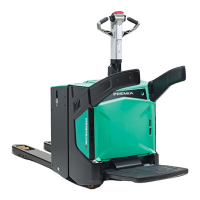
The quick battery replacement device enables changing the battery without the use of aThe quick battery replacement device enables changing the battery without the use of a
lifting device.lifting device.
1.1. Open the battery cover. For instructions, see the Open the battery cover. For instructions, see the sectionsection5.4.4.5.4.4.
2.2. Disconnect the battery connector.Disconnect the battery connector.
3.3. Pull out the batteryPull out the battery
4.4. Insert a new battery (verify Insert a new battery (verify the battery type and voltage).the battery type and voltage).
5.5. Connect the battery connector. Make sure that the battery cables remainConnect the battery connector. Make sure that the battery cables remain
completely safe within the frame of the truck.completely safe within the frame of the truck.
6.6. Close the battery cover. The cover Close the battery cover. The cover acts as a acts as a battery locking device. Make surebattery locking device. Make sure
that the locking button returns all the that the locking button returns all the way to the locking position.way to the locking position.


 To Next Page
 Loading...