7
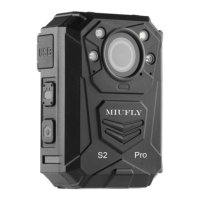
a). Press to take pictures in standby mode
b). Press to take a single snapshot image while in
video recording
c). Hold to turn on/off white light
One Press
Video
Recording
a). Press to start/stop recording
b). Hold to power up camera and start video
recording immediately when camera is powered off.
Connects to USB cable for charging or connection to
PC
PS: optionally connects to external camera
Inside the USB port, press to reset the device
a). Hold for 3 seconds to turn on/off camera.
b). Press to enter or exit screen saver when camera is
on
Green: camera is powered up and in standby mode,
not recording
Flashing Red: camera is recording video
Flashing Yellow: camera is recording audio only
RED: Charging Status
Flat GREEN when device is fully charged
Connect to charging dock to charge the camera


 To Next Page