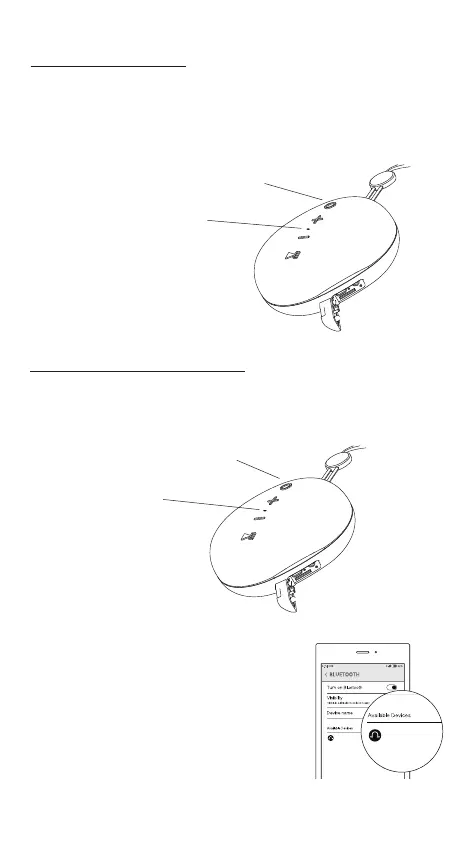
How to power ON/OFF?
Press & Hold the power button for 1 second until the
LED glows blue.
Press & Hold
Power button
LED
glows blue
Press & Hold the power button for 3 seconds until
the LED turns o.
3. Search for “Mivi Moonstone” in the
Bluetooth discovery list and tap to
connect.
4. The LED will glow blue every
3 seconds if it has successfully
connected.
Your Moonstone will auto-recon-
nect to your device if you have
paired it earlier.
How to connect a device?
Mivi Moonstone
Mivi Moonstone
1. Power on your Moonstone to automatically enter pairing
mode. The LED blinks blue.
When the music is playing, press the MFB button to pause
the music. Please press it again to resume playing.
How to Play/Pause music?
Press MFB to
pause/resume playing
Volume Up (+)
Volume Down (-)
Press the Volume Down (-) decrease the volume.
Press the Volume Up (+) button for increase it.
How to control the volume?
Press & Hold
Volume Up (+) for 1 second
Press & Hold
Volume Down (-) for 1 second
How to Skip to the Previous/Next track?
Press & Hold the Volume Down (-) button for 1 second
to play the PREVIOUS track.
Press & Hold the Volume Up (+) button for 1 second
to play the NEXT track.
Press the MFB button to ANSWER an incoming call.
Press it again to END the call.
How to Answer and End Incoming calls?
Press & Hold the MFB for 1 second to
ignore an incoming call.
How to Ignore Incoming calls?
1. If you have already paired
a Moonstone with your
device rst unpair it by
going to the Bluetooth
discovery list and tap Mivi
Moonstone to disconnect.
2. Press & Hold the MFB
button on any one speaker
for 5 seconds to connect
both the Moonstone
together.
3. Search for Mivi
Moonstone in the
Bluetooth discovery list
and tap to connect.
4. Now both speakers are
connected for you to
enjoy true
wireless sound.
How to connect 2 speakers together?
Press & Hold power button
for 1 second
LED
glows blue
1. If the speakers are in TWS mode they will automatically pair to
each other when they are powered on.
2. To disconnect press the MFB button for 2 seconds.
How to disconnect TWS?
Press
MFB button
Press & Hold
MFB button 1 second
Press MFB button
for 2 seconds
1. Insert the memory card in the MicroSD port.
2. Power on your Moonstone.
3. After the Moonstone powers on press the Power
button to toggle between Bluetooth and Memory
card.
How do I play songs from my memory card?
1. Power on your Moonstone.
2. Plug in one end of the Aux cable in the Moonstone and the
other in a compatible device.
3. Now you can play music from your device using the
Moonstone.
How do I play songs using my Aux cable?
Press power
button
Press & Hold
MFB button 5 seconds
Mivi Moonstone
Mivi Moonstone


 To Next Page
 Loading...