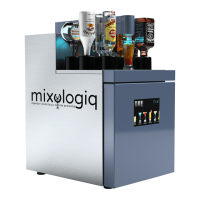
The Mixologiq Cocktail Machine, specifically the MixoTwo model, is an advanced automated cocktail machine designed to prepare cocktails efficiently and consistently. It is intended for indoor use and aims to simplify the cocktail-making process, making it accessible to a wider audience.
Function Description:
The MixoTwo Cocktail Machine automates the preparation of cocktails by dispensing precise quantities of various ingredients (alcohols, liquors, syrups, and juices) from up to 20 bottles. It features a user-friendly interface with a touchscreen display that allows users to select from preloaded cocktail families and individual recipes. The machine can be connected to the internet for recipe management (add, edit, delete), consumption statistics, software updates, remote control for troubleshooting, and backoffice support. It includes both chilled and room-temperature storage slots for ingredients, ensuring optimal conditions for different liquids. The machine guides the user through the cocktail preparation process, including instructions for adding ice, garnishes, and shaking/straining. It also provides alerts for empty bottles, new software updates, and other operational issues.
Important Technical Specifications:
- Model: MixoTwo
- Refrigerant: R600a (18g)
- Voltage: 220-240V 50Hz
- Current: 3.5 A
- Bottle Capacity: 20 slots (10 chilled, 10 room temperature)
- Connectivity: USB Wireless Dongle (for Wi-Fi), RJ45 Ethernet port
- Climate Classification: N (suitable for ambient temperatures from +16 °C to +32°C)
- Dimensions (Clearance): Minimum 20 cm above the machine for bottle changes, minimum 10 cm space around the machine for air circulation.
- Power Inlets: Two electrical inlets (one for the fridge, one for the electronic system).
Usage Features:
- Intuitive Touchscreen Interface: Easy navigation through cocktail menus, settings, and alerts.
- Preloaded Cocktail Recipes: Offers a variety of "Classical," "Signature," and "Mocktails" families with detailed preparation steps.
- Recipe Management: Users can add, edit, and delete recipes via an online backoffice portal (https://my.mixologiq.com), requiring internet connection.
- Ingredient Dispensing: Automatically dispenses precise amounts of ingredients for consistent cocktail quality.
- Bottle Map: A visual representation of ingredient bottles, showing their location and status (top and inside sections).
- Calibration Process: Essential for accurate dispensing, the machine features an auto-calibration process that checks ingredient viscosity and sets pumping times. Manual calibration options are also available for fine-tuning.
- Language Selection: Multiple language options available in the settings menu.
- Internet Connection Status: Displays active or inactive internet connection status, crucial for updates and backoffice functions.
- Alert Messages: Notifies users about empty bottles, software updates, and other operational issues. It provides options to "Retry" or "Skip" ingredients if an empty bottle is detected but still contains liquid.
- Queue Management: Allows users to view and cancel cocktails in progress.
- Refrigerated Section: Maintains optimal temperature for chilled ingredients. The fridge temperature can be adjusted via an internal thermostat.
- Mobile Caps with Aerator: Ten mobile caps with aerators are provided for bottles in the top section, designed for easy insertion and degassing.
- Rigid Tubes and Black Caps: Used for bottles in the inside section, ensuring proper connection and preventing air intake.
Maintenance Features:
- Regular Cleaning Process: Essential for optimal performance, divided into two main operations:
- Inside Section Cleaning (Daily Operation): Recommended daily, especially for tubes containing juices or syrups, to prevent deterioration or blockages. Involves removing bottles, filling an inside container with hot water and descaling agent, placing tubes inside, and running a cleaning cycle.
- Top Section Cleaning (Weekly or Daily): Weekly for dry alcohols, daily for sugary ingredients. Involves removing bottles, placing top containers on their caps, filling with hot water and descaling agent, and running a cleaning cycle.
- Calibration Sensor Cleaning: If the machine detects a dirty sensor, it will prompt the user to clean it with a dry tissue.
- Troubleshooting Guide: The manual provides a table of common problems, probable causes, and solutions to assist users before contacting customer support.
- Software Updates: The machine receives continuous software improvements, with alerts displayed on the screen when an update is available.
- Backoffice Access: Allows distributors and users (with access codes) to manage recipes and monitor machine statistics, aiding in remote maintenance and support.
- Warranty and Service Support: A 1-year warranty is provided, and users can register their product and request service through the manufacturer's website.


 To Next Page
 General