%
%
%
%
%
%
Step.2 A – left turning sensitivity setting
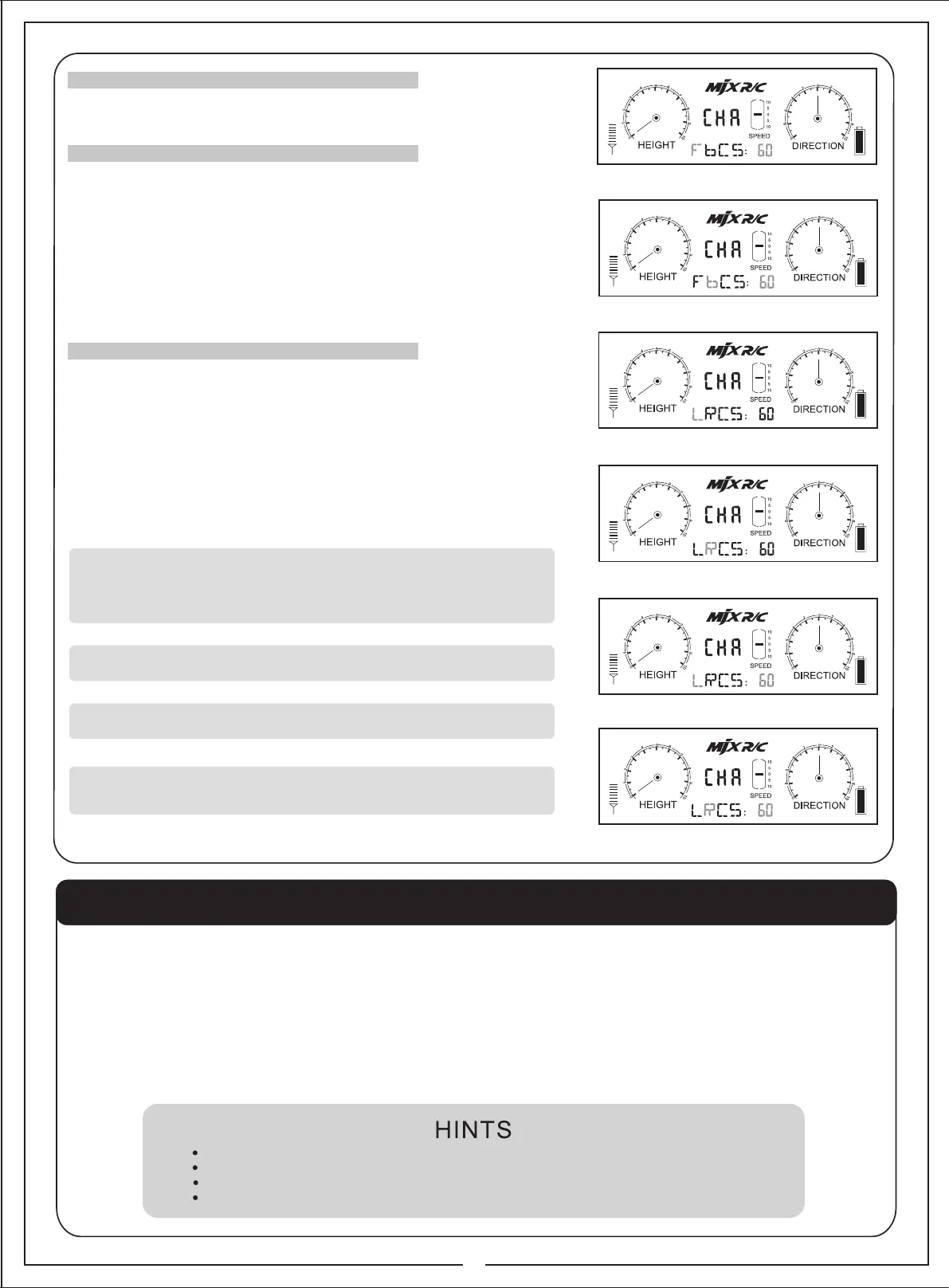
● Press the “parameter setting” knob again. The letter “L” will start to blink. ( pic. 15 )
● Press the “parameter setting” knob again. The letter “L” is blinking together with the
parameter ( pic.17).
You may tune up the left turning sensitivity by by turning the “parameter setting” knob in
a clockwise direction or tune down by turning the “parameter setting” knob in a counter-
clockwise direction The parameter will show the reading accordingly. ( Reading is from
min 0% to max 100% . The higher the reading, the faster the speed and vice versa)
● Press the “parameter setting” knob again to store your setting and Letter “L” keeps
blinking. ( pic. 15 )
( You may work on the adjustment of the right turning sensitivity now. Please follow the
Step.2B – right turning sensitivity setting.)
● Press “EXIT /LIGHT” if setting is done & “LRCS” keeps blinking(pic. 10)
● Press again “EXIT /LIGHT” return to the start up interface.
There are 3 channels on the remote control: channel A, channel 1 and channel 2.
When selecting channel A, user can directly play the helicopter without the action
of signal connection. To play 2 helicopters at the same time, the remote control of
each helicopter should select channel 1 and channel 2 separately. Choosing the
same channel, the two helicopters will be out of control.
Push up/down the “up/down speed setting” key, the helicopter will ascend/descend at
the speed as the user assigned.
When the LCD screen displays as Pic 6, press “EXIT/LIGHT”, background light of the
LCD screen and the helicopter light can be turned on and turned off.
When power of the remote control is weak, the battery power icon on the LCD screen
will keep blinking and send out “beep” sound. The helicopter will not be under control
until new batteries are installed.
4.Channel connection setting
5.Up/down speed setting
6.Light control
7.Battery Lower power display
6
Pic. 13
Pic. 14
Pic. 15
Pic. 16
Pic. 17
Pic. 18
Step.2 – ( Setting of the leftward/rightward turning sensitivity)
Press the “parameter setting” knob to access the leftward/rightward turning speed setting
Display will show the blinking “ FbCS” ( pic. 9 ), turn the “parameter setting” knob , you
have entered the left /right turning sensitivity setting interface. Wording “LRCS” is
blinking.(pic.10 )
Step. 2B – right turning sensitivity setting
When display is showing the blinking letter “L’’ ( pic. 15 ).
● Press “UP” key and the letter ‘R’ will start to blink. ( pic. 16 )
● Press the “parameter setting” knob again. The letter “R” is blinking together with the
parameter ( pic.18).
You may tune up the backward speed by by turning the “parameter setting” knob in a
clockwise direction or tune down by turning the “parameter setting” knob in a counter-
clockwise direction The parameter will show the reading accordingly. ( Reading is from
min 0% to max 100% . The higher the reading, the faster the speed and vice versa)
●Press the “parameter setting” knob again to store your setting and Letter “R” keeps
blinking. ( pic. 16)
●Press “EXIT /LIGHT” if setting is done & “LRCS” keeps blinking. (pic.10)
●Press again “EXIT /LIGHT” return to the start up interface.
Must set the remote controller to the “OFF” position before operating step 1
1. Turn on the helicopter by switching the power button on the bottom of the helicopter, the helicopter’s indicator light will keep quickly
blinking for about 3 seconds while the helicopter is checking the middle point of the gyro. Then, the indicator light will blink slowly,
which indicates that the helicopter is ready to connect with the remote controller.
2. Firstly, select the “A”, “1” or “2” channel. Turn on the remote controller, the power indicator light on the remote controller will blink slowly,
slowly push up the throttle control stick to top and then push it down to the bottom, you will hear a “beep” sound. Then, the remote controller
send out connectional signal and the indicator light keep blinking before the remote controller finishes signal connection; Point the remote
controller to the helicopter, the indicator light of the helicopter will stay “ON” without blinking after it has successfully received the signal
from the remote controller. And the helicopter is ready for flight.
3. Push up the throttle stick to get the helicopter taken off.
Select channel 1 and channel 2 and operate maximum 2 helicopters simultaneously.
Not to use the same channel by 2 helicopters at the same time.
Set the connection on by on. Otherwise, it may not be connected.
Once turn off the power, the connection procedure must be repeated to operate the helicopter.
PREPARATION FOR FLIGHT


 To Next Page
 Loading...