LET’S ADJUST THE SCREEN
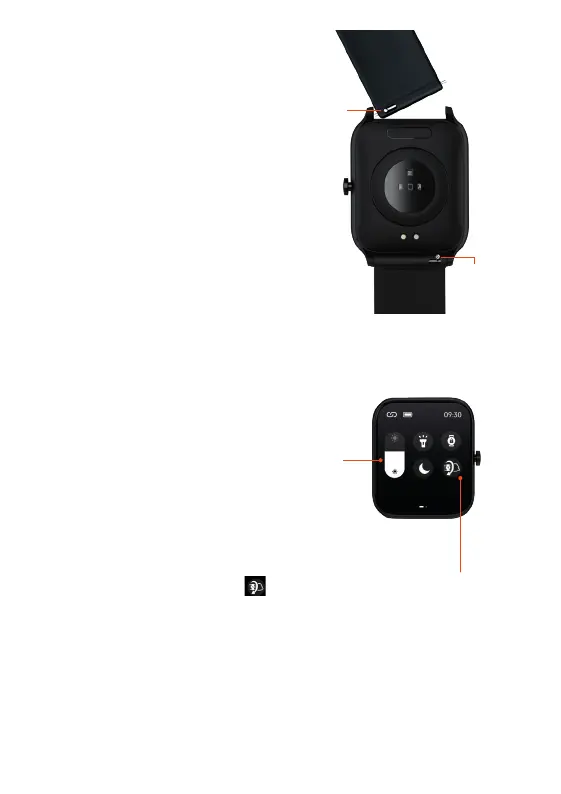
ADJUST SCREEN BRIGHTNESS
From the home screen of your Watch
Core,
swipe up to the Quick Settings Menu and
tap/swipe the brightness bar to adjust the
brightness of your screen up/down.
7 8
LET’S CHANGE THE
WATCH STRAP
You can replace the watch strap
with most regular 20mm straps
and attach it to the watch body.
Just slide the pins to remove the
straps and replace with the new
ones.
ACTIVATE SCREEN USING WRIST ROTATION
From the home screen of your Watch
Core, swipe up to the
Quick Settings Menu. Tap to turn the wrist activated screen
on/off. The icon will turn green when switched on. Once on, you
can move your wrist or arm to activate (wake up) the screen.
1. Run | 2. Walk | 3. Cycling | 4. Breathe | 5. HIIT | 6. Plank | 7. Rope skipping
8. Yoga | 9. Climb | 10. Hiking | 11. Spinning Bike | 12. Rowing | 13. Stepper
14. Elliptical | 15. Basketball | 16. Tennis | 17. Badminton
18. Football | 19. Baseball | 20. Rugby
Pins
Pins


 To Next Page