LET’S ADJUST THE SCREEN
ADJUST SCREEN BRIGHTNESS
From the home screen of your WatchCore,
swipe up to the Quick Settings Menu and
tap/swipe the brightness bar to adjust the
brightness of your screen up/down.
7 8
ACTIVATE SCREEN USING WRIST ROTATION
From the home screen of your WatchCore, swipe up to the
Quick Settings Menu. Tap to turn the wrist activated screen
on/off. The icon will turn green when switched on. Once on, you
can move your wrist or arm to activate (wake up) the screen.
LET’S PLAY
Adjust the watch strap so that it is a snug fit on your wrist
(not too tight or loose) and there is no green light coming
through from the LED light under the body of the watch.
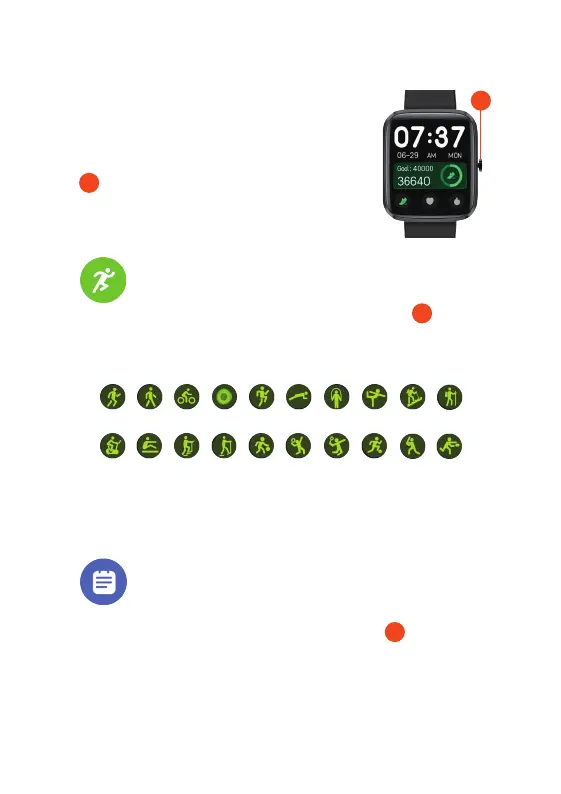
Home Screen / Power Button: Press and hold to turn
the Watch
Core
on/off. Press once for the Watch
Core
home screen.
2
2
1. WORKOUTS
From the Watch
Core home screen, press the Home screen button and
locate the Workouts feature. The Watch
Core can track the following
20 sporting activities:
2
1.
2. 3. 4. 5. 6. 7. 8. 9. 10.
11.
12. 13. 14. 15. 16. 17. 18. 19. 20.
1. Run | 2. Walk | 3. Cycling | 4. Breathe | 5. HIIT | 6. Plank | 7. Rope skipping
8. Yoga | 9. Climb | 10. Hiking | 11. Spinning Bike | 12. Rowing | 13. Stepper
14. Elliptical | 15. Basketball | 16. Tennis | 17. Badminton
18. Football | 19. Baseball | 20. Rugby
2. SPORTS RECORD
Any workouts you have recorded can be viewed under the Sports Record. From
the Watch Core home screen, press the Home screen button and locate to
the Sports Record feature. Here you will see a list of workout data from activities
you have completed using any of the 20 workouts listed above.
2


 To Next Page
 Loading...