9 10
You can see more details of your sleep pattern
including a break down of light and deep sleep using
the App on your phone.
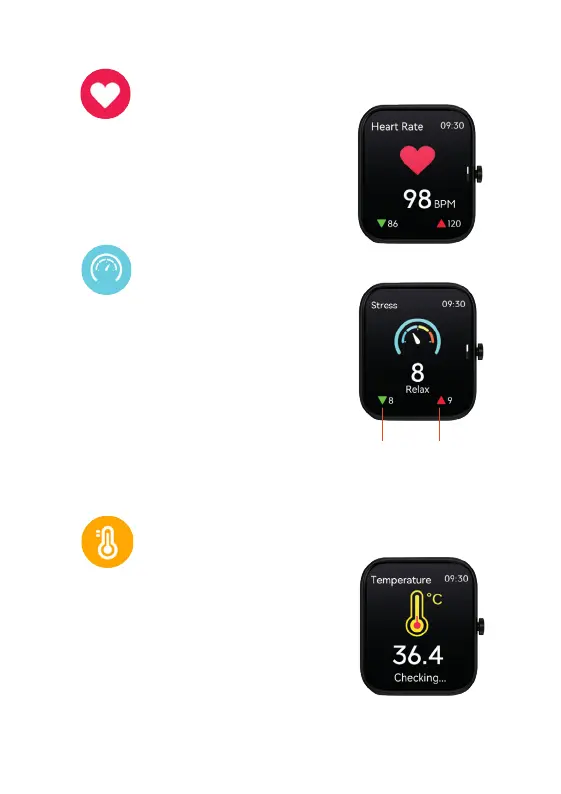
6. HEART RATE
From the Watch Core
home screen swipe right to
locate the Heart Rate feature. The Watch Core will
show your BPM heart reading. Swipe down on this
screen for 1 extra page of data.
You can see more data of your heart rate on the App
on your phone.
7. STRESS
From the Watch Core
home screen swipe right to
locate the Stress feature. A 60 second countdown will
begin whilst your stress level is calculated. Once the
countdown is complete, your stress level will appear.
Swipe down on this screen for 1 extra page of data.
1-29:
30-59:
60-79:
80-99:
The figures by the red and green arrows
represent the highest and lowest values during
the measurement.
HOW TO READ YOUR RESULTS:
Relaxed
Normal
Medium
High
This feature needs to be activated via the App.
(See P15 for more info).
From the Watch Core home screen swipe right
to locate the temperature feature. Your current
temperature will be displayed on your Watch Core
screen.
You can see more data of your temperature
on the App on your phone.
8. TEMPERATURE


 To Next Page