1615
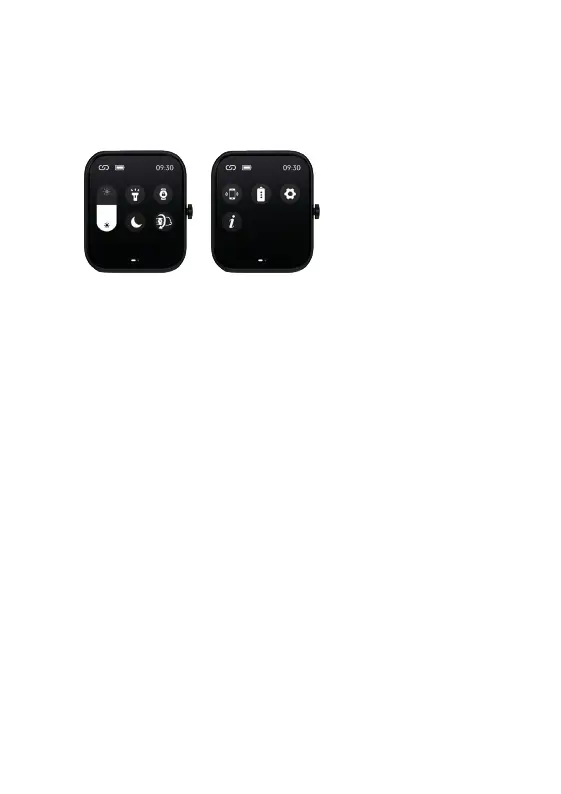
QUICK SETTINGS MENU
From the Watch
Core home screen, swipe up for the quick settings menu.
Swipe right to view the second page.
Some of these functions
are repeated in the
Watch Core’s Main
Menu above.
MORE FEATURES
Use the App to switch on the features outlined below to receive these reminders
from your watch.
1. Temperature - This feature will need to be activated via the WoFit App. Once
paired, use the App and tap the Device icon. Choose the Watch Core from the
device list, scroll down to the ‘Other’ section and select ‘Switch setting’. From
here make sure the sliders are switched on for Temperature and this will now
be added to your Watch Core.
2. Set goals – set yourself personal goals for: steps, fat reduction and sleep.
3. Sedentary alert – sets a reminder for you to move. This is handy if you sit in
a chair all day.
4. Incoming call – turn this feature on under ‘Notifications’ and follow the on
screen instructions so that you can obtain notifications on your watch.
QUICK SETTINGS ICONS P1:
1. Brightness (see p7)
2. Torch (see p14)
3. Screen lock
4. Do not disturb
5. Wrist activated display (see p7)
QUICK SETTINGS ICONS P2:
1. Look for cellphone
2. Save power (see p13)
3. Settings
4. About
’S VIEW TECHNICAL SPECS
atch strap length: 240 mm
atch strap width: 22 mm
eight: 38g (including strap)
ery: 250mAh Poly-Li
aterproof rating: IP68
ONTACT MIXX
eedback is welcome simply email us on support@mixx-io.com
mixxwatch.com for more information.
YCLE
oduct can be recycled.
oducts bearing this symbol must NOT be thrown away with
d waste.
ake the product to a collection point designated for recycling of
lectronic devices. Find out more about return and collection
s through your local authority.


 To Next Page
 Loading...