EasyManua.ls Logo

Mkove Electronics MK75 - User Manual

Mkove Electronics MK75
9 pages
Print Icon
To Next Page IconTo Next Page
Loading...
Mkove MK75 Battery Monitor – Instruction Manual
MK75 Instruction Manual
version 0.9 - preliminary
Welcome
The Mkove Battery Monitor is a precision instrument which will allow you to monitor the state of
any low or medium voltage Lithium or Lead Acid battery system.
With reliable information you will be able to accurately assess your energy systems performance
and take care of your battery system.
The battery monitor will show you;
• The state of charge of your battery system.
Accurate measurements of the current flowing into and out of the system as well as the current
battery voltage.
• Historical data about the utilisation and performance of the system.
This battery monitor uses a number of techniques to provide accurate information about your
system.
Mkove Electronics Page 1
Question and Answer IconNeed help?

Do you have a question about the Mkove Electronics MK75 and is the answer not in the manual?

Summary

Welcome

Notes on Safety

Package Contents

Important Notes on Installation

Installing the Battery Monitor

BATT+ Connection

Connects to the positive terminal of the battery or battery bank for accurate readings.

GND Connection

Connects to the ground or negative terminal of the battery or battery bank.

SENS- Connection

Connects to the more negative screw terminal on the shunt for correct current direction.

SENS+ Connection

Connects to the more positive screw terminal on the shunt for correct current direction.

Panel Mounting of the Battery Monitor

Initial Use of the Device

Battery Settings

Specify battery type, capacity, and cell count for accurate operation. Incorrect settings lead to errors.

Initial State of Charge

Estimated based on initial battery voltage. Accuracy improves after a full charge cycle.

Zero Amps Calibration

Calibrates the system to show zero amps when no current is flowing. Essential for accurate readings.

Network Connection and Over the Air Updates

Wifi Connection Types

The device can operate as an Access Point or a Wifi Station for connectivity.

Accessing Battery Data via Web

Access the device's web interface via IP address or hostname to view battery status.

Over The Air (OTA) Firmware Updates

Download and install firmware updates wirelessly to improve functionality and fix bugs.

Overview

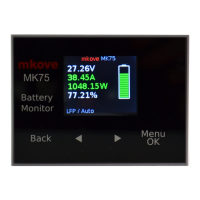
The Mkove MK75 Battery Monitor is a precision instrument designed to provide comprehensive monitoring of low and medium voltage Lithium or Lead Acid battery systems. It offers users reliable information to accurately assess energy system performance and facilitate proper battery system care.

Function Description

The primary function of the Mkove MK75 is to display critical battery parameters, including:

  • State of Charge (SoC): The monitor provides an accurate representation of the battery's current charge level.
  • Current Flow: It measures the current flowing both into and out of the battery system, offering real-time insights into charging and discharging activities.
  • Battery Voltage: The device accurately measures and displays the current battery voltage.
  • Historical Data: The monitor stores and presents historical data regarding the utilization and performance of the battery system, allowing for long-term analysis and trend identification.

The Mkove MK75 employs a variety of techniques to ensure the accuracy of the information it provides, making it a valuable tool for managing battery health and optimizing energy usage.

Usage Features

The Mkove MK75 is designed for ease of use and offers several features to enhance its functionality:

  • Panel Mounting: The device is designed for panel mounting, and the package includes two clips for easy installation and removal. These clips allow for a firm connection against the back of a panel, supporting thicknesses up to 7mm. A square hole of at least 78mm x 56mm is required for mounting, with a tolerance of up to 6mm larger in either direction due thanks to the surrounding flange.
  • Initial Setup - Battery Settings: For correct operation, users must specify accurate battery specifications, including battery type, capacity, and the number of cells or voltage. Battery capacity should correspond to the manufacturer's specification, not CCA or other ratings. These settings can be accessed via the "Menu" -> "Settings" -> "Battery Settings" path. The number of cells can be set manually or automatically. The auto-cell count is determined at startup or when settings are changed, though it may be inaccurate if the battery is in a low state of charge due to overlapping cell voltages.
  • Initial Setup - State of Charge: Upon initial power-on, the monitor estimates the state of charge based on battery voltage. This estimate is most accurate if the battery has been at rest for some time. The state of charge becomes more precise after the monitor observes a full charge cycle and displays "FULL."
  • Zero Amps Calibration: If the system shows a non-zero current reading when nothing is connected, the "Zero Amps" function (found under "Settings") can be used to calibrate the reading to 0.00 amps.
  • Wi-Fi Connectivity: The Mkove MK75 supports Wi-Fi connectivity, operating in two modes:
    • Access Point Mode: In this mode, the monitor acts as an access point, allowing a device (computer, tablet, or phone) to connect directly to it. While connected in this mode, wider internet access is not available, preventing Over The Air (OTA) firmware updates. However, users can still access the monitor's internal web site to view battery data. The monitor displays its SSID, password, and network address (typically 192.168.4.1) on its screen.
    • Wi-Fi Station Mode: When configured as a Wi-Fi station, the monitor connects to an existing Wi-Fi network. This mode generally provides wider internet access, enabling OTA firmware updates. Users can still view the monitor's web site for battery information. The monitor displays its network address (IP address) on its screen, and in some cases, "MK75.lan" can be used as the web site address.
  • Viewing Battery Data via Web Site: In both Access Point and Wi-Fi Station modes, the monitor's internal web site is accessible. By typing the displayed IP address (or "MK75.lan" in some cases) into a web browser, users can view various battery information.
  • Over The Air (OTA) Updates: The Mkove MK75 can download firmware updates from the internet, providing access to newer features and improvements. The OTA update process involves two main steps:
    1. Connecting to a Wi-Fi Network: Users first connect to the battery monitor in Access Point mode using a device. On the monitor's web site, they select "Wifi Settings" and enter the SSID and password of a nearby Wi-Fi network with internet access. The monitor then restarts and attempts to connect to the specified network. If unsuccessful, it reverts to Access Point mode.
    2. Performing the Update: Once connected to a Wi-Fi network with internet access, users navigate to "Settings" -> "Ota Update." The monitor will check for updates and indicate if an update server cannot be reached, if the current firmware is the latest, or if a newer version is available. If an update is available, pressing the "OK/Menu" button initiates the download and installation. This process may take some time, and the monitor will restart upon completion. Users can verify the installed firmware version by going to "Menu" -> "About" or by checking the current version published on www.mkove.com.

Maintenance Features

The Mkove MK75 is designed with minimal maintenance requirements, focusing on safe and reliable operation:

  • Cleaning: The device should only be cleaned with a soft, dry cloth. Solvents, abrasive cleaners, or water should not be used to prevent damage.
  • Installation Considerations for Accuracy: Proper installation is crucial for accurate data. The shunt, which carries all current into and out of the battery, must be installed in either the main positive or negative battery cable. All loads and charge sources must be connected to the shunt, not directly to the battery, to ensure comprehensive current measurement. The battery monitor itself is the only item that should be connected directly to the battery, as it accounts for its own current use. If the monitor is not installed correctly, the data displayed will be inaccurate or unusable.
  • Wiring: While heavy-duty cables are needed for the shunt connections to the main battery supply, all other wires for the monitor carry very small currents and can be thin. The connections between the battery/battery bank and the monitor can be quite long (tested up to 50 meters) without loss of accuracy.
  • Safety Precautions: Users are advised to read all instructions before use. The monitor is for indoor use only and should not be exposed to heat, water, other liquids, or corrosive/salty environments. The product should not be opened or disassembled. All wiring connections must be solid and secure, avoiding loose, corroded, or burnt wiring. When working with lead acid and Lithium battery systems, extreme caution is necessary due to high energy electric currents. Precautions should be taken to prevent battery terminals from connecting, such as via tools or jewelry. If in doubt, a professional installer should be consulted.
  • Wiring Connections (BATT+, GND, SENS-, SENS+):
    • BATT+: Connect to the positive terminal of the battery or battery bank, ideally directly to the main terminal for most accurate voltage readings.
    • GND: Connect to the ground or negative terminal of the battery or battery bank, ideally directly to the main terminal or a sturdy nearby connection point.
    • SENS-: Connect to the more negative of the two small screw terminals on the shunt. This is the end connected closer to the negative battery terminal. Incorrect connection of SENS- and SENS+ will result in incorrect current direction readings.
    • SENS+: Connect to the more positive of the two small screw terminals on the shunt. This is the end connected closer to the positive battery terminal. If the shunt is in the negative battery cable, this will be the end opposite the one connected directly to the battery. Incorrect connection of SENS- and SENS+ will result in incorrect current direction readings.
  • System Reconnection: After all connections are made and verified, the main battery or battery bank can be reconnected, and the system's operation should be checked.

Mkove Electronics MK75 Specifications

General IconGeneral
Screen Size27 inches
Resolution1920 x 1080 (Full HD)
Display TechnologyIPS
Refresh Rate75Hz
Response Time5ms
Aspect Ratio16:9
Viewing Angle178° (H) / 178° (V)
Brightness250 cd/m²
Color Support16.7 Million Colors
Contrast Ratio1000:1
Input PortsHDMI, VGA
Built-in SpeakersYes