Hot Water Dispenser - English
5
EN
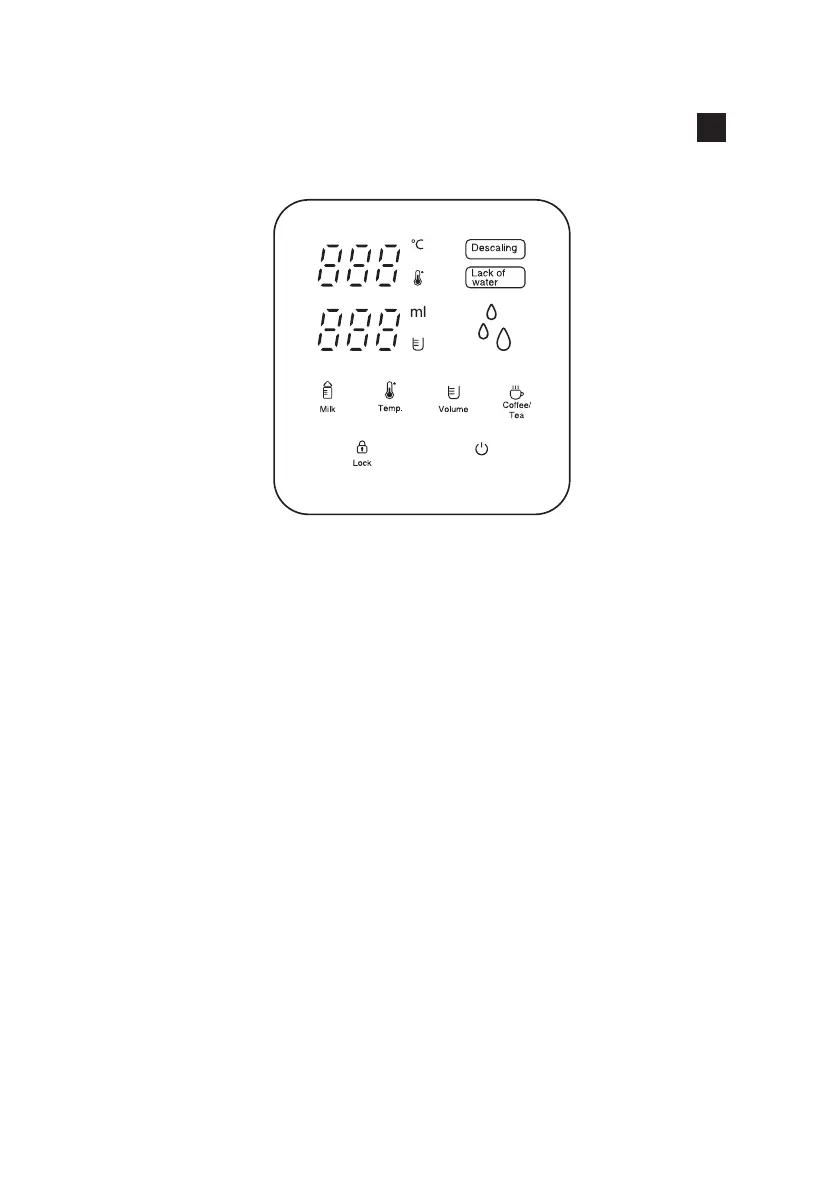
• Press and hold down the LOCK button for about 3-5 seconds to
unlock. Auto lock will activate if there is no activity within 10 seconds.
The Control Panel screen can be unlocked by pressing the LOCK
button.
• Temp. button: Set the desired temperature according to
000 (normal temperature water): 45°C / 55°C / 65°C /
75°C / 85°C / 100°C.
• Volume button: Set the water volume according to
100ml / 200ml / 300ml / 400ml / 000 (continuous ow
water)
• Milk button: Pour the desired amount of milk powder into
a bottle or cup and press MILK button. Temperature will
indicate 40°C and select the desired volume 100ml / 200ml / 300ml
/ 400ml / 000 (continuous ow water). Press Start/Stop button to
operate.)
• Coffee/Tea button: Pour the desired amount of coffee powder or
insert tea bag in a bottle or cup. Press the COFFEE/TEA button.
Temperature will indicate 92°C and select the desired volume 100ml /
200ml / 300ml / 400ml / 000 (continuous ow water).
Press Start/Stop button to operate.
• Press Start/Stop button to start or stop function setting.
CONTROL PANEL
Start/Stop


 To Next Page