MO2270
EN
Smart wireless health watch
1. Compatible system and requirement:
Android 4.4 or above
iOS 8.0 or above
Some functions may not be compatible with some rare type of
smart phones.
2. Charging:
Please make sure the battery is fully charged before first
application. Charge time is approx. two hours. The screen
displays a battery icon whilst charging. When 20% battery
level remains, please charge the device.
Remarks: Once the charging cable is connected to a power
source, DO NOT connect the metal pin with objects other
than the wristband.
Please charge the device at least once every 3 months if not
used for an extensive period.
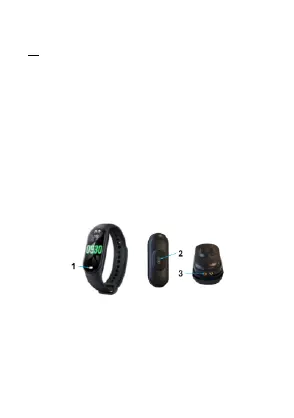
1. Touch button: Press to choose mode; Long press to
confirm
2. Sensor light
3. Contact for charging cable
3. Connection
Please Search “Hryfine” App from App Store or Google Play
and install it.
Device name: MO2270.



 To Next Page