MO2271
EN
Smart wireless health watch
1. Compatible system and requirement
Android 4.4 or above
iOS 8.0 or above
Some functions may not be compatible with some rare type of
smart phones.
2. Charging
Please make sure the battery is fully charged before first
application. Charge time is two hours. The screen displays a
battery icon while charging. When 20% battery level remains,
please charge the device.
Remarks: Once the charging cable is connected to a power
source, DO NOT connect the metal pin with objects other
than the wristband.
Please charge the device at least once every 3 months if not
used for an extensive period.
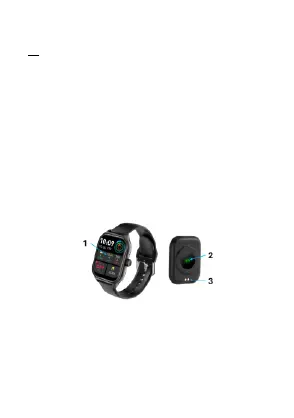
1. Touch menu
2. Sensor light
3. Magnetic suction contact
3. Connection
Please Search “Hryfine” App from App Store or Google Play
and install it or scan below QR code for installation.
QR code for IOS / Google Play
Device name: MO2271.



 To Next Page