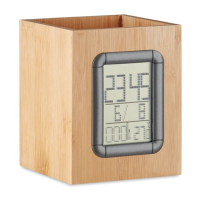
MO6289
EN
FEATURES:
• Time (12/24H format)
• Calendar: 2000/1/1 ~ 2099/12/31
• Alarm and Snooze(1-60 minutes snooze time)
• Weekday display
• Indoor temperature range: -0°C ~ 50°C ( 32°F ~ 122°F)
• Countdown timer function (Max time: 23 hours, 59 minutes and
59 seconds)
• Power consumption: 2 x LR1130H batteries (included)
OPERATION:
• Under time mode, press MODE key to view alarm time.
• Under time mode, press DOWN/CF key to switch temperature
display in °C or °F.
• Under time mode, press UP/12/24 key to switch time display to
12H or 24H format.
• Under time mode, press SET key to start time setting.
• Under time mode, press TIMER key to enter timer mode.
• Under Alarm mode, press DOWN key to turn on/off alarm and
snooze function.
• Under Alarm mode, press SET key to start Alarm setting.
TIME SETTING:
1. Under time mode, press SET key to enter the setting mode. The
setting sequence is Hour -> Minute -> Year->Month->Day
2. During setting process, press “UP” key once and ahead; hold
“UP” key for 2 seconds, go ahead more quickly.
3. During setting process, Press “DOWN” key once and back;
press “DOWN” key for 2 seconds, go back more quickly.
ALARM AND SNOOZE SETTING:
1. After the time setting, press MODE key to into Alarm mode, press
SET key to start alarm time setting. The setting sequence is Hour-


 To Next Page