MO9959
EN
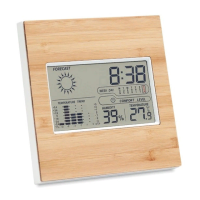
Weather station with bamboo front
Features:
Measuring temperature range: 0~50℃ (32℉-122℉).
Measuring humidity range: 20%~99%.
Resolution: 1℃
Display: max/min temperature and
humidity records.
Calendar: 2001-2099 year.
Operation:
1. Press MODE one time to view calendar.
2. Press MODE one more time to view the alarm time.
Setting the time:
1. Press and hold MODE for 3 seconds to enter the time setting
mode.
2. The hour digits are blinking and can be set by pressing UP or
DOWN for setting hour.
3. Press MODE again: the minute digits are blinking and can be
set by pressing UP or DOWN for setting minute.
Setting the alarm:
1. Press MODE for 2 times to view the alarm time.
2. Press MODE hold for 3 seconds to enter the alarm setting
mode.
3. The hour digits are blinking and can be set by pressing UP or
DOWN for setting hour.
4. Press MODE again: the minute digits are blinking and can be
set by pressing UP or DOWN for setting minute.
Setting the calendar:
1. Press MODE to the view calendar.
2. Press MODE hold for 3 seconds to enter the calendar setting
mode.
3. The year digits are blinking and can be set by pressing UP or


 To Next Page