EasyManua.ls Logo

Mobi Technologies DXR Touch - Main Menu Navigation; Volume and Display Adjustments; Lullaby and Night Light Control; Recording and Playback Options

Mobi Technologies DXR Touch
24 pages
Print Icon
To Next Page IconTo Next Page
To Previous Page IconTo Previous Page
Loading...
6
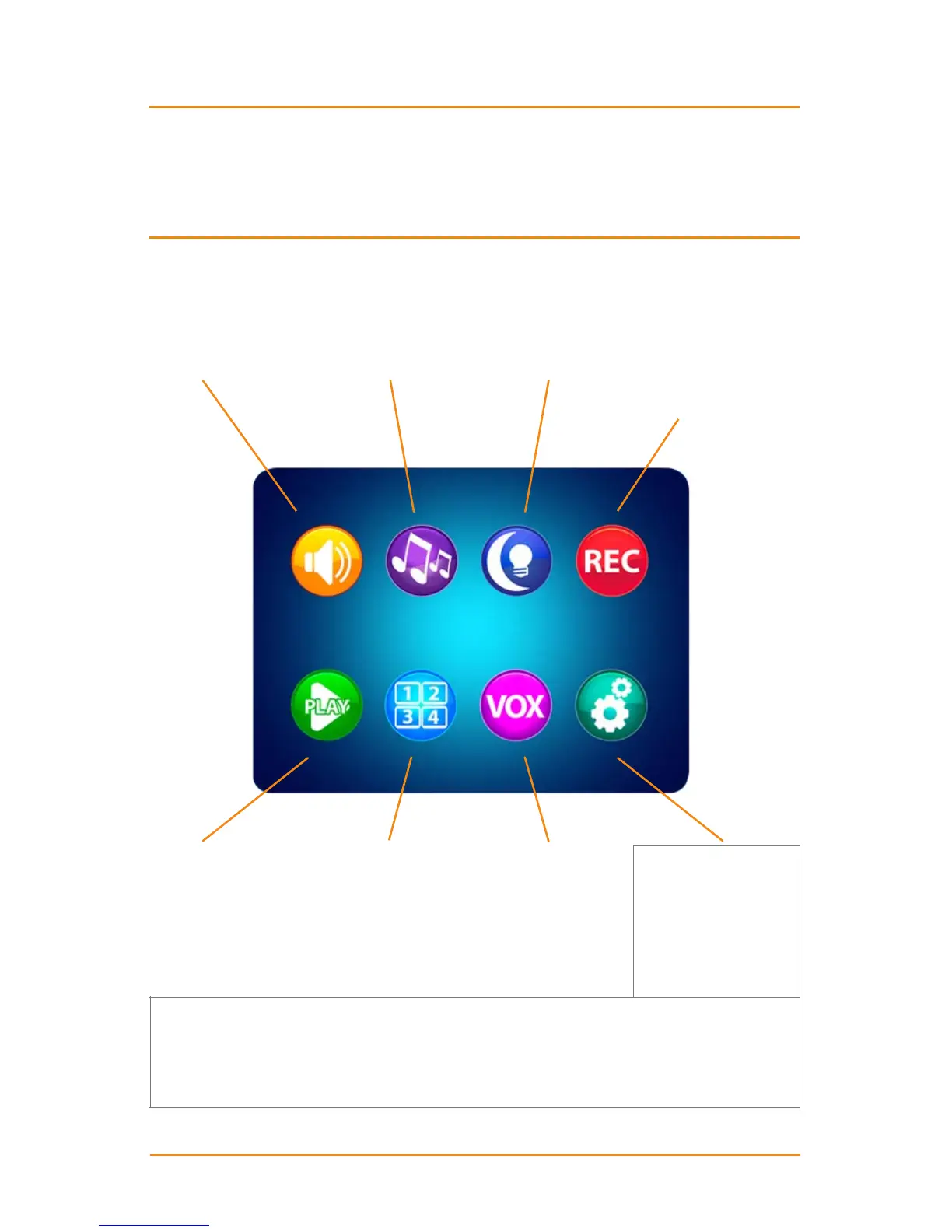
MAIN MENU ... touch the ESC Button to open the Main Menu on screen
VOLUME / DISPLAY
adjust
• Sound Volume
• Screen Contrast
• Screen Brightness
PLAY
select / play
• Recorded Video
• Recorded Photo
• Delete Files
LULLABYS
select
• Camera Number
• Lullaby Choice
• Lullaby Volume
QUAD / CHANNEL
select
• Quad View
• Specic CAMs
• Switch CAMs
NIGHT LIGHT
select
• Camera Number
• Night Light On
• Night Light O
VOX (Voice Activation)
select
• Camera Number
VOX On/O
• Sound Sensitivity
• Auto Record On/O
RECORD
select
• Record Video
Take Photo
• Format SD Card
• SD Information
Time/Date Stamp
• 6 Languages
• Reset to Default
• About / Version
• Date/Time
• Date/Time
Time Alarm
• Auto Switch Time
• AV Out Format
• Zoom/Pan/Tilt
• Screen Timeout
Touch Calibration
• SD Card Update
SETTINGS
for the Camera
Temperature Alarm
TX Power/Volume
SETTINGS
for the Monitor
• USB Output
• Recording Schedule
Touch the appropriate icon to access all Settings and Options.
IMPORTANT: Use ONLY a ngertip or other NON-SHARP object to select touch screen
options. Using sharp objects can damage the screen and void the warranty.

Related product manuals