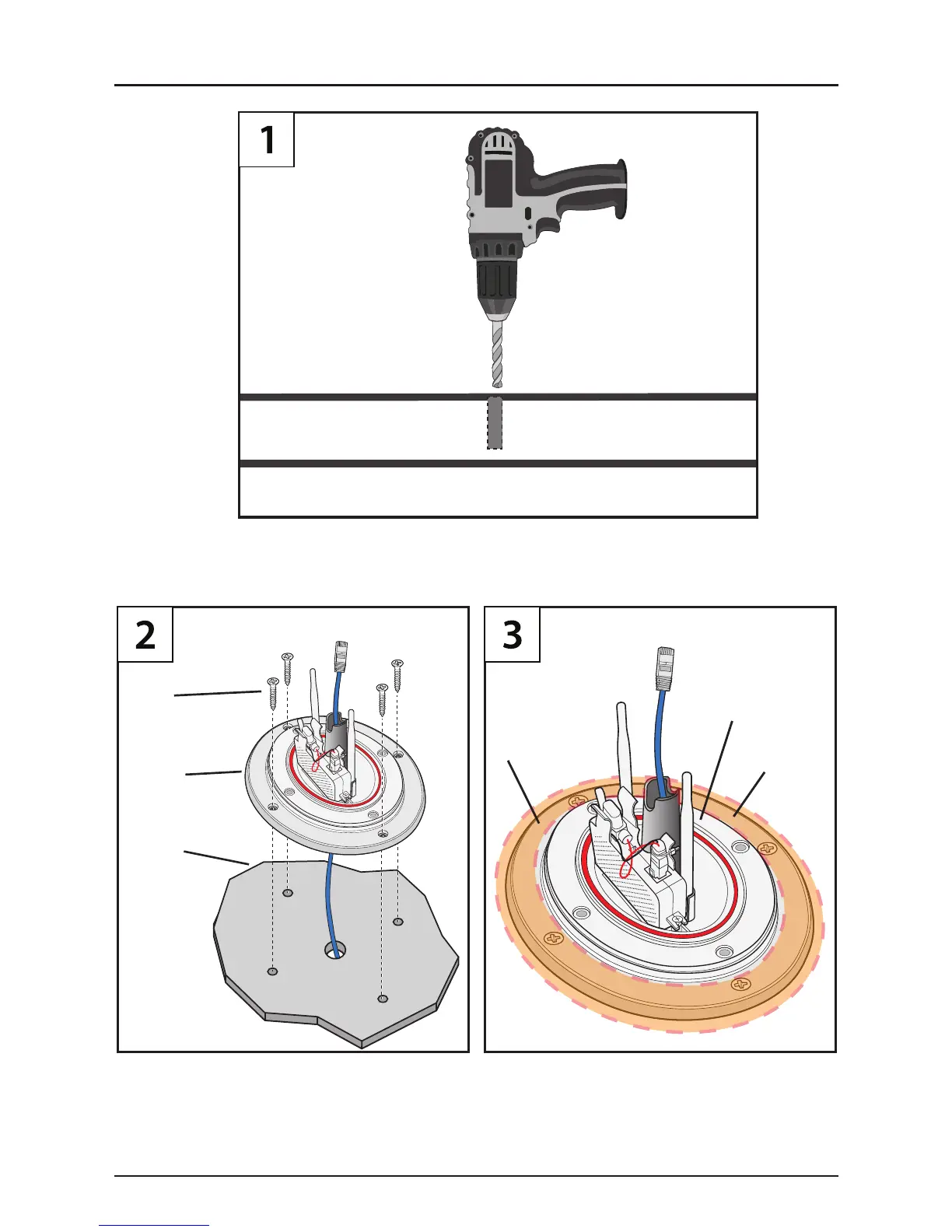
2) Screw the Extender Housing Bottom Mount to roof
with Self Tapping Screws (#8).
1) Center the Extender Housing Bottom Mount over
drilled hole.
Caulk the Extender Housing Bottom Mount on 1st
Level (shown in orange area).
WARNING - Do not caulk on the 2nd Level (where the Top
Mount connects to the Extender Housing Bottom Mount).
Bottom
Mount
Self
Tapping
Screws #8
RV
Roof
1st Level
Caulking Area
Represented in
Orange
2nd Level
Drill a 1/2” hole from the exterior roof where the Extender Housing will be
mounted over. This hole will be used to route the WET-15 Shielded Ethernet Cable
from the MV2458 Router Control Unit to the MV2400 Extender in the housing.
(Inside RV)
(Rooftop)
(Back Side of
RV Ceiling)
18
MV2400 Extender Ethernet Installation



 To Next Page