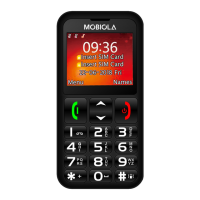
Enter to menu. Confirm (in some sections).
Accept call.
Back. Typing text: clear characters. Standby
mode: Contacts. End call.
Incoming call - silent. During call: switch from
Handsfree mode to normal. Standby mode: long
press – LED torch on/off.
Start calling (after choosing number or contact).
Incoming call – Accept. Standby mode: open call
history.
Long press: Switch on/off. Short press: End call.
Back to standby mode.
Typing text: gap between words.
Standby mode: enter characters (*, +, P, w)
Typing text: special characters or punctuation
marks.
Long press: Switch between General, Silent and
Meeting profiles. Typing text: switch between
character cases.
Switch the device on and off
To switch the device on or off, press and hold the power key
(10). If the device prompts for a PIN code, enter it and select
OK or press “#” key.


 To Next Page