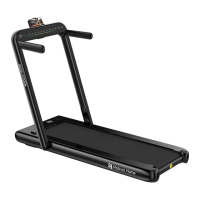
This document serves as an instruction manual for the Mobvoi Home Incline Treadmill, Model NO: G4011. It provides comprehensive guidance on safety, product features, installation, operation, and maintenance.
Function Description
The Mobvoi Home Incline Treadmill is designed for indoor use, offering a platform for walking and running exercises. It features an incline function, allowing users to simulate uphill training, and can be connected to smartwatches and mobile applications for synchronized exercise data tracking. The treadmill is foldable for space-saving storage and includes a safety lock for emergency stops.
Important Technical Specifications
- Working Voltage: AC 220-240V 50/60 Hz
- Max Load: 100 kg
- Outsize (L*W*H): 1319*666*1133 mm
- Running Area: 400*1100 mm
- Motor Power: 1.0 HP
- Speed: 1.0-14.0 km/h
- Incline: 0-15%
- Control Method: Console
- Weight: 45 kg
The packing list includes the main body (1 unit) and a spare parts package (1 unit). The spare parts package contains:
- M8*16 Screw (2 units) - Fixed to the back of risers
- M8*45 Screw (2 units) - Fixed to the sides of risers
- M8*10 Screw (4 units) - Fix left and right handlebars
- Φ8.5 Flat washer (2 units)
- Φ9 Curved spacer (2 units)
- M6*12 Screw (4 units)
- ST4.2*16 Bolts (2 units) - Fix tail housings
- 5mm Hex wrench (1 unit) - Other
- 6mm Hex wrench (1 unit) - Adjust belt
- Open-ended wrench (1 unit) - Other
- Handlebar (2 units)
- Moving trundle (2 units)
- Left tail housing, right tail housing (1 for each)
- Safety lock (1 unit)
- Methyl silicon oil (2 units)
- Manual, Qualification (1 unit)
Usage Features
Safety Precautions:
Users are advised to read the instructions carefully. The treadmill should be placed indoors, away from moisture and foreign matter. Appropriate sportswear and shoes should be worn, and running barefoot is discouraged. The power plug must be reliably grounded to a dedicated 20A circuit. Children should be kept away from the machine. Overload operation should be avoided to prevent motor and controller damage. Regular maintenance is essential. Good ventilation is recommended during use. The safety lock cable should be fastened to clothing during exercise. Users should stop exercising and consult a doctor if they feel uncomfortable. Silicone oil should be kept away from children. The safety area behind the treadmill is 1000x2000mm. In emergencies, users can jump off by holding the riser and placing both feet on the sidebar.
Installation Procedure:
- Unpack the main body and lay it flat on a carpet or cushions, padding the tail end with packaging material.
- Raise the left and right risers to their limit position. Secure them with M8*45 screws, Φ8.5 flat washers, and 5mm hex wrenches. Then, secure with M8*16 screws, Φ9 curved spacers, and 5mm hex wrenches.
- Adjust the console angle by loosening M8*10 screws with a 5mm hex wrench, then tightening them. Insert and fix the left and right handlebars into the risers with M8*10 screws, ensuring they are parallel to the risers.
- Lift the running platform until it locks into the air spring sleeve.
- Fix two moving trundles to the main frame with M6*12 screws, ensuring the nut side faces the running belt.
- Install the left and right tail housings on the main frame with ST4.2*16 bolts.
- Insert the red "Safety lock" into the yellow box on the console. Plug in the treadmill, turn on the power switch, and enter standby mode. All bolts should be checked for tightness after assembly.
Treadmill Folding and Moving Instructions:
- Folding: Turn off the power, unplug, and lift the running platform until it locks into the air spring sleeve.
- Putting Down: Lightly step on the air spring sleeve with your foot to slowly lower the running platform to the ground. Ensure children are not nearby during this step.
- Moving: After folding, fix one side of the base frame with your feet, pull the handlebar back with both hands to tilt the machine, and move it using the two trundles. Avoid dragging the treadmill if the trundles are not touching the ground. Store the treadmill in a place where children cannot easily access it.
Operating Instructions:
The console displays time, calories, distance, and step count.
- Start/Stop: Short press the "START/STOP" key.
- Speed Adjustment: Short press "TARGET" to switch to speed adjustment, then use +(-) for slow adjustment or long press for fast adjustment.
- Incline Adjustment: Short press "TARGET" to switch to incline adjustment, then use +(-) for slow adjustment or long press for fast adjustment.
- Exercise Mode Selection: In stop state, press "TARGET" to cycle through countdown modes (distance, calories) or preset Pxx modes. Countdown values can be set in countdown mode.
- Plus and Minus Button Function Switch: Short press "TARGET" to switch between speed and slope adjustment. Use +(-) to adjust the displayed value.
- Safety Lock Function: Pulling off the safety lock displays "E07" and triggers a buzzer. The motor will emergency stop if running. The treadmill cannot be started without the safety lock.
Mobvoi Home Intelligent Experience:
- Smartwatch Integration: Use a Wear OS by Google™ smartwatch and download the Mobvoi Treadmill App to view synchronized exercise data and heart rate.
- App Download: Search and install "Mobvoi Treadmill" and "Mobvoi Account" from the Play Store on your smartwatch.
- Login: Sign in to your Mobvoi account via the smartwatch or phone.
- Treadmill Pairing: Ensure Bluetooth is on for both treadmill and smartwatch. Open the Mobvoi Treadmill App on the smartwatch, click "Connect Devices" to automatically pair.
- Data Tracking: View real-time heart rate, exercise time, speed, distance, calories, and paces on the smartwatch. After exercise, the smartwatch records and generates a sports record.
- Mobile App Sync: Sync smartwatch data to the mobile Mobvoi App. View detailed exercise history on the "Sports Card" page and share with others.
Maintenance Features
1. Lubrication:
The running belt requires lubrication with special methyl silicone oil after a period of use.
- Frequency:
- 1 hour or less per week: Lubricate every 6 months
- Less than 3 hours per week: Lubricate every 3 months
- 3-6 hours per week: Lubricate every 2 months
- More than 6 hours per week: Lubricate every month
- Checking Lubrication: Touch the middle of the running belt back with your hands. If silicone is present (slightly damp), no lubrication is needed. If the pad is dry, lubrication is required.
- Lubrication Steps:
- Stop the treadmill and fold the machine.
- Lift the running belt from the underside of the main body and spray methyl silicone oil as far as possible into the middle and contacting areas of the running belt.
- Run the treadmill at 1 km/h to evenly distribute the oil, then step on the running belt from left to right for a few minutes until the oil is absorbed.
2. Adjusting Tightness of Running Belt:
Treadmills are adjusted for tightness before delivery and after installation. If the running belt loosens over time, causing stopping or slipping during exercise, adjust the running belt bolts clockwise by half a circle. Avoid overtightening, as this can damage the motor, running belt, and roller.
3. Running Belt Deviation Adjustment:
Running belt deviation can occur due to uneven placement of the main body, users not stepping in the center, or uneven force between feet.
- If deviation is caused by incorrect usage, it may return to normal after a few minutes of no-load rotation. If not, adjust with a 6mm wrench by half a circle.
- If the running belt deviates to the left, adjust the left bolt clockwise and the right bolt counterclockwise.
- If the running belt deviates to the right, adjust the right bolt clockwise and the left bolt counterclockwise.
- Note: Running belt deviation is not covered under warranty and should be maintained by the user. Timely detection and correction are crucial to prevent serious damage to the running belt.
Common Failures and Troubleshooting:
The manual provides a table of possible causes and maintenance methods for common issues such as:
- Treadmill not working (not connected, power off, safety lock dropped, circuit signal system broken, fuse blown out).
- Running belt not running smoothly (insufficient lubrication, belt too tight).
- Running belt slipped (belt too loose, belt too tight).
Error Messages on Electronic Meter and Elimination Methods:
A table lists error codes (E01-E07) and "Abnormal display" with their possible causes and maintenance methods:
- E01 (Poor connection): Signal line not plugged in. Plug it in again.
- E02 (Motor wire loose/falling off, carbon brush worn out): Check motor cable/carbon brush. Replace motor/electric controller if damaged.
- E03 (Not detecting signal): Sensing wire not plugged in. Plug it in again correctly.
- E04 (Controller or motor not working): Probable overload. Replace controller or motor.
- E05 (Overload protect activated): Overload. Replace controller.
- E06 (System self-check failed): System failure. Replace controller.
- E07 (Safety lock dropped): Put the safety lock in the correct position.
- Abnormal display (External disturbance): Turn off power switch, turn on it after one minute.
Service Commitment:
Mobvoi Home provides statutory warranty service in the country of purchase. Regulatory compliance and full Supplier DoC are available on the official website (www.mobvoi.com/products). For non-human damage under normal use within the warranty period, free accessories are provided. After warranty expiration, preferential prices for spare parts may be offered. Manufacturer: Jiangxi EQi Industrial Co., Ltd.

 Need help?

 To Next Page
 General