English 29
4.2.2 ES 10DR
4.2.2.1 Specific function requirements of keys and display screen
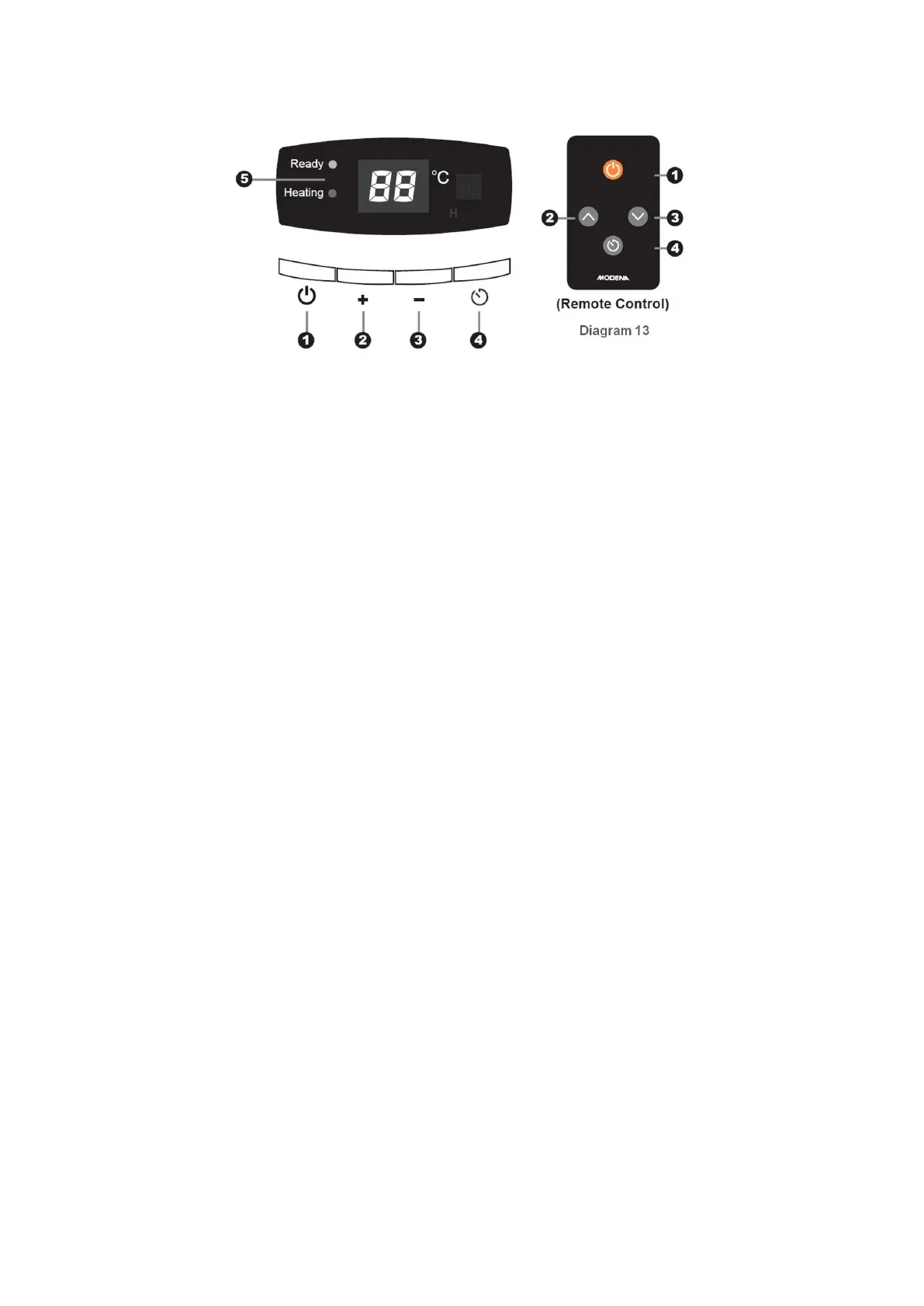
(1) “ON/OFF” key
This key acts as an ON/OFF operating key. When power is connected, display screen is fully bright for
2s. If there is power failure memory function, return to the working condition before power failure.
Otherwise, system will enter into power off state.
When in power-on state, press “ON/OFF” key to shut down the system.
When in power-off state, press “ON/OFF” key to turn on the system. In this case, power failure
memory data will be restored and the system will enter into the corresponding working condition.
Notes:
a. “ON/OFF” key is the highest priority key among all keys in system. That is, if you press it
under all failure-free working conditions, the system will enter into the power-off state; no
content is displayed in power-off state.
b. Software version number will be displayed after full screen display for 2s. (Double “8”
digital tube show 01)
(2) “+” key (key on remote controller)
a. Cooperate with “BOOK” key to adjust the booked time. The specific operations are shown in
booking adjustment function.
b. Adjust setting temperature: temperature is adjusted in the range of (Tmin)-(Tmin+1)-
(Tmin+1)……75-(Tmin). The setting temperature will rise by 1
o
C after “+” key is clicked for once.
Long pressing “+” key will render the setting temperature to increase at the rate of 5
o
C /s. If no
key is pressed within 5 s, the system will store the setting temperature parameters and exit the
temperature setting status.
(3) “-” key (key on remote controller)
a. Cooperate with “BOOK” key to adjust the booked time. The specific operations are shown in
booking adjustment function.
b. Adjust setting temperature: temperature is adjusted in the range of 75-74-73-…-(Tmin+1)-(Tmin)-
35. The setting temperature will rise by 1
o
C after “-” key is clicked for once. Long pressing “-” key
will render the setting temperature to increase at the rate of 5
o
C /s. If no key is pressed within 5
s, the system will store the setting temperature parameters and exit the temperature setting
status.
(4) “BOOK (Time Progrming)” key
Power on state: press this key to enter into booked time setting mod. At this moment, booked time can
be set through pressing “+”or “-” key. The specific operations are shown in booking function
introduction. Power off state: this key is invalid.
(5) LED light indicator (ES 10DR);
The green “Heating” LED remains ON during heating. The red “Ready” LED will turn on when the
water temperature reaches the user setting at the end of the heating phase; meanwhile the green
LED turns off.



 To Next Page